AI in TheBrain Web Client
06.13.23: Release of Vulcan AI | TheBrain AI = ChatGPT
Available by clicking within the main search bar and selecting the new AI button in the upper-right corner.
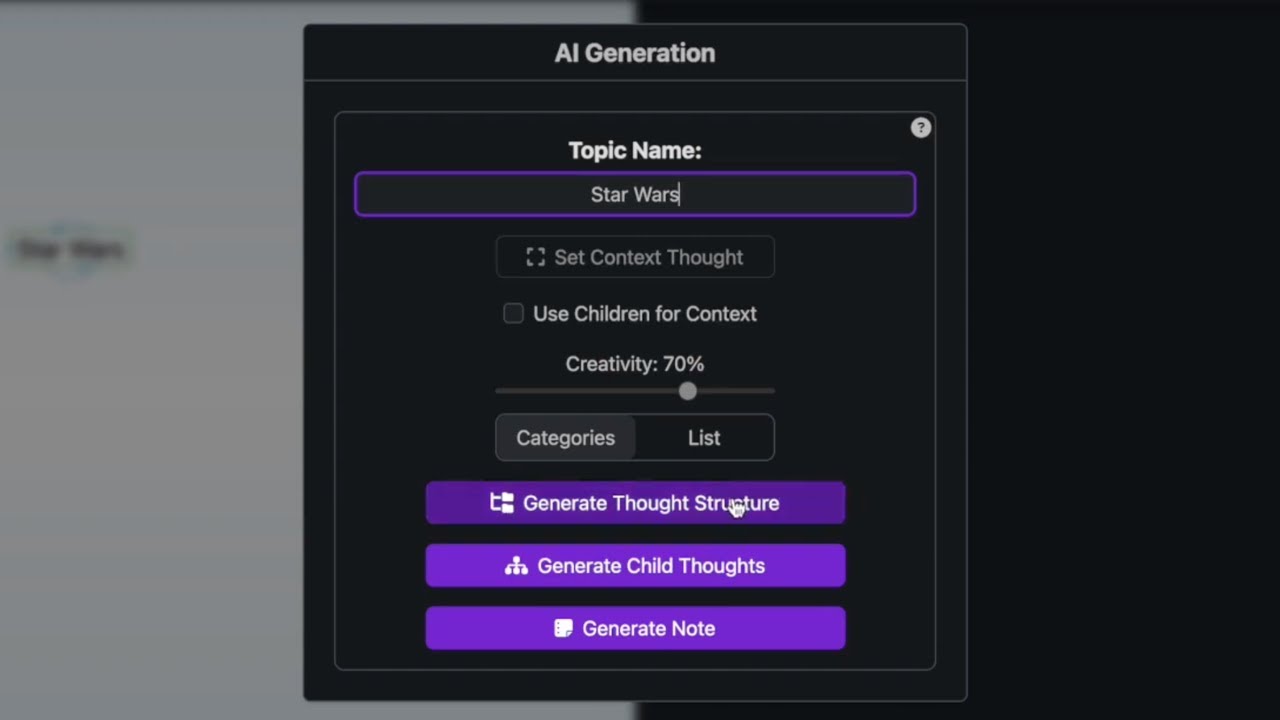
Use the Generate Thought Structure option to generate an entire mini-brain on any topic that you desire. The resulting structure will be multiple levels deep with many thoughts at each level. Great for getting started on adding content to your brain on a new subject, or doing a deep-dive into a topic that already exists in a brain.
The Generate Child Thoughts option can be used to generate child thoughts under the active thought, only a single level deep. This is preferred for filling out an empty Child Thought Zone below the active thought to expand upon a certain topic, and adds an element of discovery to the process of creating a brain.
Looking to quickly summarize a topic in one go? Use the Generate Note option to fill the active thought’s Note with a 500-800 word overview about that topic. Only available for thoughts that do not currently have any content in their note.
Note: This feature does not look at or send any information stored in your brain to anywhere outside of our servers, unless the Set Context Thought or Use Children for Context features are used, in which case only the selected thought’s names are used for context.
A full user guide with more information can be found in TheBrain’s Knowledgebase.
Related Resources
Important Warnings | See child thoughts