Outlining & Collapsing Sections in Notes
Outlining & Collapsing Sections in Notes
TheBrain 12+ allows users to collapse and expand sections of text in the notes based on a nested heirarchy of outline levels. This Markdown outlining (nesting) sequence is detailed below:
Nesting sequence
Header 1 > Header 2 > Header 3 > Header 4 > Header 5 > Bold Text > Normal text > List Item > Nested List Item > Nested Nested List Item
Bold Header Nesting
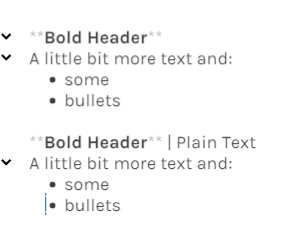
See examples of the collapse controls for bold section headers and list items illustrated in the left margin of the note below:
Note:
When using Bold text as a section header, plain text characters in the same line will remove the control options in the left menu for collapsing and expanding the same line of text, as illustrated above.
Nested Paragraphs
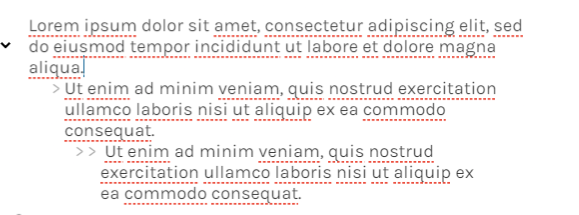
Paragraphs can also be nested under one another using the "Indent-Tab" option in the note editor menu. However, only the first paragraph will have a collapse/expand control option if other paragraphs are indented beneath it. See screenshot below.
Collapse/Expand Controls on Context Menu
Corresponding collapse/expand controls are also provided on the right click context menu. However, these controls are currently buggy and will require additional troubleshooting. See the following jump thought for details: