Fast Linking and Creating Thoughts from Notes
Pressing Ctrl/Cmd+K is a shortcut to:
- Insert a link to an existing thought
- Create a new thought
- Link to a URL
- Edit or remove a link
After you press Ctrl/Cmd+K:
- An edit box opens so you can begin typing a URL or the name of the thought you want to perform any of these activities on. Or, if you select text or a URL first, that text will appear in the edit box.
- Double-click the entry that appears to insert a link to that item in the note. For example, double-clicking “Volunteer Opportunities” in the example below creates a link to that thought in the notes for “Goals.”
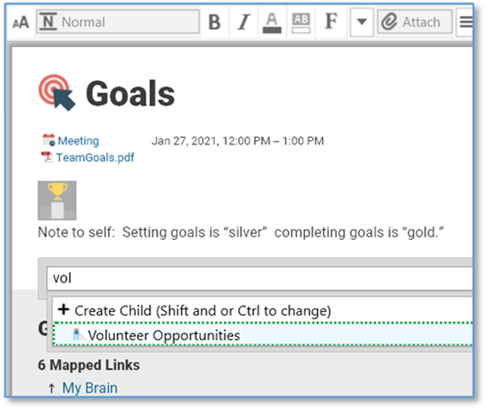
Figure 220. The Ctrl/Cmd+K Shortcut
- If an existing link is selected, you’re ready to begin editing it. To remove the link, just delete its name in the edit box.
- If you type a URL, it will be inserted.
The link command includes all the features of Quick Thought Creation so you can insert all types of relationships easily.
 Alternatively, you can type [[ to link or create thoughts.