Using Outline View
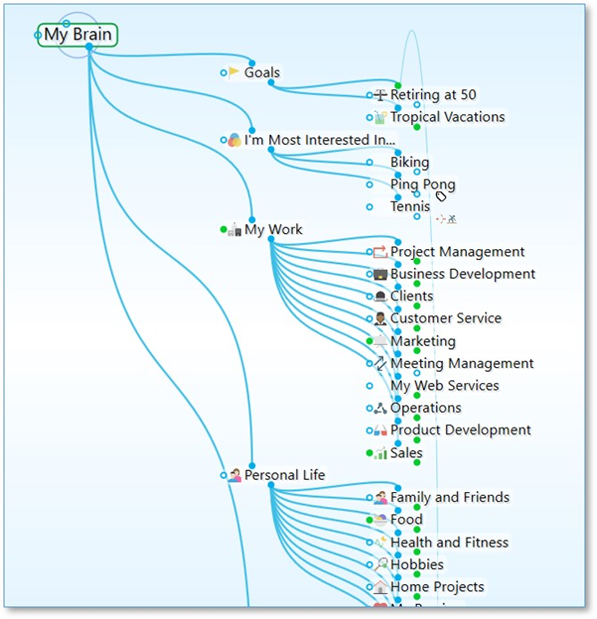
Figure 175. Plex in Outline View
Providing a clean, organized way of looking at your thoughts, Outline view enables a fast, easily understood overview of the active area of your thought network. The level of detail can go as deep as you want while maintaining an ordered view.
When the plex is in Outline view, you can show or hide generations of children for individual thoughts. To see if a thought has child thoughts that aren’t currently showing, point the mouse at the thought.
- On mouseover, a plus sign (+) icon will appear above the top edge of the thought’s outline if there are child generations to display. Click the + icon to expand and show that thought’s children.
- On mouseover, a minus sign (-) icon will appear below the bottom edge of the thoughts’ outline if child thoughts can be collapsed or hidden. Click the - icon to hide that thought’s children.
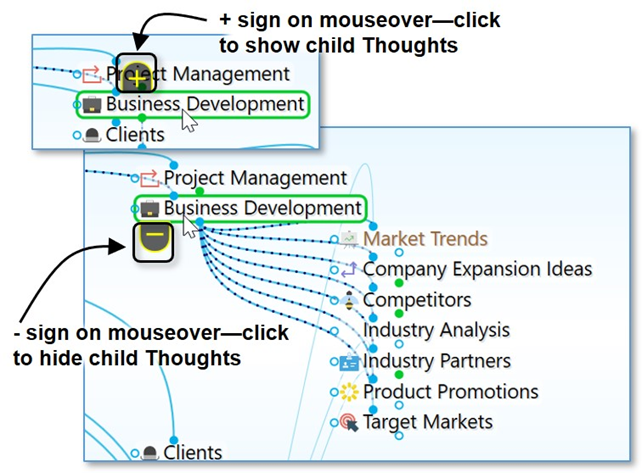
Figure 176. Showing/Hiding Additional Generations of Individual Thoughts