Brain Terminologies

Here is a list of working definitions for the basic terms used throughout TheBrain.
| Brain | A collection of associated thoughts, each of which can have content. You can create multiple brains. |
| Thought | The topics that you link together in your brain are called thoughts and are the basic unit of a brain. A thought can represent anything you want it to. It can include an icon, notes, and one or more attachments (such as files and websites) or it can have no content at all and simply act as a subject heading or organizer. Minimally, a thought has a name. |
| Plex | The visible, graphical portion of your brain that displays your thoughts. |
| Content Area | The portion of TheBrain window that displays content that can be associated with the active thought or link. Types of content include notes, attachments (such as worksheets, presentations, documents, videos, and images), links, URLs, and events. The content area also displays and provides quick access to related thoughts. |
Clicking any thought or link in the plex displays its associated content in the content area.
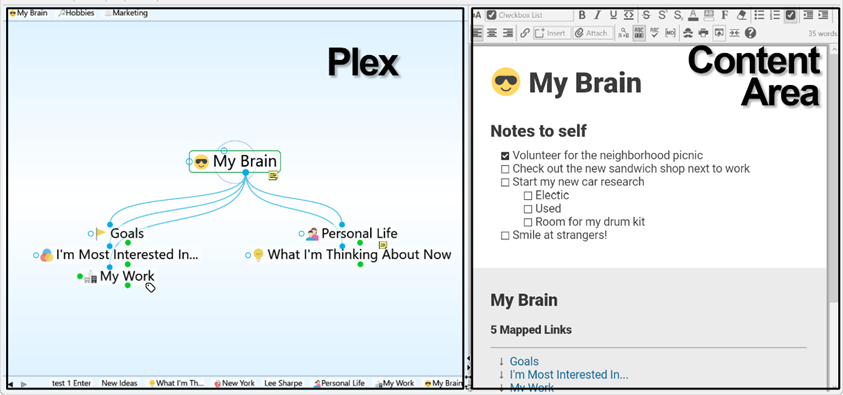
Figure 2. TheBrain Plex and Content Area
| Active Thought | The active thought appears in the center of the plex and is the current focus. Any items attached to the thought, like notes, files, links, and events appear in the content area. |
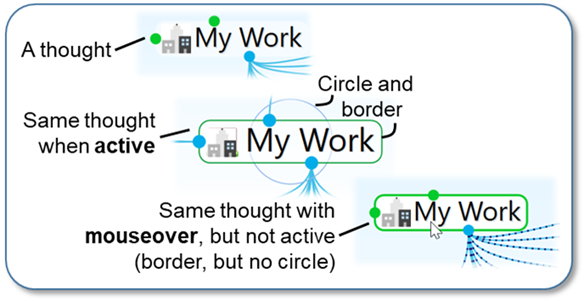
Figure 3. The Different Ways a Thought Can Appear
As shown below, when you click a thought, it moves to the center of the plex and it becomes the active thought
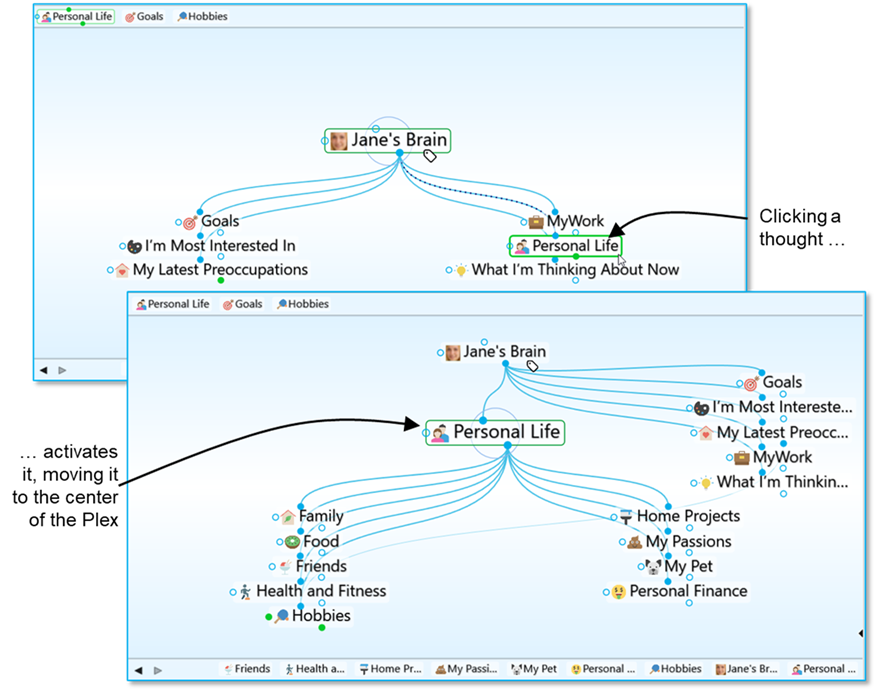
Figure 4. Activating a Thought
| Thought Relationships | A thought is said to be a “parent thought,” “child thought,” “sibling thought,” or “jump thought” based on its relationship to other thoughts with which it is linked. |
In your own life, you may be someone’s parent, and someone’s child, and someone’s sibling, and someone’s peer, advisor, or colleague. So, who are you? The answer to that question is relative—it depends on the circumstances and what hat you’re wearing at the moment.
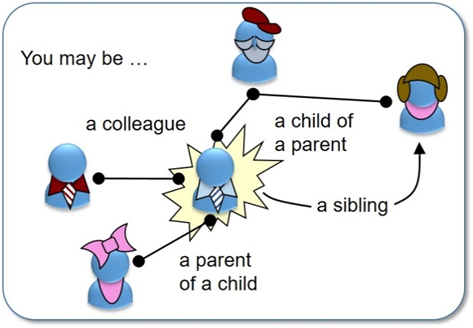
Figure 5. Relationships are Relative to You
The same applies to thoughts. The relationships between thoughts are displayed automatically, based on which thought is active at the moment.
 Whether a thought is a parent, child, or sibling depends on its current relationship to the active thought.
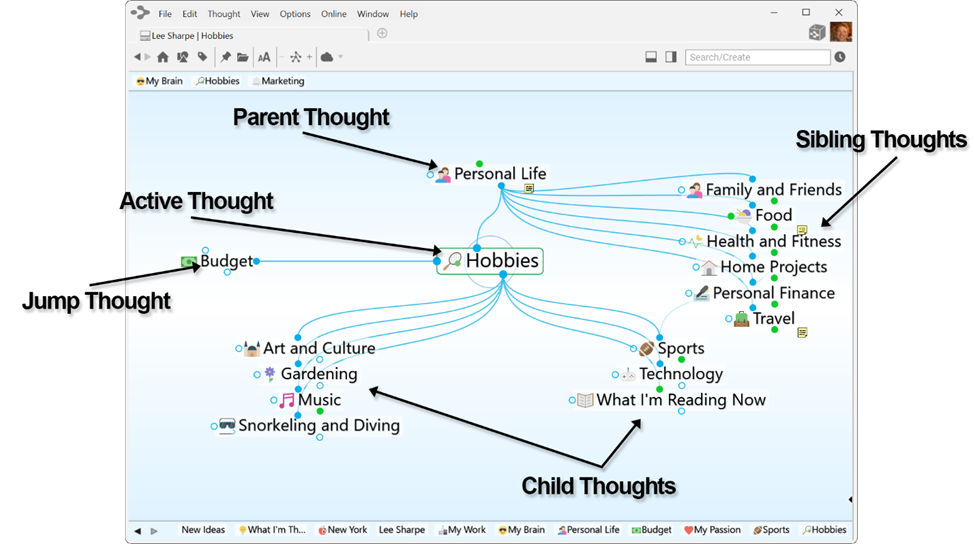
Figure 6. Thought Relationships are Relative to the Active Thought
| Child Thought | Child thoughts are subtopics of the active thought. They appear in the “child zone,” below the active thought. In the picture above, the active thought “Hobbies” has seven child thoughts. |
| Parent Thought | Parent thoughts represent superordinate topics of the active thought. They appear in the parent zone, above the active thought. |
| Sibling Thought | Sibling thoughts share a parent with the active thought. They appear in the sibling zone, to the right of the active thought. In the picture above, “Family,” “Food,” “Health and Fitness,” “Home Projects,” “My Passion,” “My Pet,” and “Personal Finance” are siblings of “Hobbies” because they are all children of “Personal Life.” Sibling thoughts will not be displayed if there are more than 50 parents to show in the current plex. |
| Jump Thought | Jump thoughts are related to the active thought but are neither child nor parent topics. They appear in the jump zone to the left of the active thought. Jump thoughts have an “equal weight” relationship with the thought to which they are related. For example, as shown above, “Hobbies” has the various hobbies “Art and Culture,” “Gardening,” “Music,” “Snorkeling and Diving,” “Sports,” “Technology,” and “What I’m Reading Now” linked as child thoughts since they are types of hobbies. “Budget” affects the amount of resources available to spend on the various hobbies and so it is closely related, but it is not a hobby itself. Therefore, it makes a perfect jump thought―related, but not part of the main thought grouping. |
| Gate | Thoughts in the plex have three circular “gates,” each of which is used to link a specific type of relation: The parent gate is above a thought, the child gate is below it, and the jump gate is to the left or right of it. A gate is hollow when there are no links attached to it and solid when one or more links are attached. Solid gates in a contrasting color have links to thoughts that are not currently showing in the plex. The color of gates is based on the current color scheme. When you point at a gate, a highlighting circle appears around it. |
| Link | A link is the line that connects two thoughts. When used as a verb, to “link” is the act of connecting thoughts to establish close relationships. Links can also show direction to help you visualize relationships. |
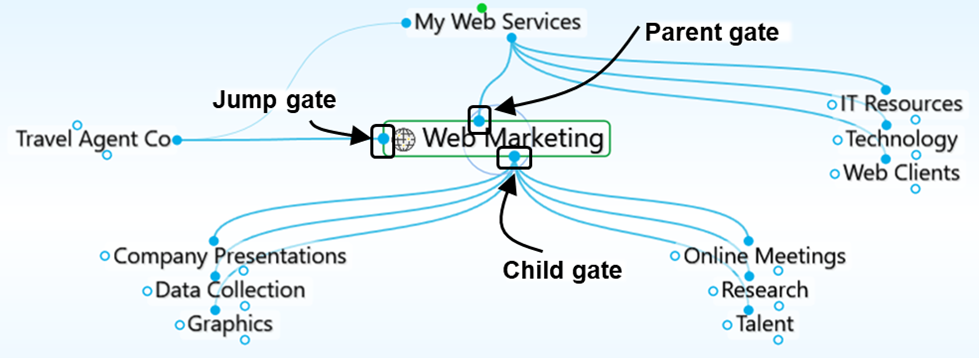
Figure 7. Thought Gates