Creating a Single Thought
There are many ways to create a thought, but most start with the same step: choosing the thought with which the new thought will have a relationship. You will use the chosen thought as a starting place when creating the new thought.
Generally speaking, you’ll create child thoughts more often than parents or jumps. There are certainly exceptions, but usually, using a “top-down” approach is helpful if you are just getting started: Create children (and jumps, as appropriate) and let parents happen naturally.
Once you have activated the thought that will have a relationship with your new thought, use any of these techniques to begin creating a new thought:
- Drag from the thought’s parent, child, or jump gate
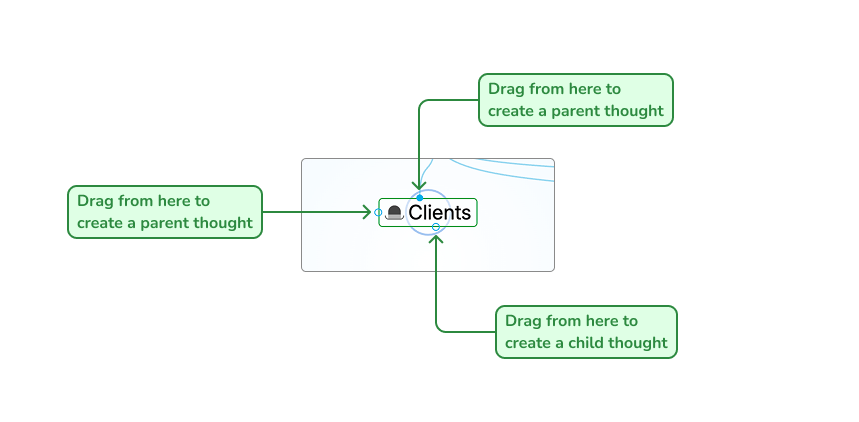
Gates to Drag for Creating Thoughts
- Or, right-click the thought, then click the
Create Child,Create Parent, orCreate Jumpcommand
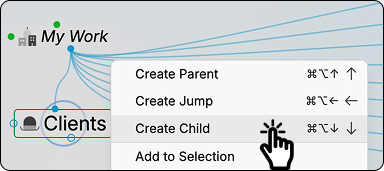
- Or use a keyboard shortcut:
- On Windows, press the
Ctrl+Alt+Down Arrow(for a child thought),Ctrl+Alt+Up Arrow(for a parent thought), orCtrl+Alt+Left Arrow(for a jump thought)
- On Windows, press the
- On macOS, press the
Option+Cmd+Down Arrow(for a child thought),Option+Cmd+Up Arrow(for a parent thought), orOption+Cmd+Left Arrow(for a jump thought)
- On macOS, press the
No matter which of the above methods you use to begin creating your new thought, the next thing you’ll see is the Thought Creation dialog box with the cursor blinking in the field for typing in the name of your new thought.
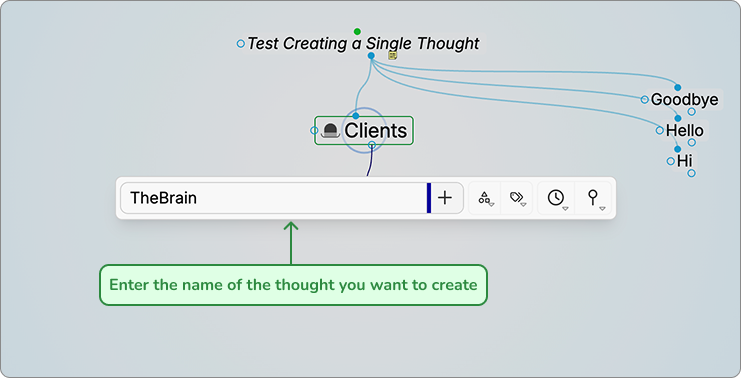
Thought Creation Dialog Box
- Type the name of your new thought in the field provided.
- Press the
Enterkey or click in a blank area of the plex to save your new thought (or press theEsckey to cancel the process and close the box).
Automatic initial-capitalization: If you type a thought name using all lowercase letters, the first letters of words will be capitalized for you automatically. TheBrain uses “smart rules” to determine which words should be lowercase (such as “a,” “and,” and “of”). For example, if you’ve typed “visit the statue of liberty,” the thought name will automatically become “Visit the Statue of Liberty.” This feature is active, by default, but you can turn it off in the Behavior tab of the Preferences dialog box.
If spellcheck is turned on in the content area toolbar, thought names will also be spellchecked in the Thought Creation dialog box, as well as in the Thought Properties dialog box.