Using Thought URLs
Each thought in TheBrain is available via a unique URL. A thought URL can be used to create links to thoughts from external third-party applications or from other brains. Thought URLs can also be used within TheBrain as another way to connect thoughts via links within notes or as attachments to thoughts.
 Thought URLs can be added as hyperlinks in many third-party applications so that when the link is activated, TheBrain will go to the referenced thought.
To copy a thought URL:
- Right-click the thought (or click the Edit menu), then click the Copy Local Thought URL command.
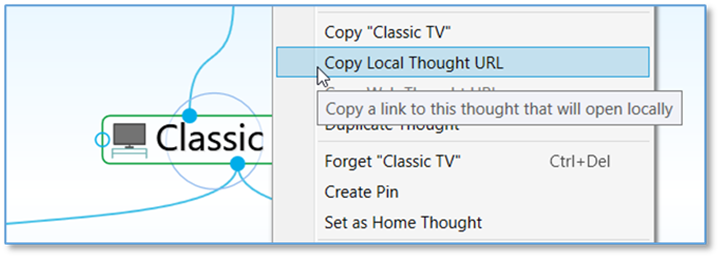
Figure 137. Copying a Thought URL
To paste a copied thought URL so it will be another thought’s attachment:
- Activate the thought to which it should be copied (which may be in the original brain or any active brain), then right-click the thought (or click the Edit menu).
- Click Add Attachment and select the Paste Web Link command. The URL will be added to the thought as an attachment.
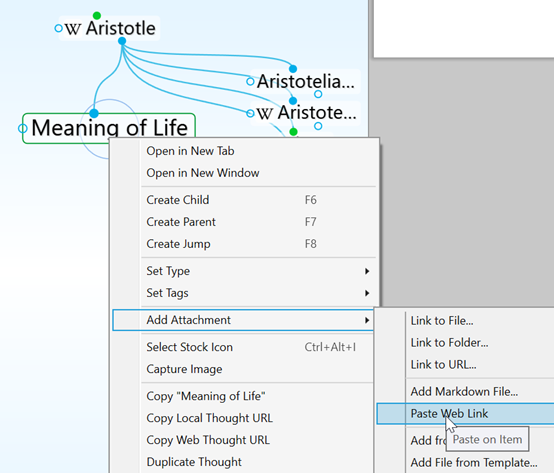
Figure 138. Pasting a Thought URL
To paste a thought URL after it has been copied so that it becomes a hyperlink in a note:
- In the note, select the text that will be the link using one of the two methods below:
- If the text happens to be the name of a thought you want to link to, it will have a dotted underline—click within the underlined text
- If the text isn’t the name of a thought, just drag through it to select it
- Click the Insert Thought or Web Link command in the content area toolbar (or right-click and select it from the context menu).
- Select the thought in the drop-down list, then click outside of the list to close it and create the link.
When you click the link, the thought will open and you can click its attachment(s) to view them in the content area.
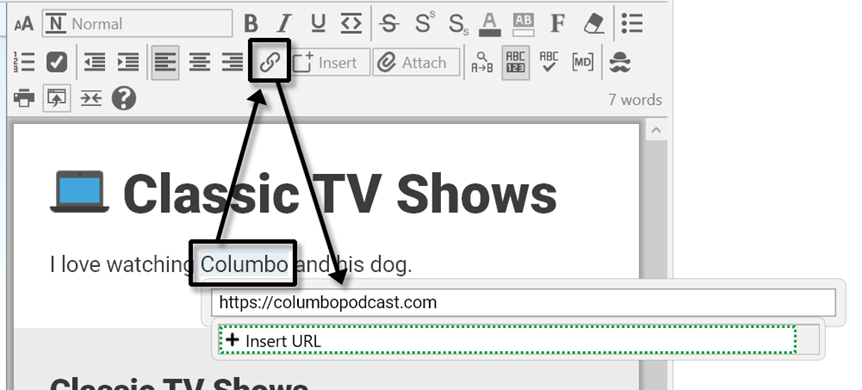
Figure 139. Inserting a Hyperlink in a Note