Creating Context-Sensitive Thought Names Using Commas
It's always good to be specific with your thought names. TheBrain has a built-in time saver for situations where you have repetitive information that needs to be added across multiple thoughts.
Say you have a thought for each of your trips, and each one needs a child thought called "Packing List." If every child thought shares the same name, you won't be able to tell them apart without checking their parents. To solve this, you can use the comma trick type a comma at the start or end of the new thought's name, and the parent thought's name will be inherited automatically.
For example, with a parent thought of Japan Trip:, Packing List or Packing List,
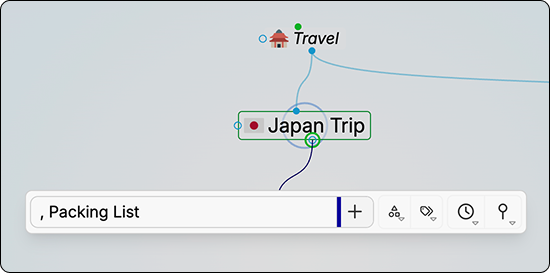
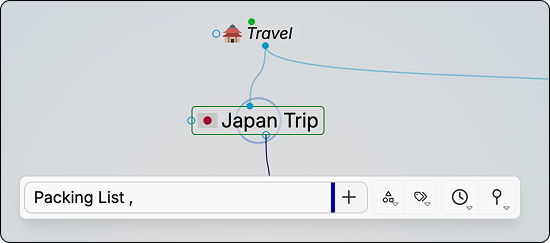
Adding the Comma at the Front/End of a Thought Name
Where you place the comma determines where the inherited name appears, at the beginning or the end.
Once created, the thought's display name is context-sensitive:
- When the parent thought is active, the inherited portion is hidden, and only the unique part of the name is shown (e.g., just "Packing List").
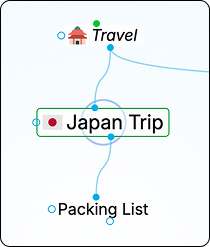
How the Thought Appears Before Activation
- When hovering over the thought while it's not active, the full name is revealed (e.g., "Japan Trip, Packing List").
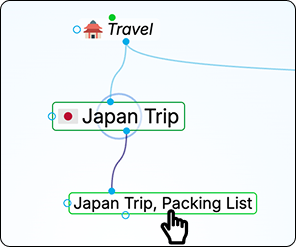
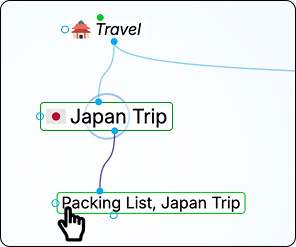
Hovering Reveals the Full Thought Name
- When the thought itself is active, the full combined name is displayed.
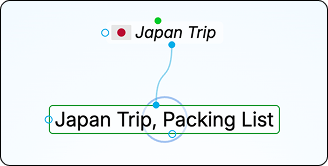
Full Name Displayed When the Thought is Active
This keeps your plex clean while ensuring every thought has a unique, identifiable name, no matter where it appears.
Tip: The context-sensitivity works in both directions. If "Packing List" is active and you have a linked thought named "Japan Trip, Packing List," it will appear as just "Japan Trip." When "Japan Trip" is active, that same thought appears as "Packing List." Thoughts in alphabetical order will sort based on whichever version of the name is currently visible.