Content Area Overview
Here are some handy things to know about the content area:
- By default, the content area shows content attached to the active thought. If the active thought has no content, the content area shows only the thought’s name and related content (or placeholders for related content to come). However, if you want to see the content for thoughts you point at with the mouse, select the “Update displayed content on hover” option in the Behavior tab of the Preferences window. (Please see the Behavior Preferences section on page 62 for more information about setting global user interface preferences.)
- A red border highlights the content area when the content belongs to a moused-over thought.
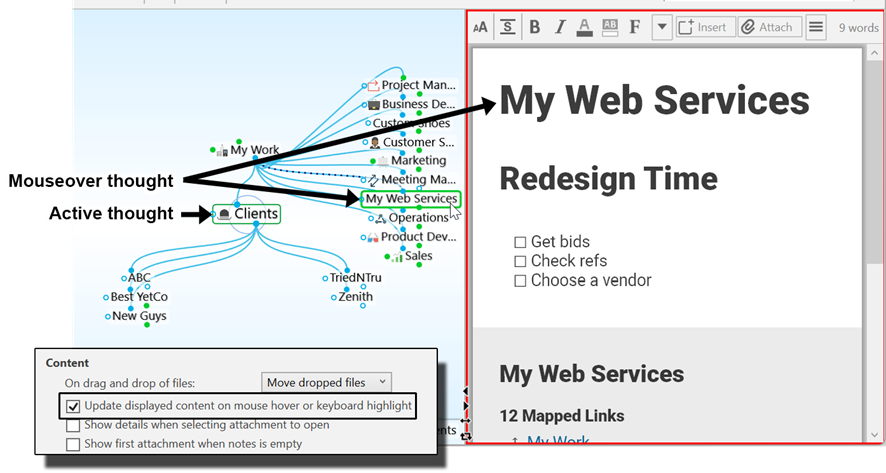
Figure 186. Content of an Inactive Thought after Behavior Preference is Changed
 Preferences are global; whatever options are selected when one brain is active will also be selected in your other brains. Of course, you can change your preferences at any time.
- With one click, you can move the content area to any side of the plex—above, below, left, or right. See the Using Smart-Splitter to Arrange TheBrain Window section on page 36 for details. While you’re working on content you might find it convenient to maximize the content area.
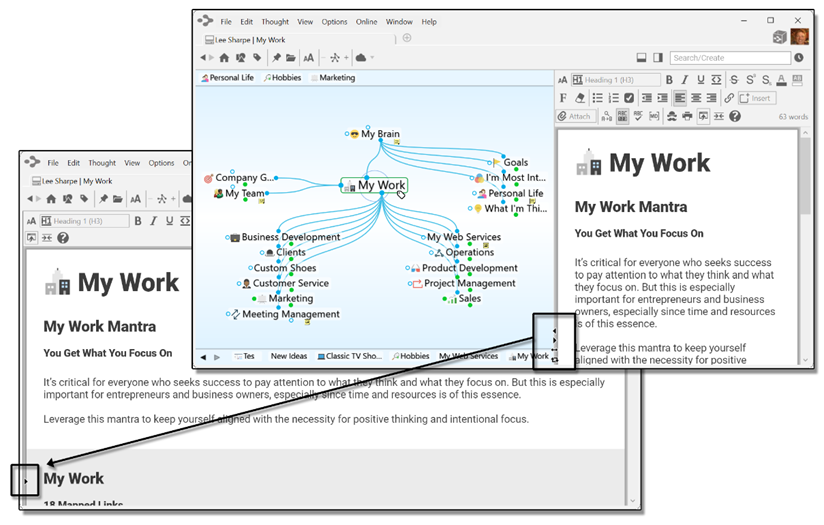
Figure187. Maximizing the Content Area
- The size of the content area depends on the size of TheBrain window, but when the plex and the content area are side-by-side, you’re in control of how much of the available space each area occupies. Just point the mouse at the line between the two areas and when the double-headed arrow appears, drag left or right to change the proportions.
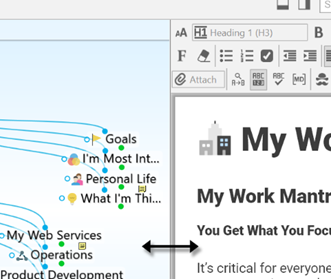
Figure188. Making the Content Area More Wide or Narrow
 Tip: To work with the content area in a separate window, click the New Window command on the File menu. Then, maximize the plex in one window and the content area in the other. Changes you make in one window will be reflected in the other because you’re working with the same brain, however, the windows won’t be in synch. In other words, making a thought active in one window won’t make it active in the other.