Create Child from item
I am assuming "item" definition?
- So we have child and children but how about Parent?
I am having a challenge with not being able to select a list in the content area and then link the selected thoughts. I would like to create a selection list and then link the selection as parents of a thought.
- First select the list in Notes, be sure to wrap the selection from the begining of the first item in the list and all the way to the end of the last item in the last. Otherwise it will leave off the last item.
- Then use the key binding: "Ctrl+Shift+S"
- Then if you want to link as Parents of the current thought: "Ctrl+Shift+K"
- IF you want to link as Child "Ctrl+Shift+D"
For example, I have a baseball player who has played for several years for several different teams. I have a list of the teams in the content/notes page. Some of the thoughts already exist in the brain and some need to be added (create a new thought for the team/YEAR).
While the engine includes explicit multi-item construction rules for downstream links (children), the upstream logic (parents) is expected to be handled natively via the Plex or through the new Selection Box Actions drop-down menu rather than an inline note attachment generation command.
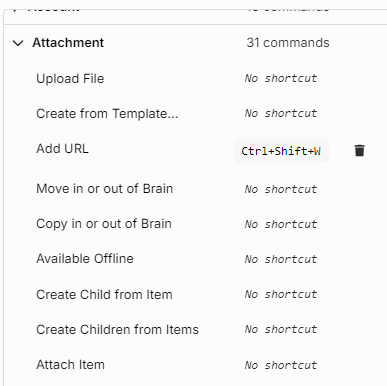
In Settings|Keyboard|Attachment there is a list of keyboard shortcuts with Create Child from item and another for Create Children from items .
- But there are none listed for
Create Parent from itemorCreate Parents from items.
The shift from version 14 to the rewritten architecture of v15 has altered some deep-rooted UI behaviors and keyboard/mouse combinations. The exact reason for the prior trick isn't working—and why we are hitting a wall looking for "Create Parent from item" commands.