Toolbars, Main Toolbar
This is my current Main Toolbar
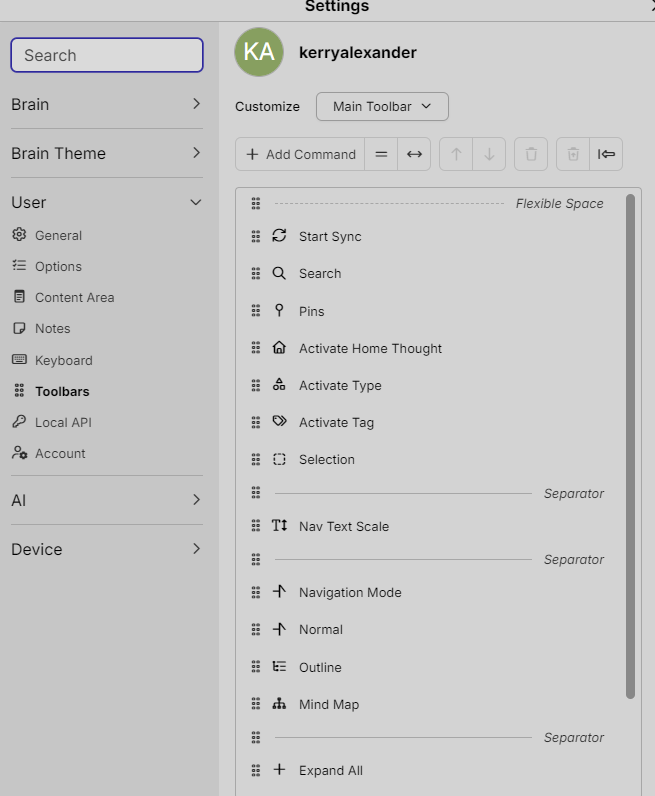
I placed a Separator on the top, which has actually almost centered horizontally, the search box, and now the search results are not covering up the selection list on the far left.
Then I moved the "Start Sync", because that felt better to me, to easily find it on the very left of the search box.
- I don't know what the selection box does in the plex yet. However, what we need is a selection box in the content/notes pane, which would put everything in the selection box added to the selection list. Rather than having to click on a thought link and then hold shift and click again. And hopefully you hit the target the first try.
- I noticed that my saved shortcut keys in v.14 have changed and it's not funny. After I got everything set up then Microsoft installed an OS update and took over shortcuts and whipped out my shortcuts again. I have noticed also that the Brain allows more than one short-cut key combo for one command.
- I have notice that setting this main toolbar in the Web client does not stick. I keep moving the search box toward the center so that the drop down list results don't cover the Selection List panel. However, the search box keeps going back to the default extreme left location. I haven't really moved anything else just the search box.