Show outline controls
What does it mean to show outline controls
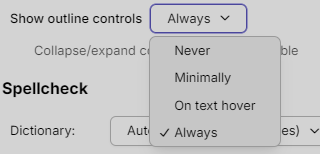
In that Settings → Users → Note → Options context, “Show outline controls” is a display preference for the little UI handles that control outline structure in your notes (for example, controls that let you:
- Expand/collapse indented sections
- Promote/demote list/outline items
- Reorder outline items
The dropdown values likely behave like this:
- Always – The outline controls are always visible next to applicable items in your notes.
- Never – The controls are hidden; you still have the structure, but not the extra UI handles.
- Minimally – Controls only appear where strictly necessary (e.g., only on hovered/selected items or parents with children), reducing visual clutter.
- On text hover – Controls appear only when your mouse is over the text/line that has outline structure, so they’re available when needed but hidden otherwise.
So this setting doesn’t change what your outline can do; it changes how prominently those outline controls are shown while you edit/read notes.
6/12/2026 1:25:43 AM I changed to "On Text Hover"