Animate text cursor (experimental)
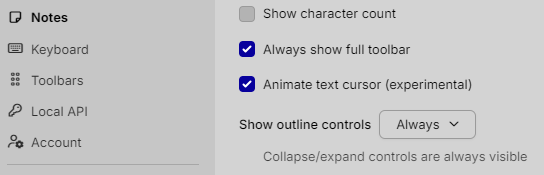
From the context, “Animate text cursor” appears as a command (or checkbox-style option) under your thought “Settings User, Notes, Options” — but I don’t have any built‑in documentation or UI description that explains its exact behavior in TheBrain 15.
What I can say, based on the wording and common UX patterns, is:
- It is almost certainly a visual-only preference that affects how the text insertion cursor (caret) behaves in note editors.
Typical behaviors options like this control are things such as:
- Whether the text cursor smoothly slides/animates to the new position when you click or use arrow keys, vs. jumping instantly.
- Possibly whether the cursor uses a fade / pulse animation while blinking.
However, none of that is explicitly confirmed from the context you’ve given me, so I can’t assert the exact effect in TheBrain 15.
To positively identify what it does in your environment, you could:
- Enable/disable “Animate text cursor”.
- Open any note editor and:
- Click different positions in the text.
- Use arrow keys or Page Up/Down.
- Observe whether the insertion bar:
- Jumps vs. slides,
- Has any extra animation vs. a static blink.
If you’d like, you can tell me what you observe when it’s on vs. off, and I can help you phrase a precise description to keep in your brain (for example, as a short note on that setting).