Customizing Thought and Link Properties
To open the Thought Properties dialog box, use any of these methods:
- Click the active thought, or
- Click the thought once to select it, then a second time to open the box, or
- Alt-click the thought (whether or not the thought is active), or
- Right-click the thought, then click
Show Thought Propertieson the context menu, or
- Click the thought to select it, click the
Thought Menuin the menu bar, then click theShow Thought Propertiescommand
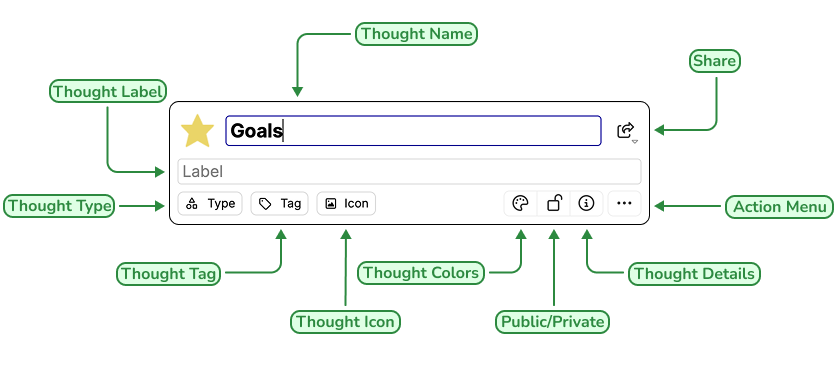
To open the Thought Properties dialog box, use any of these methods:
- Click the active thought, or
- Click the thought once to select it, then a second time to open the box, or
- Alt-click the thought (whether or not the thought is active), or
- Right-click the thought, then click
Show Thought Propertieson the context menu, or
- Click the thought to select it, click the
Thought Menuin the menu bar, then click theShow Thought Propertiescommand