TCP Flags
The responses of the hosts to the SYN segments depends on the values of the flags in TCP header. To thoroughly understand the Idle Scan concept you have to know the following TCP responses.
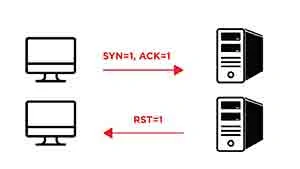
1.) If a host receives a TCP segment where SYN and ACK flags are set then it responses with the RST flag since there is no corresponding session which started with a SYN earlier to SYN/ACK)
2.) If a host receives a TCP segment to its open port where only SYN flag is set (which is describing an intent for setting up a TCP connection) then it responses with SYN and ACK flags.
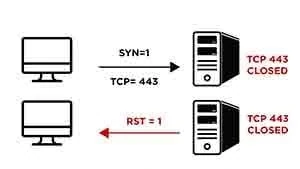
3.) If a host receives a TCP segment to its closed port where only SYN flag is set then it responses with RST flag.
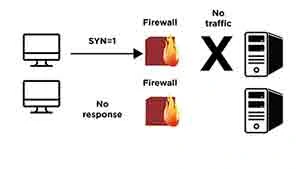
4.) If a firewall or a similar access control device blocks the access to some ports of the host then these port are called filtered ports. If a SYN segment is sent to a filtered port of the host then the host doesn’t give a response to this segment because the segment couldn’t reach the host because of the firewall which simply drops the packet. (The result is also the same for other TCP segments.)
To give a summary:
- If a SYN/ACK segment is sent to a host it responds with RST segment
- If a SYN segment is sent to a host it responds with a SYN/ACK if the port is open,
- If a SYN segment is sent to a host it responds with a RST if the port closed,
- If a SYN segment is sent to a host it doesn’tgive a response if the port filtered.
After this introduction now we can proceed with the explanation of Idle Scan. We will explain Idle Scan for three different scenarios: 1) victim port open, 2) victim port closed and 3) victim port filtered. The results of Port Closed and Port Filtered scenarios are the same though.
As we mentioned above for Idle Scan to be executed we need a host of which network traffic is very low. (Or better it has almost no traffic. You can detect such idle hosts in a network with some network scanning tools.) Otherwise it can cause some false positives for the Idle Scan. Such “idle” computers generally are called as “Zombie computers”. (We also will call them as Zombie computers throughout this article.) We will use these Zombie computers to detect the status of the ports of other computers. (Seems weird. But don’t be afraid.)
After we have determined our Zombie computer in the network its time to execute Idle Scan.