Smbmap
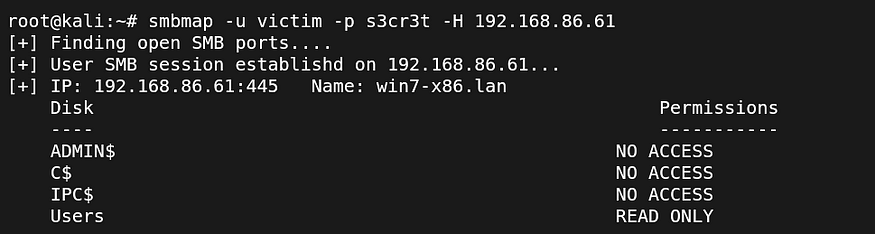
SMBMap allows users to enumerate samba share drives across an entire domain. List share drives, drive permissions, share contents, upload/download functionality, file name auto-download pattern matching, and even execute remote commands. This tool was designed with pen testing in mind, and is intended to simplify searching for potentially sensitive data across large networks.
$ smbmap \-husage: smbmap [\-h] (\-H HOST | -\-host-file FILE) [\-u USERNAME] [\-p PASSWORD] [\-s SHARE] [\-d DOMAIN] [\-P PORT] [\-v] [-\-admin] [\-x COMMAND] [-\-mode CMDMODE] [\-L | \-R [PATH] | \-r [PATH]] [\-A PATTERN | \-g] [-\-dir-only] [-\-no-write-check] [\-q] [-\-depth DEPTH] [-\-exclude SHARE [SHARE ...]] [\-F PATTERN] [-\-search-path PATH] [-\-search-timeout TIMEOUT] [-\-download PATH] [-\-upload SRC DST] [-\-delete PATH TO FILE] [-\-skip]SMBMap - Samba Share Enumerator | Shawn Evans - ShawnDEvans@gmail.comoptions: \-h, -\-help show this help message and exitMain arguments: \-H HOST IP of host -\-host-file FILE File containing a list of hosts \-u USERNAME Username, if omitted null session assumed \-p PASSWORD Password or NTLM hash \-s SHARE Specify a share (default C$), ex 'C$' \-d DOMAIN Domain name (default WORKGROUP) \-P PORT SMB port (default 445) \-v Return the OS version of the remote host -\-admin Just report if the user is an adminCommand Execution: Options for executing commands on the specified host \-x COMMAND Execute a command ex. 'ipconfig /all' -\-mode CMDMODE Set the execution method, wmi or psexec, default wmiShard drive Search: Options for searching/enumerating the share of the specified host(s) \-L List all drives on the specified host \-R [PATH] Recursively list dirs, and files (no share\path lists ALL shares), ex. 'C$\Finance' \-r [PATH] List contents of directory, default is to list root of all shares, ex. \-r 'C$\Documents and Settings\Administrator\Documents' \-A PATTERN Define a file name pattern (regex) that auto downloads a file on a match (requires \-R or \-r), not case sensitive, ex '(web|global).(asax|config)' \-g Make the output grep friendly, used with \-r or \-R (otherwise it outputs nothing) -\-dir-only List only directories, ommit files. -\-no-write-check Skip check to see if drive grants WRITE access. \-q Quiet verbose output. Only shows shares you have READ or WRITE on, and suppresses file listing when performing a search (\-A). -\-depth DEPTH Traverse a directory tree to a specific depth. Default is 5. -\-exclude SHARE [SHARE ...] Exclude share(s) from searching and listing, ex. -\-exclude ADMIN$ C$'File Content Search: Options for searching the content of files (must run as root) \-F PATTERN File content search, \-F '[Pp]assword' (requires admin access to execute commands, and PowerShell on victim host) -\-search-path PATH Specify drive/path to search (used with \-F, default C:\Users), ex 'D:\HR\' -\-search-timeout TIMEOUT Specifcy a timeout (in seconds) before the file search job gets killed. Default is 300 seconds.Filesystem interaction: Options for interacting with the specified host's filesystem -\-download PATH Download a file from the remote system, ex.'C$\temp\passwords.txt' -\-upload SRC DST Upload a file to the remote system ex. '/tmp/payload.exe C$\temp\payload.exe' -\-delete PATH TO FILE Delete a remote file, ex. 'C$\temp\msf.exe' -\-skip Skip delete file confirmation promptExamples:$ smbmap \-u jsmith \-p password1 \-d workgroup \-H 192.168.0.1$ smbmap \-u jsmith \-p 'aad3b435b51404eeaad3b435b51404ee:da76f2c4c96028b7a6111aef4a50a94d' \-H 172.16.0.20$ smbmap \-u 'apadmin' \-p 'asdf1234!' \-d ACME \-h 10.1.3.30 \-x 'net group "Domain Admins" /domain'