Paths / Locations for Google Docs
March 27, 2024, 2:22 PM - Justin huddled in Slack to ask how to find the full path for Google Docs.
March 27, 2024, 3:13 PM email to Justin re: Paths / Locations for Google Docs
In a Google Sheet or Doc that you have open you can find its parent folder by going File > Details or by clicking on Search (magnifying glass) > Details.
You will get a popup similar to these:
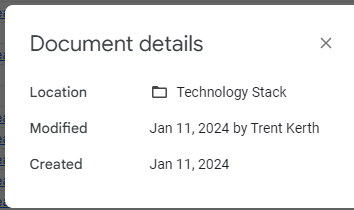
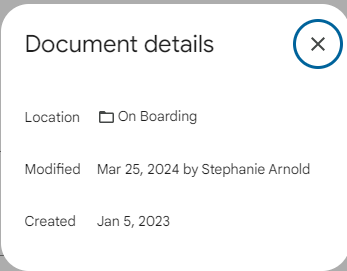
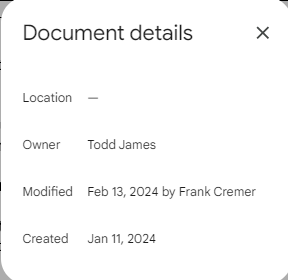
The right-most image indicates that the parent folder has not been shared with you, hence the "-" displayed next to Location.:
But this is only the parent folder, and not the full path!
The Google documentation and discussion threads about this indicate that if you click on the folder indicated next to Location, it should open that folder, but I am not finding that that is the case.
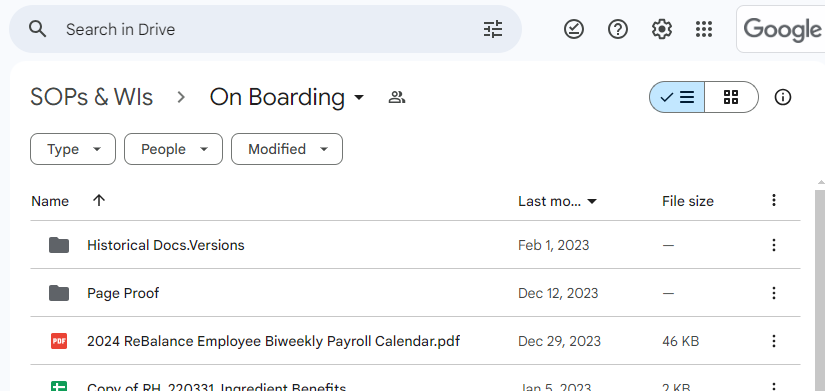
The best way I have found to find the full path for the document is search for the Location = Parent Folder in Google Drive.
When you click on that Location/name in the search results you will see the full path to that Parent Folder, as below:
I hope this helps.
Please let me know if you would like me to research further, for example, there may be third-party tools that can assist with this.
But noting that we are migrating from Google Workspace to Microsoft 365, I recommend that we wait for the different challenges that Microsoft may throw at us.