TheBrain12.0.92.0
Be sure to check the various Menus for quick access to topics!

To view all of the tabs, open the “info panel” all the way, see directions below.
There are literally thousands of plants in the database, found either by search, or discovering through being linked to various conditions they treat. Additionally, all are organized according their taxonomy and one way to learn is by going through the plant families. Not all plants are used medicinally or as food but are included for botanical and plant identification purposes. When looking up a plant, also take a look at its genus for more information.
The database is loaded with medical research papers, it's well known there are "good" studies and "bad" studies...how do you know which is which? To the left, you'll see a topic "Clinical/Medical Research" and going through that and it's related topics will help you learn how to read and evaluate studies. Titles can be misleading so if a research paper interests you, read it.
NOTE: You will need a computer to use the database, it doesn't work on mobile.
1. To open any link found in the "notes" tab, just click on it in the normal way, you'll see a small square icon at the end of the link (or bottom right of videos), click on the icon.
2. The "info panel" (what you are reading now) slides using arrows (see below) and has "browser-like" tabs for additional links. Open it all the way to see all of the tabs, or close it completely to view more of the "plex" with it's clickable topics. Additionally, when there is a lot of text in the notes section the text appears in columns, visible by opening the info panel all the way. These arrows are very small.

Click on the upper arrow to open the info panel all the way. The lower arrow closes the info panel so you can see more of the plex. The bottom two arrows cause the info panel to shift to the bottom (instead of the side) ...click it again to return to side view. This is useful if you ever open the database and the graphics/text/ appears "messed up", by clicking the bottom two arrows, dropping the panel to the bottom of the screen, the database returns to the normal view. You can then click again to bring the panel back to the side.
3. Database 2 has a menu for major categories and new menus for individual topics are currently being added, for example, Menu - First Aid
4. Check out the Color Codes, they'll help you with navigation. For example, the dark green is for conditions and therapeutics. Light green is for healing therapies.
5. When using the search box, the "search button" isn't clickable, its just there to identify the search area. Your searches will pop up above your entry for you to select which one you want.
6. If the screen seems to be "stuck" or you get an error message, just refresh your browser.
7. If tabs seem too slow to open, it sometimes helps to click back onto the Notes and then to the tab you want to open (it acts like a reset).
8. Many of the topics have a pop-up accessible by mousing over the far left icon, especially useful for a quick view of plants:
Example: (area highlighted inside of white outline) 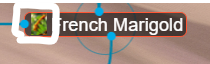
9. You can search using abbreviations, for example, when looking up a multi-word topic you can just type in the first letter of each word.
Across the top of the screen you'll see a few key topics pinned for quick access including a menu.
Important:
In the content panel (on the right) you'll see a section called "Notes" which may include links followed by a link icon. Click on the icon to open the link in your browser. Some of these links will switch you to the term where its located inside the database. The tabs provide addition links which will open on a new browser window.
New material is added daily. If there's something you're looking for and not finding, or have suggestions for content, contact D'Coda at ozarkherbalacademy@gmail.com.
Be sure to watch the*Herbal Knowledge Keepers*broadcast and join our Facebook group, Herbal Knowledge Keepers (shows are posted there as they are published) Your questions about the database, herbs, conditions, etc. will be answered. You'll discover the depth of this database as we explore it together. You'll find archives in the Media section and in the database itself.
Not every plant listed is a medicinal or edible plant. They are included for identification purposes to assist in recognizing the correct medicinal/edible plants. If you see only botanical information, nothing about use, that's a strong indication that the plant should not be ingested.
Sources:
You'll find links to sources in one of three ways: After the article text as (source) click the link to open in a new tab, or if its from a book it will be attributed to the author by name and you can go to "Sources" for the title of the book. Wikipedia articles load automatically into the info panel and you'll find the link at the top. If you can't locate the source let D'Coda know.
About the Database:
Folks who dive deeply into herbal studies soon recognize that its a life-long learning adventure. D'Coda began creating this database years ago to assist in collecting all of the knowledge found in books and on the web, organizing it into searchable categories for quick access. Daily, new research is added to it, so its a work-in-progress.
Using the search box you can quickly locate whatever you are looking for, or, you can begin with one of the headings that's pinned to the top of the screen and simply work through each attached learning object. Observe the patterns as they unfold. You will be able to begin associating plant families to their members, members to their energetics, actions, phytochemicals and therapeutics. Listed below is a quick way to begin with the therapeutics section. Each label will take you directly to its learning object. There are often links along the top of the lesson page, just click them to visit the site.
Be sure to run your mouse over the labels on the learning objects since additional information often pops up, for example, the binomial name for the herb.
Note the color coding
FDA Compliance
The information on this website has not been evaluated by the Food & Drug Administration or any other medical body. We do not aim to diagnose, treat, cure or prevent any illness or disease. Information is shared for educational purposes only. You must consult your doctor before acting on any content on this website, especially if you are pregnant, nursing, taking medication, or have a medical condition.