Computer Mouse
A computer mouse is a handheld hardware input device that controls a cursor in a GUI (graphical user interface) for pointing, moving and selecting text, icons, files, and folders on your computer. In addition to these functions, a mouse can also be used to drag-and-drop objects and give you access to the right-click menu.
A computer mouse (plural mice, sometimes mouses)[nb 1] is a hand-held pointing device that detects two-dimensional motion relative to a surface. This motion is typically translated into the motion of a pointer on a display, which allows a smooth control of the graphical user interface of a computer.
The first public demonstration of a mouse controlling a computer system was in 1968. Mice originally used two separate wheels to track movement across a surface: one in the X-dimension and one in the Y. Later, the standard design shifted to utilize a ball rolling on a surface to detect motion. Most modern mice use optical sensors that have no moving parts. Though originally all mice were connected to a computer by a cable, many modern mice are cordless, relying on short-range radio communication with the connected system.
In addition to moving a cursor, computer mice have one or more buttons to allow operations such as the selection of a menu item on a display. Mice often also feature other elements, such as touch surfaces and scroll wheels, which enable additional control and dimensional input.
Etymology[]

A computer mouse is named for its resemblance to the rodent.
The earliest known written use of the term mouse in reference to a computer pointing device is in Bill English's July 1965 publication, "Computer-Aided Display Control", likely originating from its resemblance to the shape and size of a mouse, a rodent, with the cord resembling its tail.[1][2][3] The popularity of wireless mice without cords makes the resemblance less obvious.
According to Roger Bates, a hardware designer under English, the term also came about because the cursor on the screen was for some unknown reason referred to as "CAT" and was seen by the team as if it would be chasing the new desktop device.[4][5]
The plural for the small rodent is always "mice" in modern usage. The plural for a computer mouse is either "mice" or "mouses" according to most dictionaries, with "mice" being more common.[6] The first recorded plural usage is "mice"; the online Oxford Dictionaries cites a 1984 use, and earlier uses include J. C. R. Licklider's "The Computer as a Communication Device" of 1968.[7]
History[]
Stationary trackballs[]
The trackball, a related pointing device, was invented in 1946 by Ralph Benjamin as part of a post-World War II-era fire-control radar plotting system called the Comprehensive Display System (CDS). Benjamin was then working for the British Royal Navy Scientific Service. Benjamin's project used analog computers to calculate the future position of target aircraft based on several initial input points provided by a user with a joystick. Benjamin felt that a more elegant input device was needed and invented what they called a "roller ball" for this purpose.[8][9]
The device was patented in 1947,[9] but only a prototype using a metal ball rolling on two rubber-coated wheels was ever built, and the device was kept as a military secret.[8]
Another early trackball was built by Kenyon Taylor, a British electrical engineer working in collaboration with Tom Cranston and Fred Longstaff. Taylor was part of the original Ferranti Canada, working on the Royal Canadian Navy's DATAR (Digital Automated Tracking and Resolving) system in 1952.[10]
DATAR was similar in concept to Benjamin's display. The trackball used four disks to pick up motion, two each for the X and Y directions. Several rollers provided mechanical support. When the ball was rolled, the pickup discs spun and contacts on their outer rim made periodic contact with wires, producing pulses of output with each movement of the ball. By counting the pulses, the physical movement of the ball could be determined. A digital computer calculated the tracks and sent the resulting data to other ships in a task force using pulse-code modulation radio signals. This trackball used a standard Canadian five-pin bowling ball. It was not patented, since it was a secret military project.[11][12]
Engelbart's First "Mouse"
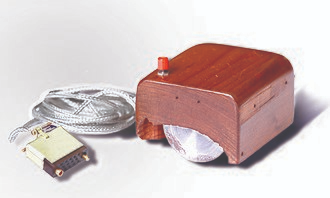
Douglas Engelbart of the Stanford Research Institute (now SRI International, second node ofthe Internet) has been credited in published books by Thierry Bardini,[14] Paul Ceruzzi,[15] Howard Rheingold,[16] and several others[17][18][19] as the inventor of the computer mouse. Engelbart was also recognized as such in various obituary titles after his death in July 2013.[20][21][22][23]
By 1963, Engelbart had already established a research lab at SRI, the Augmentation Research Center (ARC), to pursue his objective of developing both hardware and software computer technology to "augment" human intelligence. That November, while attending a conference on computer graphics in Reno, Nevada, Engelbart began to ponder how to adapt the underlying principles of the planimeter to inputting X- and Y-coordinate data.[14] On 14 November 1963, he first recorded his thoughts in his personal notebook about something he initially called a "bug", which in a "3-point" form could have a "drop point and 2 orthogonal wheels".[4][14] He wrote that the "bug" would be "easier" and "more natural" to use, and unlike a stylus, it would stay still when let go, which meant it would be "much better for coordination with the keyboard".[14]

The Engelbart mouse
In 1964, Bill English joined ARC, where he helped Engelbart build the first mouse prototype.[2][24] They christened the device the mouse as early models had a cord attached to the rear part of the device which looked like a tail, and in turn resembled the common mouse.[25] According to Roger Bates, a hardware designer under English, another reason for choosing this name was because the cursor on the screen was also referred to as "CAT" at this time.[4][5]
As noted above, this "mouse" was first mentioned in print in a July 1965 report, on which English was the lead author.[1][2][3] On 9 December 1968, Engelbart publicly demonstrated the mouse at what would come to be known as The Mother of All Demos. Engelbart never received any royalties for it, as his employer SRI held the patent, which expired before the mouse became widely used in personal computers.[26] In any event, the invention of the mouse was just a small part of Engelbart's much larger project of augmenting human intellect.[27][28]
Several other experimental pointing-devices developed for Engelbart's oN-Line System (NLS) exploited different body movements – for example, head-mounted devices attached to the chin or nose – but ultimately the mouse won out because of its speed and convenience.[29] The first mouse, a bulky device (pictured) used two potentiometers perpendicular to each other and connected to wheels: the rotation of each wheel translated into motion along one axis.[30] At the time of the "Mother of All Demos", Engelbart's group had been using their second generation, 3-button mouse for about a year.
First Rolling-ball Mouse

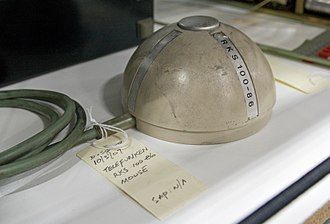
The ball-based Telefunken Rollkugelsteuerung RKS 100-86 from 1968
On 2 October 1968, three years after Engelbart's prototype but more than two months before his public demo, a mouse device named Rollkugelsteuerung (German for "rolling ball control") was shown in a sales brochure by the German company AEG-Telefunken as an optional input device for the SIG 100 vector graphics terminal, part of the system around their process computer TR 86 and the TR 440 [de] main frame.[31][32][33][34] Based on an even earlier trackball device, the mouse device had been developed by the company since 1966 in what had been a parallel and independent discovery.[34][35] As the name suggests and unlike Engelbart's mouse, the Telefunken model already had a ball (diameter 40 mm, weight 40 g[36]) and two mechanical 4-bit[36][37] rotational position transducers[36][38][37] with Gray code-like[36][37][nb 2] states, allowing easy movement in any direction.[39] The bits remained stable for at least two successive states to relax debouncing requirements.[36][37] This arrangement was chosen so that the data could also be transmitted to the TR 86 front end process computer and over longer distance telex lines with c. 50 baud.[38] Weighing 465 g, the device with a total height of about 7 cm came in a c. 12 cm diameter hemispherical injection-molded thermoplastic casing featuring one central push button.[36]
As noted above, the device was based on an earlier trackball-like device (also named Rollkugel) that was embedded into radar flight control desks.[35] This trackball had been originally developed by a team led by Rainer Mallebrein [de] at Telefunken Konstanz for the German Bundesanstalt für Flugsicherung [de] (Federal Air Traffic Control). It was part of the corresponding work station system SAP 300 and the terminal SIG 3001, which had been designed and developed since 1963.[38] Development for the TR 440 main frame began in 1965.[40][38] This led to the development of the TR 86 process computer system with its SIG 100-86[34][32] terminal. Inspired by a discussion with a university customer, Mallebrein came up with the idea of "reversing" the existing Rollkugel trackball into a moveable mouse-like device in 1966,[38] so that customers did not have to be bothered with mounting holes for the earlier trackball device. The device was finished in early 1968,[38] and together with light pens and trackballs, it was commercially offered as an optional input device for their system starting later that year.[31][32][33][41] Not all customers opted to buy the device, which added costs of DM 1,500 per piece to the already up to 20-million DM deal for the main frame, of which only a total of 46 systems were sold or leased.[34][42] They were installed at more than 20 German universities including RWTH Aachen, Technical University Berlin, University of Stuttgart[43][44] and Konstanz.[39] Several Rollkugel mice installed at the Leibniz Supercomputing Centre in Munich in 1972 are well preserved in a museum,[34][45][35] two others survived in a museum at Stuttgart university,[43][36][35] two in Hamburg, the one from Aachen at the Computer History Museum in the US,[46][35] and yet another sample was recently donated to the Heinz Nixdorf MuseumsForum (HNF) in Paderborn.[47][42] Anecdotal reports claim that Telefunken's attempt to patent the device was rejected by the German Patent Office due to lack of inventiveness.[35][39][42][38] For the air traffic control system, the Mallebrein team had already developed a precursor to touch screens in form of an ultrasonic-curtain-based pointing device in front of the display.[38] In 1970, they developed a device named "Touchinput-Einrichtung" ("touch input facility") based on a conductively coated glass screen.[39][38]
First mice on personal computers and workstations[]

HP-HIL Mouse from 1984
The Xerox Alto was one of the first computers designed for individual use in 1973 and is regarded as the first modern computer to use a mouse.[48] Inspired by PARC's Alto, the Lilith, a computer which had been developed by a team around Niklaus Wirth at ETH Zürich between 1978 and 1980, provided a mouse as well. The third marketed version of an integrated mouse shipped as a part of a computer and intended for personal computer navigation came with the Xerox 8010 Star in 1981.
By 1982, the Xerox 8010 was probably the best-known computer with a mouse. The Sun-1 also came with a mouse, and the forthcoming Apple Lisa was rumored to use one, but the peripheral remained obscure; Jack Hawley of The Mouse House reported that one buyer for a large organization believed at first that his company sold lab mice. Hawley, who manufactured mice for Xerox, stated that "Practically, I have the market all to myself right now"; a Hawley mouse cost $415.[49] In 1982, Logitech introduced the P4 Mouse at the Comdex trade show in Las Vegas, its first hardware mouse.[50] That same year Microsoft made the decision to make the MS-DOS program Microsoft Word mouse-compatible, and developed the first PC-compatible mouse. Microsoft's mouse shipped in 1983, thus beginning the Microsoft Hardware division of the company.[51] However, the mouse remained relatively obscure until the appearance of the Macintosh 128K (which included an updated version of the single-button[52] Lisa Mouse) in 1984,[53] and of the Amiga 1000 and the Atari ST in 1985.
Operation
Further information: Point and click
A mouse typically controls the motion of a pointer in two dimensions in a graphical user interface (GUI). The mouse turns movements of the hand backward and forward, left and right into equivalent electronic signals that in turn are used to move the pointer....
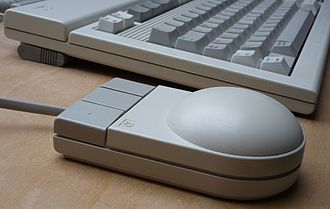
The three buttons are a simplification of Engelbart’s chordset, seen at the pioneering 1968 Mother of All Demos.
3D Mice
Also known as bats,[68] flying mice, or wands,[69] these devices generally function through ultrasound and provide at least three degrees of freedom. Probably the best known example would be 3Dconnexion ("Logitech's SpaceMouse") from the early 1990s. In the late 1990s Kantek introduced the 3D RingMouse. This wireless mouse was worn on a ring around a finger, which enabled the thumb to access three buttons. The mouse was tracked in three dimensions by a base station.[70] Despite a certain appeal, it was finally discontinued because it did not provide sufficient resolution.
One example of a 2000s consumer 3D pointing device is the Wii Remote. While primarily a motion-sensing device (that is, it can determine its orientation and direction of movement), Wii Remote can also detect its spatial position by comparing the distance and position of the lights from the IR emitter using its integrated IR camera (since the nunchuk accessory lacks a camera, it can only tell its current heading and orientation). The obvious drawback to this approach is that it can only produce spatial coordinates while its camera can see the sensor bar. More accurate consumer devices have since been released, including the PlayStation Move, the Razer Hydra, and the controllers part of the HTC Vive virtual reality system. All of these devices can accurately detect position and orientation in 3D space regardless of angle relative to the sensor station.[citation needed]
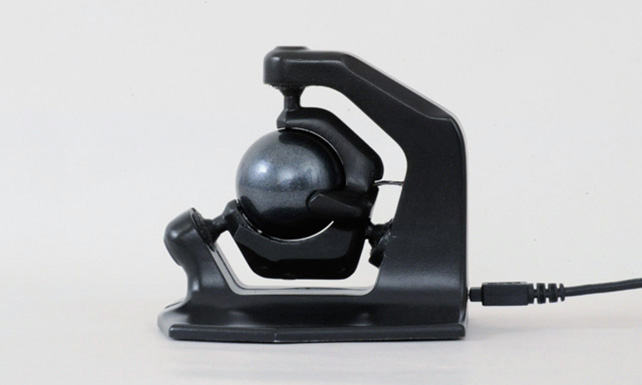
A mouse-related controller called the SpaceBall[71] has a ball placed above the work surface that can easily be gripped. With spring-loaded centering, it sends both translational as well as angular displacements on all six axes, in both directions for each. In November 2010 a German Company called Axsotic introduced a new concept of 3D mouse called 3D Spheric Mouse....