How to delete thebrain #96623
https://thebrain.zendesk.com/agent/tickets/96623
Hello Kenny,
Thank you for reaching out, and welcome to TheBrain! We're excited to have you on board.
To delete a Brain you no longer need, just follow these steps:
- Click the “+” icon next to your Brain tabs at the top to open the Brain selection panel.

- Find the Brain you’d like to delete.
- Click the three-line menu icon in the lower right corner of the Brain tile
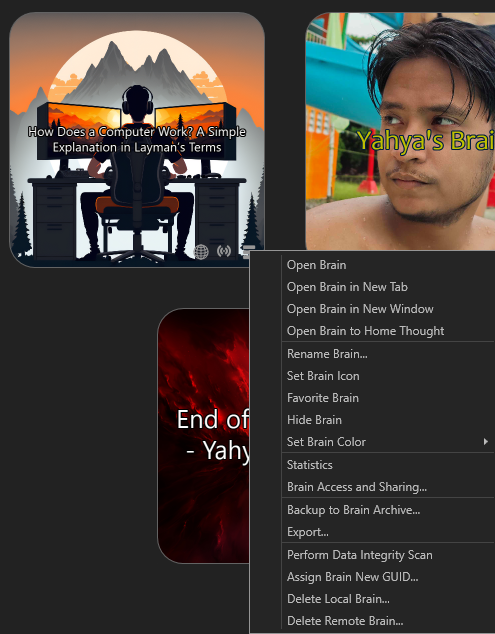
- Choose one of the following:
- Delete Local Brain – to remove it from your computer.
- Delete Remote Brain – to remove it from the cloud (if it was synced).
If you’re just getting started, here are some great learning resources to help you become more familiar with TheBrain:
- Quick Tutorial Videos:
https://www.thebrain.com/support/tutorials
- TheBrain 101 – Live Weekly Webinar:
https://www.thebrain.com/support/thebrain-101
- TheBrain 14 User Guide (PDF):
https://assets.thebrain.com/documents/TheBrain14/TheBrain14-User-Guide-v01.pdf
Let me know if you have any questions, we are happy to help as you explore and build with TheBrain!
Best regards,
John