Update on #95256
https://thebrain.zendesk.com/agent/tickets/95256
Hello again, Jan,
My apologies for not fully explaining that earlier. In short, the Brain Archive allows you to back up your entire brain, enabling you to import it to another device or the same device (even across different versions of TheBrain). This ensures you can always recover your work if needed.
This step is essential before performing a MetaDB reset, as you could lose access to your brains if not backed up, this is one safety procedure, if you can confirm that your data is synced via the cloud then this step isn't necessary as you can just download your brains from the cloud once again 🙂
To create a backup, follow these steps:
- Open the brain you wish to back up.
- Navigate to
File > Backup to Brain Archive. - Choose a location on your computer to save the backup file. This will generate a
.brzfile for that specific brain. If you have multiple brains to back up, you’ll need to create a separate backup for each one.
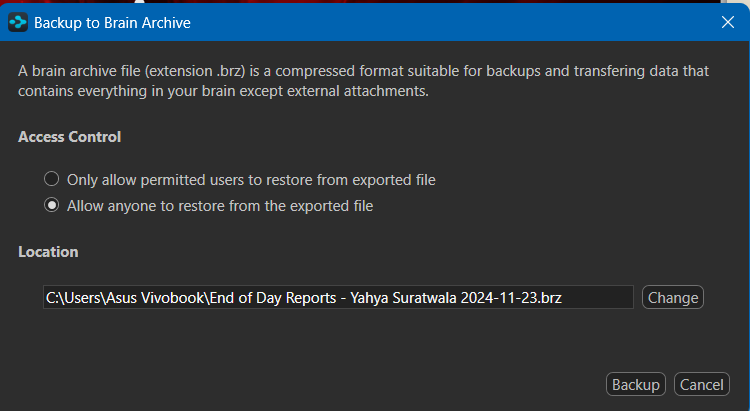
Please note: If you plan to import a .brz file while logged into a different account than the one used to create that brain, you must check the Allow anyone to restore from the exported file option in the Import dialogue window. Make sure to remember the location where you saved the backup file for easy access when importing.
Let me know if you need further clarification or assistance with this process!
Best regards,
John