How to turn off light sync #99122
https://thebrain.zendesk.com/agent/tickets/99122
Hello,
You can turn off Light Sync on a per-Brain basis in TheBrain 15. This is the recommended approach if you’re still using version 14 at work and want to keep compatibility.
Please do the following in TheBrain 15:
Open the Brain you want to use in both versions.
In the top right corner, click the Sync icon (the circular arrows).
Open the sync dropdown menu.
Uncheck “Light Sync attachments” for that Brain.
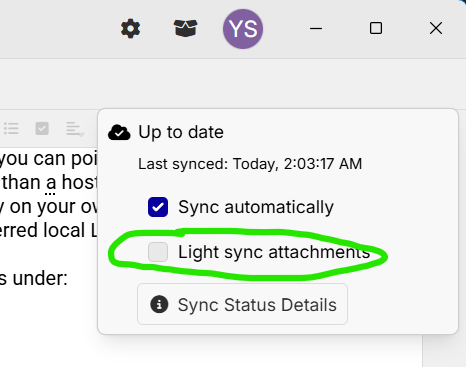
Once Light Sync is disabled, you can close TheBrain 15 and continue opening that Brain in version 14 as usual.
If you plan to switch back and forth between version 14 and 15, it’s best to keep Light Sync turned off for any Brain you need to access in both versions.
Please let me know if you don’t see the option or if anything behaves differently on your system.
Best regards,
John