V14 Dynamic Wallpaper per Thought #95678
https://thebrain.zendesk.com/agent/tickets/95678
Hello again 🙂
Sure, here is how to do it:
To set up a dynamic wallpaper:
- Navigate to a thought type.
- Right click and select Set Dynamic Wallpaper
- Navigate through your machine to locate the desired wallpaper image and click Open.
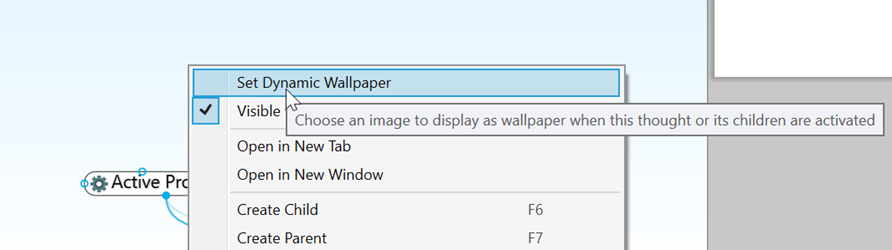
Figure 143. Setting Up Dynamic Wallpaper on a Thought Type
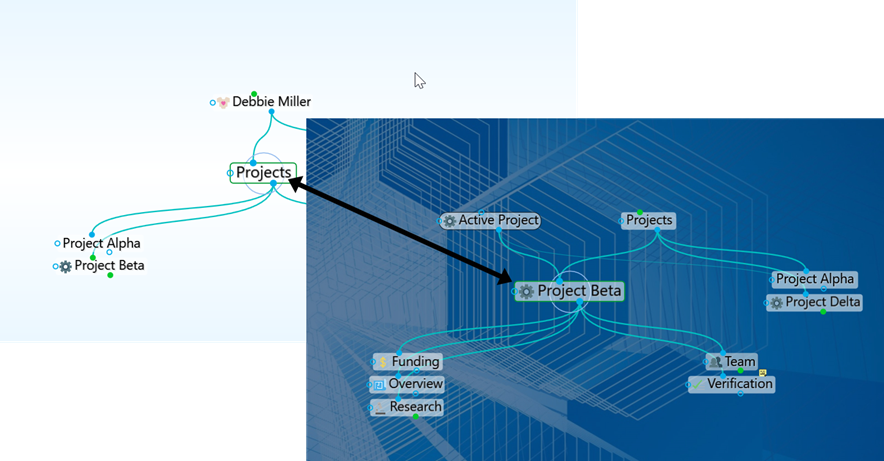
Figure 144. Navigating to a Thought with a Dynamic Wallpaper assigned to its Type
Navigating to any thought that is associated with a Thought Type containing Dynamic Wallpaper will fade the current background and transition to the Thought Type Wallpaper.
Unfortunately, it isnt possible to make TheBrain 14 transparent ... You could write it up as a feature request here so we can track it: https://thebrain.uservoice.com/
Best regards,
John