Restoring old brain to newer version using ver 8 for Clark Karen #97683
https://thebrain.zendesk.com/agent/tickets/97683
Hello Clark!
Thank you for reaching out and for your continued interest in TheBrain! Was a pleasure to have spoken with you over the phone.
Older brains created before TheBrain 8 (like PersonalBrain 7 for example), need to be opened in TheBrain 8 first, so they can be archived and transferred forward. After that, the resulting archive can be imported directly into TheBrain 9 or any newer version.
Here are the download links for TheBrain 8:
Once you’ve installed TheBrain 8:
- Open your older brain in TheBrain 8.
- Go to File > Back Up to Brain Archive.
- Choose where to save the
.brz/brainzip backup file. - Make sure to check Allow anyone to restore from exported file (this ensures it can be opened later).
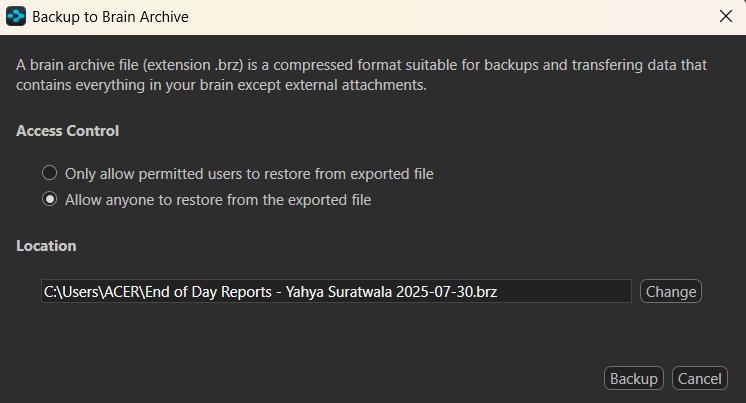
The .brz or Brainzip file is a complete backup of your brain. After the backup is created, open TheBrain 9 (or any later version, in your case, TheBrain 14) and import that file using File > Import. Your brain will then be available in the newer version.
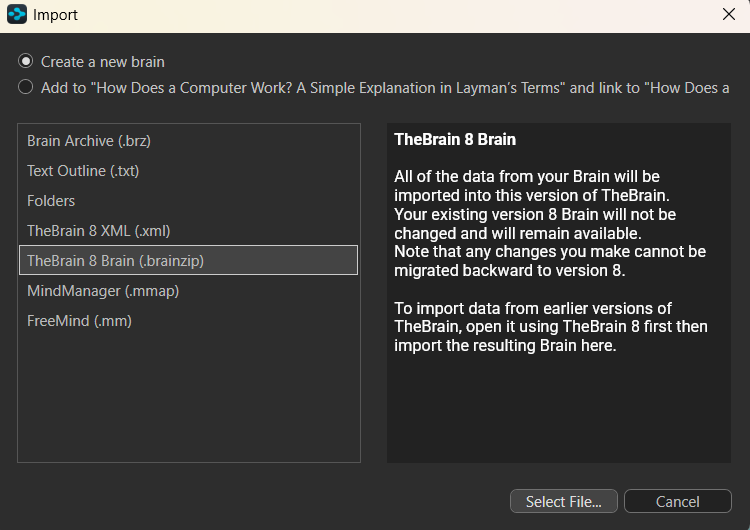
This process is the smoothest way to bring older data forward. If you run into any issues or would like step-by-step guidance while doing this, just let me know and I’ll be glad to assist.
Best regards,
John