Android brain database is missing and unlinked mentions #95378
https://thebrain.zendesk.com/agent/tickets/95378
Hello Dave,
Thank you for your patience as we worked on resolving the issue and for bringing it to our attention. Based on your description, here are two steps you can follow to address them:
- Re-download your Brain from the Cloud: It seems that part of your Brain’s database might be missing. To resolve this, please delete the local version of your Brain from your device and re-download it from the cloud.
To do that simply navigate to your Brains list menu and click on the three bars as shown in this screenshot (click the highlights in red first then green):
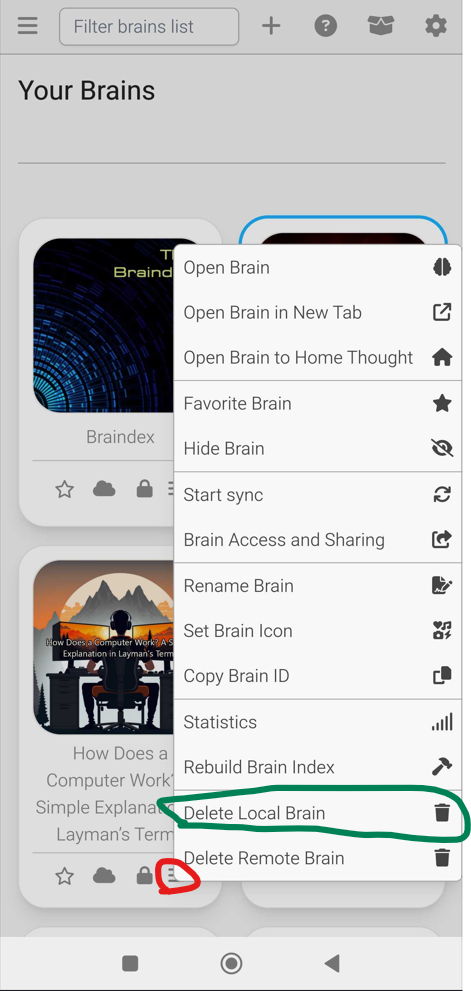
- Ensure your device remains on, unlocked, and does not go to sleep while the download is in progress to prevent interruptions.
- Disable "Show Unlinked Mentions": The second issue is related to highlighting Unlinked Mentions in a note. Until a fix is available, you can resolve this by disabling the "Show Unlinked Mentions in Notes" option.
- To do this, tap the Gear icon in the upper-right corner to access the All Brain Settings menu, and toggle off this feature.
Please try these steps and let us know if the issues persist. We’re here to help ensure everything works smoothly for you!
Best regards,
John