Tag information cut off #97749
https://thebrain.zendesk.com/agent/tickets/97749
Hello Nick,
Thank you for sending this in, along with the screenshot, that makes it much easier to understand the issue.
At present, the tags in the Plex always anchor from the thought icon outward, which means that if there isn’t enough space on the right side, some of them may get cut off until the thought is centered. I can definitely see how that makes it harder to quickly scan important information.
As a workaround, you can increase the available Plex space by either dragging the smart splitter bar between the Plex and the Notes window or collapsing the Notes window entirely. This will give tags more room to display before they get pushed off the edge of the screen.
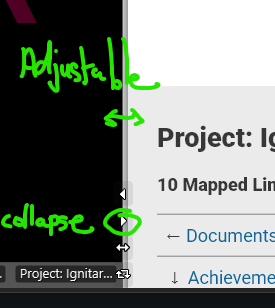
Please give the adjustment a try and let me know if it helps in your workflow.
Best regards,
John