Advanced Climate Web FAQs
This page organizes content via:
- The Quick Start tips and links below
- The FAQs in the Plex at left
Screen Display Basics
TheBrain’s on-line interface is mobile-friendly.
The Toolbar at the Top of Your Screen
- Click on “the Climate Web” at the far top left to return to the Climate Web’s front door thought at any time.
- “Pins” at top left provides a drop-down menu of selected places in the Climate Web you can instantly jump to at any time.
- The Search box(https://app.thebrain.com/brain/2cfec560-6321-4d32-a42f-f04ad33f1092/a61d1c6b-bc34-5e29-b093-5c94dfb6b3ec), in addition to helping search the Climate Web, displays a list of recently accessed thoughts. This can be helpful for retracing your steps if you get lost.
- “Types” and “Tags” are a software feature we use to help organize Climate Web content, but the dropdown menus are not particularly relevant for users.
- Every thought in the Climate Web has its own URL, making it very easy to share content you find throughout the climate web. Just click on the “share button” at the top right of this Notes Field (just below the “Login” message) to copy the thought’s URL. Note that if you share Premium Access content with someone who doesn’t have Premium Access, they won’t be able to access it. Premium Access users can easily identify Premium Access thoughts via the small “padlock” associated with them.
- If you have Premium Access to the Climate Web, click on the “Login” message at top right to enter your user name and password. You must be logged in to your TheBrain account for Premium Access content to be visible.
Retracing Your Steps
One of the most powerful features of the Climate Web is your ability to click on thoughts in the plex at left, or on links embedded in the Notes Field, to move from thought to thought in search of what you’re most interested in. But you can get a bit lost and want to retrace your steps. It’s easy!
- Simply click on the left or right navigation buttons in your browser, or the equivalent Alt-Left Arrow and Alt-Right Arrow keyboard shortcuts (at least that’s the shortcut for the Chrome browser in Windows), to retrace your steps in the Climate Web (backward or forward from where you are right now).
- Click on the “Search” box in the toolbar to access a list of your recently accessed thoughts. Click on a thought in the list to return there.
“Plex” Mode
The Climate Web’s default display mode is “no-plex.” If you were accessing this content in “plex mode,” here’s what it would look like with the “plex” open on the left, and the Notes Field on the right:
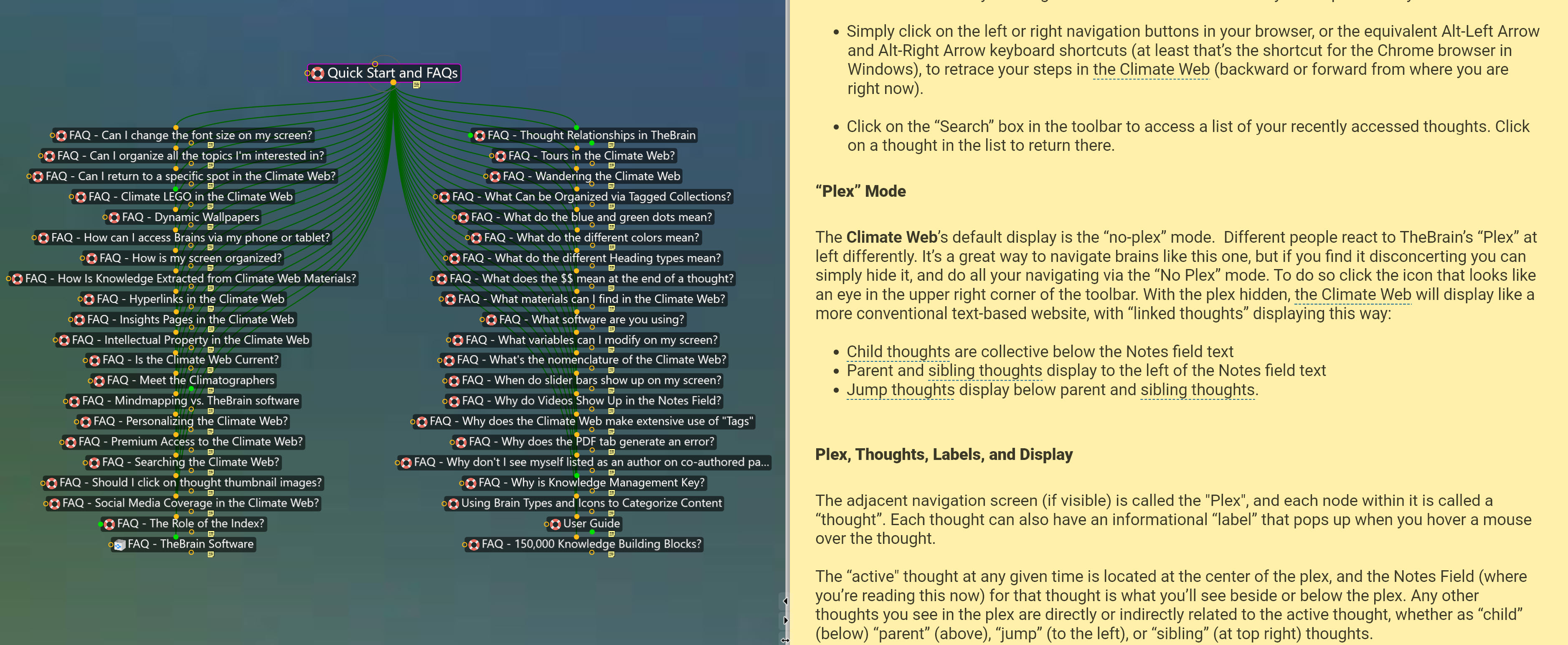
A lot of people find the “plex” disconcerting, which is why we’ve set the default to be “no plex.” But “plex mode” can be a great way to navigate the Climate Web, and it’s easy to switch between modes by clicking on the icon that looks like an eye in the upper right corner of the toolbar. In “no plex” mode the Climate Web displays like a more conventional text-based website, with “linked thoughts” displaying this way:
- Child thoughts are collected below the Notes field text
- Parent and sibling thoughts display to the left of the Notes field text
- Jump thoughts display below parent and sibling thoughts to the left
Plex, Thoughts, Labels, and Display
In “plex” mode each node (or “thought”) can also have an informational “label” that pops up when you hover a mouse over the thought.
The “active" thought at any given time is located at the center of the plex, and the Notes Field (where you’re reading this now) for that thought is what you’ll see beside or below the plex. Any other thoughts you see in the plex are directly or indirectly related to the active thought, whether as “child” (below) “parent” (above), “jump” (to the left), or “sibling” (at top right) thoughts.
Plex Size and Location Options
In addition to hiding the Plex entirely, you can change the size and positioning of the plex by clicking on the "Brain Settings" icon (looks like an abacus) in the upper right corner of the toolbar.
- Click on "Plex Size" to cycle through the 3 available sizes: small, medium and large
- Alternatively, you can select "All Brain Settings", and then switch the "Plex Size" directly from "Medium" to "Large".
- If you would prefer an even larger, full width view of the plex, you can switch the "Plex Location" to "Top".
- When the Plex location is set to "Auto", the display will automatically switch to the full width view (above the notes) on devices with a narrower screen.
- Layout changes will revert to the default settings (medium width and auto location) in a new browsing session.
Presentation Mode
"Presentation Mode" expands the real estate on your display devoted to the Climate Web by temporarily hiding your browser:
- Right-click on the background of the plex at left
- Select "Presentation Mode"
- Select "Escape" on your keyboard to return to TheBrain's default display
Multiple Views Into the Climate Web
By right clicking on any thought in the plex, or in the Notes area if the plex is toggled OFF, you can open the thought into a new browser tab or a whole new window, allowing you to view different parts of the Climate Web simultaneously.
Other Relevant Help and Explanatory Links
- Tables of Contents offer an intuitive and rapid way to access and navigate the Climate Web
- Actionable Knowledge introduces you to how the Climate Web goes from infinite information to actionable knowledge
- Sources - how we integrate books, reports, journal articles, and PPTs into the Climate Web
- News and Opinion - how we integrate news and opinion stories into the Climate Web
- Networks - how we integrate websites and web pages into the Climate Web, including links to thousands of organizations and experts
- Multimedia - how we integrate not only videos and podcasts into the Climate Web, but infographics, cartoons, and more
- The Index - How we’ve built the Climate Web Index to serve as a “brain” in its own right, with more than 3,000 Index Entries all linked together and serving as topical front doors, directing users to the collections of Sources, News and Opinion, etc. for the topic.
- Icons - How we use “thought icons” and text colors to make it easy to know what you’re looking at, whether a Sources topical heading, an individual source, an individual video, etc.
- Search the Climate Web - How you can find what you’re looking for in the Climate Web. Hint: take advantage of the Index!
Leveraging the Climate Web’s Capabilities
- Index as Backbone - Worth repeating that the Index is a very powerful way to leverage the Climate Web’s content. Many Index Entries contain extensive topical insight, in addition to pointing to topical materials.
- Extracted Materials - The Climatographers go through many books, reports, journal articles, and news stories, extracting useful ideas and graphics, and then organizing them in their own right. It’s a huge value add for anyone wanting to explore how a topic has been discussed or visualized across many sources.
- Tagged Collections (Dashboards) - More than 500 Dashboards in the Climate Web pull together the best information for exploring a specific topic, or answering a specific question.
- Recent Additions - find organized in one place the Sources added to the Climate Web over the last 1-2 years, and the News and Opinion pieces added over the last several months. A great way to get an overview of the “climate conversation,” and to access and download materials you’re interested in.
- Personalized Dashboards allow for user-specific “doorways” into the Climate Web, saving time in getting back to the exact parts of the Climate Web a user finds most relevant.