BrainBox Ultra Web Capture
Overview
BrainBox Ultra is the name for TheBrain's lightweight web capture form (its page is titled Add to TheBrain). Paired with the BrainBox browser extension, it lets you capture a page, a link, or a quick note and send it to your BrainBox inbox — or, if you want, straight into a brain as a new thought. It's the fast lane from "I found something" to "it's in TheBrain." "Ultra" is branding for this capture feature, not a separate paid tier.
What You Can Capture
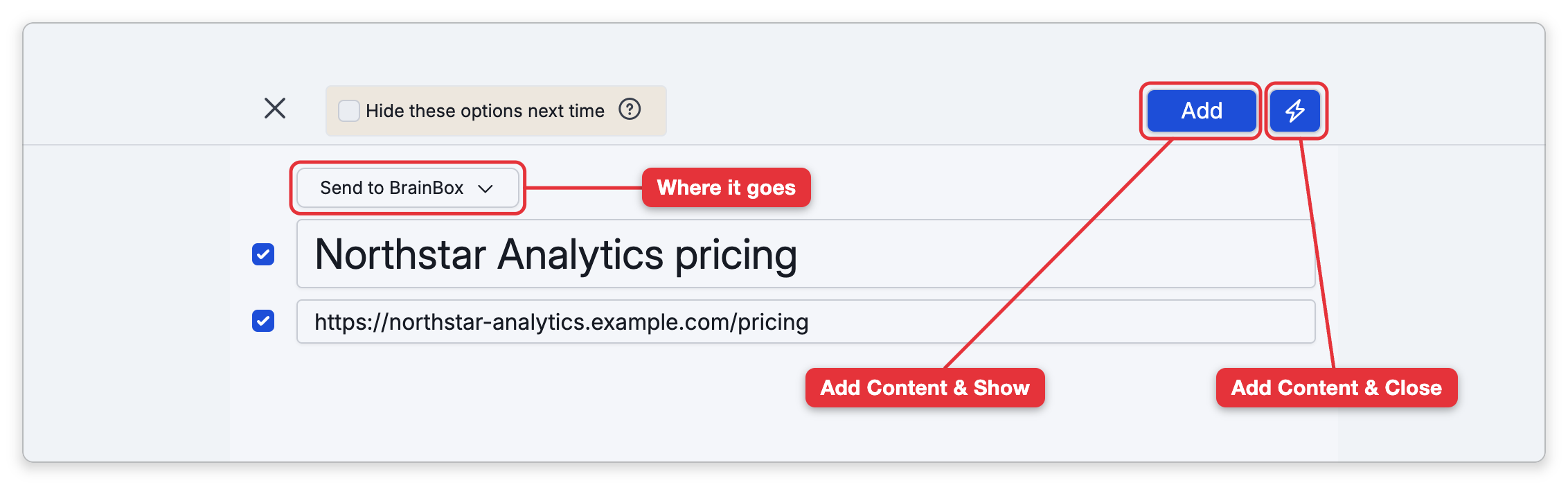
The form lets you fill in a Name, a Label, a URL, and a rich-text Note, then choose where it goes:
- Send to BrainBox — drop it into your BrainBox inbox to triage later (see BrainBox).
- Create Child of a thought — make it a new child of a thought you pick.
- Append to a thought — add it to an existing thought's note.
(In pure Send to BrainBox mode the form keeps it simple — just Name and URL; the Label and Note fields appear once you choose to file into a brain.)
When you choose to file into a brain, you search for and pick a writeable thought in any of your cloud brains as the target. Filing into a brain, and the advanced options such as capturing full web pages and adding notes, need a brain synced to the cloud; without one, capture falls back to sending to your BrainBox. Finish with the main button — its text reads Add, Append, or Create depending on where the item is going, and it opens the result — or use the adjacent lightning-bolt button to add the content and close without opening it.
- The browser extension is the main way in. Content you share to BrainBox from another app on your phone or tablet (Send to BrainBox on iPhone and iPad, BrainBox on Android) does not go through this form: it is added straight to your BrainBox — see BrainBox.