Sorting and Arranging Thoughts
Overview
When a thought has several children (or several thoughts in any gate), TheBrain decides what order to show them in. Sorting lets you choose that order — alphabetically, by type, or by date — and you can also arrange thoughts by hand into a custom order when no automatic rule captures what you want. The automatic sort is a single choice for the whole brain (thoughts sort by Type until you change it); custom orders are remembered per thought. In a shared brain, the automatic sort you choose is your own and doesn't change the order other people see.
Sorting Thoughts
Right-click empty space in the Plex and open Sort Thoughts by. The menu lists the sort orders twice: under Sort by · A to Z, newest first, and again under Reversed · Z to A, oldest first for the opposite direction. The options are:
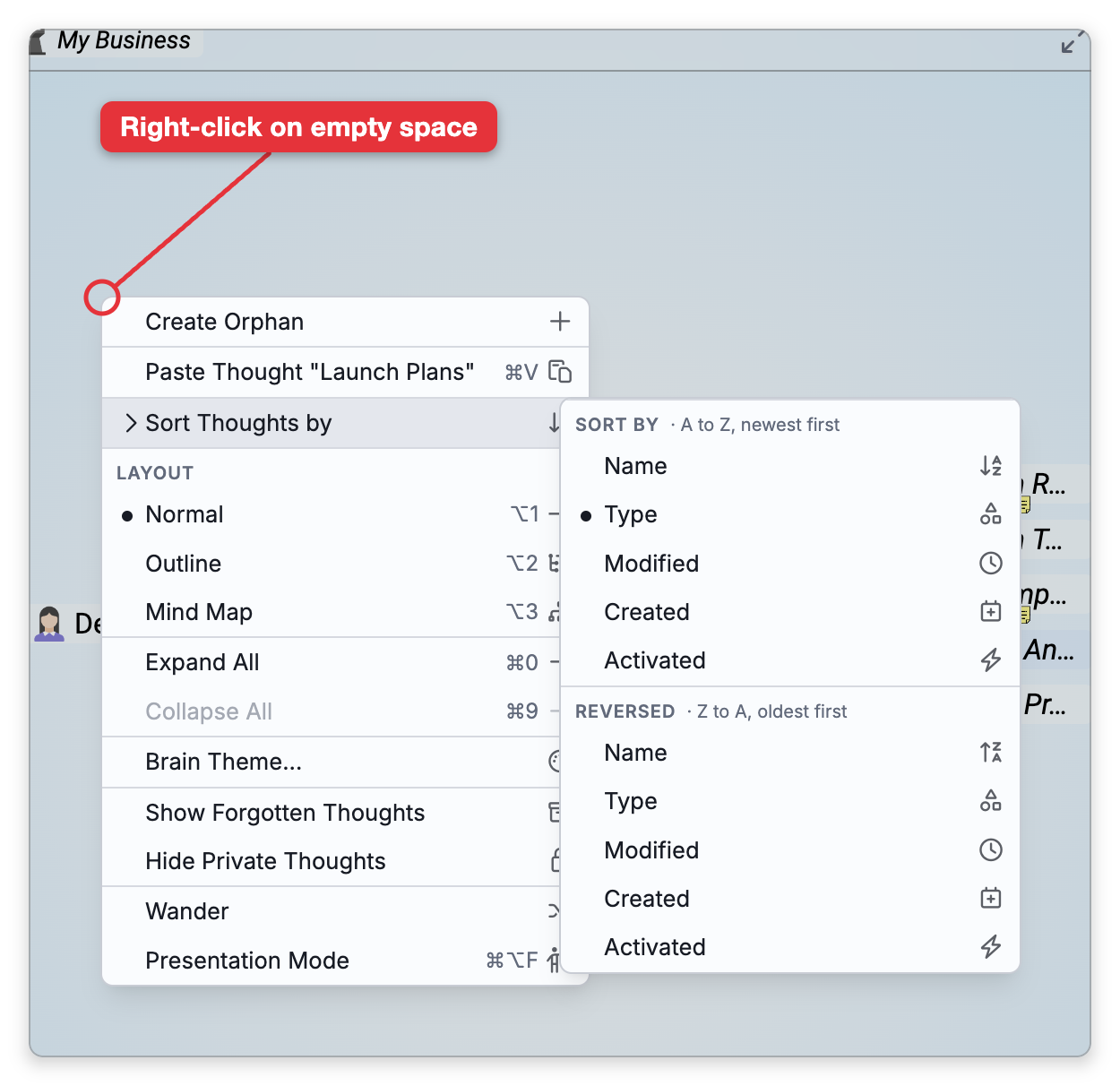
| Sort by | Orders thoughts by |
|---|---|
| Name | Alphabetical order |
| Type | Their thought type |
| Created | When they were created |
| Modified | When they were last changed |
| Activated | When they were last visited |
You can also set the sort with Sort by in Settings > Brain > Personal Settings (see Personal Settings), where the reversed ones are named Name (Descending), Modified (Oldest) and so on. In the desktop app on a Mac, the menu bar's View > Sort Thoughts By menu has the same choices, with the dates named Date Modified, Date Created and Date Activated and the reversed ones Name (Reverse), Date Modified (Reverse) and so on, and it always lists Custom and Clear Custom Order.
Custom Order
As soon as you drag a thought's children into a particular arrangement, that thought keeps your custom order. While the active thought has one, Sort Thoughts by starts with a Custom order group: Custom, which is checked, then a Then Sort by label and Clear Custom Order. The automatic sort you choose further down orders whatever your hand arrangement doesn't cover.
- Custom — Uncheck it to show the thought's children in the automatic sort instead. Your arrangement isn't deleted, and checking Custom again brings it back.
- Clear Custom Order — Removes the custom order and returns to a fully automatic sort. The default shortcut is
Ctrl+Shift+0(⇧⌘0on Mac). When it would affect five or more thoughts, TheBrain asks you to confirm first.
- Sorting affects only how thoughts are displayed, not their links or content.
- Clearing a custom order requires write access to the brain, and changes the order for everyone who uses it.
- To change a thought's actual relationships (move it between parent, child, and jump) or reorder a single sibling, see Moving and Reordering Thoughts.