Personal Settings
Overview
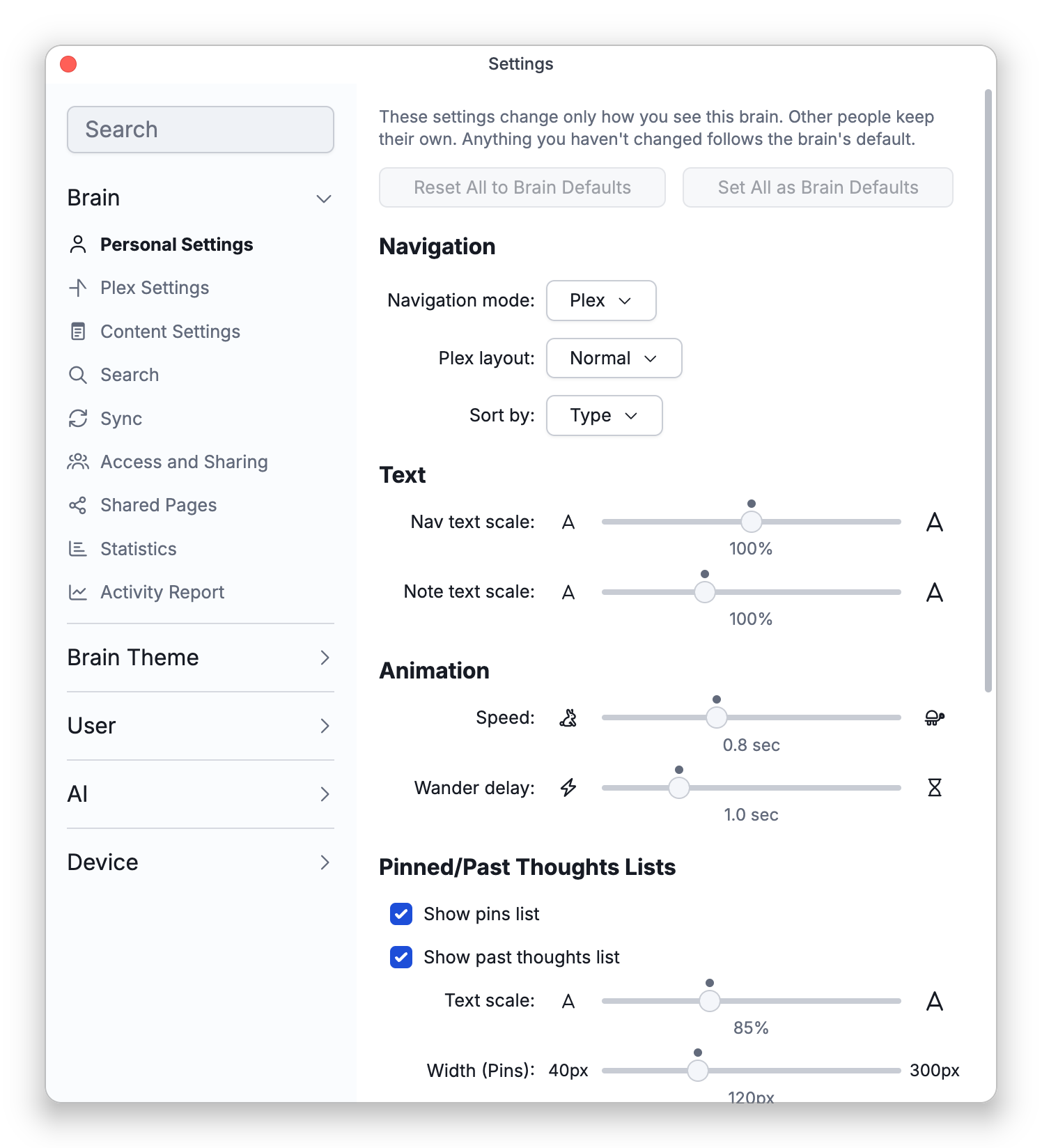
Personal Settings gathers the settings that change how you view a brain: how you navigate it, how thoughts are sorted, how big the text is, how fast the Plex animates, and which sections the content area shows. It is the first page under Settings > Brain.
In a brain that only you use, these settings work as they always have. In a shared brain — one that other people can open, or that is public or unlisted — your choices change only your own view. Other people keep theirs, so sorting a shared brain by date or making its text bigger no longer changes it for everyone else. Anything you haven't changed follows the brain's default, and people who can edit the brain can make their choices the default.
Your personal settings for a brain are saved to your account, so they follow you to your other devices.
How to Open Personal Settings
- Open Settings (the default shortcut is
Ctrl+,,⌘,on Mac) and choose Brain > Personal Settings. - Or, if you have added the Brain Settings menu (a sliders button) to a toolbar in Settings > User > Toolbars, open it and choose Personal Settings.... The toolbars don't have this button by default (see Customizing Toolbars).
What's on the Page
| Section | Settings |
|---|---|
| Navigation | Navigation mode (Plex, Tree, Cards), Plex layout (Normal, Outline, Mind Map), Sort by |
| Text | Nav text scale (the Plex and Tree text, 50–150%), Note text scale (50–200%) |
| Animation | Speed (how quickly the Plex animates), Wander delay (how long Wander mode pauses on each thought) |
| Pinned/Past Thoughts Lists | Show pins list, Show past thoughts list, their Text scale, Width (Pins), Width (Past), and whether to Expand truncated thoughts vertically or horizontally. This section isn't shown on phones. |
| Note Sections | Show mapped links section when in plex view, Show backlinks section, Show unlinked mentions section |
| Attachments | View attachments as list, Compact attachments display |
| Layout on This Device | Reset Layout on This Device (shared brains only) |
The toolbar buttons, menus and gestures that change these settings — the navigation mode and layout buttons, Sort Thoughts by on the Plex's right-click menu, the note text scale control, pinching the Plex, and so on — work the same way. In a shared brain, they change only your view too.
Shared Brains and the Brain Default
In a shared brain, the page starts with a short explanation, and each setting where your choice differs from the brain's default shows a hint underneath, such as Brain default: Name. On the sliders, the dot marks the brain default.
- Reset — Under a setting, returns it to the brain's default.
- Reset All to Brain Defaults — At the top of the page, returns every setting on the page to the brain's default.
- Set default — Under a setting, makes your choice the brain's default. You need write access to the brain to see it; if you can only read the brain, your own choices are still saved for you. TheBrain asks you to confirm first.
- Set All as Brain Defaults — At the top of the page, makes all your choices that differ the brain's defaults at once (write access needed).
A new default reaches everyone who hasn't chosen their own setting, including new members and public visitors. People who have chosen their own keep it.
Layout on This Device
In a shared brain, splitter positions, the tools panel and the timeline strip are remembered separately on each device, because screens differ, and Reset Layout on This Device puts them back to the brain's layout on the device you're using. In a brain only you use, this section isn't shown and the layout is saved with the brain.
What Visitors See
When a brain is public or unlisted and you open Settings from inside it, Settings > Brain > Access and Sharing shows a Visitor View section that summarizes the default view visitors get, such as Plex sorted by Name. Your own view isn't shown to them. To change what they see, use Set default in Personal Settings.
- Other brain settings — such as Plex Settings, Content Settings and Search — still apply to everyone who uses the brain. In a shared brain, a note at the top of those pages says so and links to Personal Settings.
- When you use a brain without being signed in (as a visitor on the web, or in the desktop app without an account), your choices are saved on that device only.
- These settings used to live on the Plex Settings page, the Content Settings page, and a separate Pins and PTL page, which has been removed.