Add to Selection
Actually, I searched for the keyboard command in theBrain v.15 Win 11 for "Add to Selection" and I don't see it under Settings|Command|Selection|
From the context available, I don’t have a confirmed list of TheBrain 15 keyboard commands or their exact locations in the UI, so I cannot reliably say whether there is a built‑in “Add to Selection” shortcut, nor where it would appear in Settings → Command → Selection on Windows 11.
All of these details (exact shortcut name, whether it exists, how it’s bound, where it’s listed) are not exposed in the data I can see, so I’d be guessing if I tried to tell you:
- So if somebody could please tell me:
- “Use this key combo for Add to Selection”, or
- “It’s located under this specific menu path in the Command settings.”
Found it! It's under keyboard commands|Notes and it is also under keyboard commands|Selection
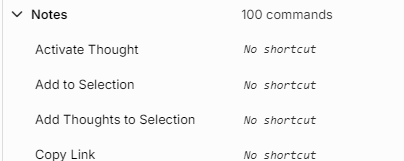
So the workflow is:
• Click each thought you want to add to the selection (False Ai info). You don't have to click each thought, you can just highlight the list of thoughts.
- Hold Ctrl + Shift + S
• The selected thoughts should be added to the Selection List
This is the main keyboard and mouse method for adding multiple thoughts to a selection.
To move forward in a reliable way, a couple of options:
- Double‑check the official documentation / support (not applicable) yet
- Since this isn’t confirmed in my context, the safest path is to:
- Check TheBrain’s official online help or knowledge base for “selection”, “add to selection”, or “multi‑select”.
- If nothing turns up, send a quick question to TheBrain support asking:
- Check TheBrain’s official online help or knowledge base for “selection”, “add to selection”, or “multi‑select”.
In TheBrain 15 for Windows, is there a keyboard command for “Add to Selection” when selecting thoughts? If so, what is it and where is it listed in Settings → Command?
- Share what you’re trying to do functionally
- If you describe your workflow, I can help you reason about it or document it in your brain, even if I can’t confirm the exact built‑in shortcut. For example:
- Are you trying to select multiple non‑adjacent thoughts in the plex?
- Are you trying to extend a selection using the keyboard only?
- Are you trying to apply a command (e.g., tag, move, copy) to multiple thoughts?
If you want, tell me exactly how you currently select multiple thoughts (e.g., with Ctrl+click, Shift+click, etc.), and I can help you design a small “Selection & Multi‑Select” reference thought structure (and notes) in your brain so you have a clear guide once you confirm the actual shortcuts from TheBrain’s docs.