Keyboard Commands, Selection
- I am trying to figure out how to click on a link in the content/notes pane and add it to the selection list.
I used to be able to select an entire column in a table and add it to the selection list with one keyboard command.
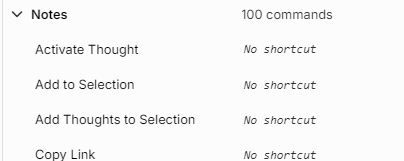
I should be able to hold Shift + click on the links below to add to the selection list. Instead I have to click on each one at a time and then link to parent or child or jump and then switch back to here and do the next one at a time. What's the purpose of a Selection List if it's not accessible?
| Add to Selection | Ctrl+Shift+S |
| Clear Selection | Ctrl+Shift+Q |
| Copy Thoughts | No shortcut |
| Copy as Text Outline | No shortcut |
| Copy as Text Outline with Notes | No shortcut |
| Copy as Markdown List | No shortcut |
| Create Document | No shortcut |
| Delete Thoughts | No shortcut |
| Forget Thoughts | No shortcut |
| Link Selection as Children | No shortcut |
| Link Selection as Parents | No shortcut |
| Link Selection as Jumps | No shortcut |
| Make Private | No shortcut |
| Make Public | No shortcut |
| Merge Thoughts | No shortcut |
| Ctrl+P | |
| Remember Thoughts | No shortcut |
| Selected Related... | No shortcut |
| Toggle Active Thought | No shortcut |
| Unlink Selection | No shortcut |