V.15.0.643
Note Headings
Go to Heading...(Ctrl/Cmd+T, also in the notes right-click menu) opens a list of the note's headings at the cursor; type to filter it, then pressEnterto go to a heading- The Headings Sidebar lists the note's headings beside it, marks the section you are reading as you scroll, and goes to a heading with one click
- In the sidebar, headings with subheadings can be collapsed, and dragging its edge resizes it; its width is kept on each device
- Turn the sidebar on or off from Note View Options, View > Window Layout > "Headings Sidebar" or the "Headings sidebar" notes setting, or right-click in the sidebar
- Both work in rich notes and in the text editor for Markdown files, while reading or editing
New Content Windows
- In the desktop app,
Open in New Content Windowin the right-click menu of a thought, a link or a thought link in a note, or in the Thought menu, opens the thought's notes and attachments in a window of its own Ctrl/Cmd+Shift-click a thought link in a note to open it in a new content window, also while editing- Links in a content window move only that window, also to other brains, and it has its own Back and Forward history
- Content windows stay open when the brain windows close and come back when the app restarts
- The title row shows the brain's icon and name; click it to activate the thought in the brain window. In the floating content window this button is now
Go to brain window - A content window opened from a window pinned to the top is pinned to the top too
Personal view settings for shared brains
- In a brain shared with other people, and in an unlisted or public brain, your navigation mode, plex layout, sorting, text scales, animation, pins and past thoughts lists, the sections shown below notes and attachment display now apply only to you, and pane sizes only to the device you are on
- Change them on the new Brain > "Personal Settings" page in Settings, also opened by
Personal Settings...in the brain settings menu; Animation, Sort by and Text scale moved there from Plex Settings, and the pins and past thoughts lists from their own page
- A setting that differs from the brain's default shows that default, with
Resetto go back to it andSet defaultto make your value the brain's default;Reset All to Brain DefaultsandSet All as Brain Defaultsare at the top of the page
- Visitors to an unlisted or public brain see its default view, not yours
Note View Options
- A
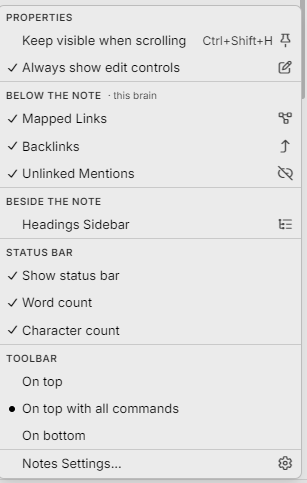
View Optionsbutton at the right end of the notes status bar opens the note's view options; they are also in View > "Note View Options" and, when the status bar is hidden, at the end of the notes toolbar
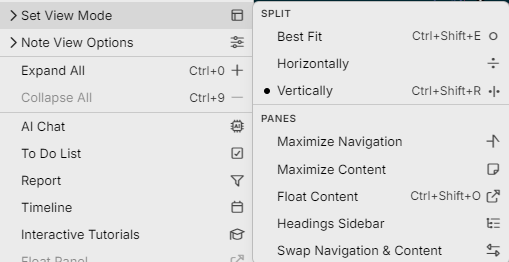
The menu groups properties, backlinks and unlinked mentions, the Headings Sidebar, the status bar with new word and character counts, and the toolbar position
Menus such as Table, Format Paragraph, Sort Thoughts By, Window Layout and Attachments now group their items under small headings with shorter names, and show a dot for one-of-several choices such as plex layout and alignment
Notes: Collapsed headings, list items and callouts stay collapsed the next time you open the note on the same device, without changing the note for anyone else
In the Outline and Mind Map layouts, Expand/Collapse in a thought's right-click menu expands or collapses the thought; Space still does this, now also for the thought under the mouse, and the command can be given its own shortcut in Keyboard settings
FIXES AND IMPROVEMENTS(18)
Notes: Code blocks, tables, dividers, diagrams and math blocks can now go inside a quote or callout; before, they showed as plain text or split the callout in two
Notes: Backspace at the start of a callout's first line now removes a heading or list format before it removes the callout
Notes: Images linked by a path relative to the note file, such as images/photo.png in notes written in other Markdown apps, now show when the image is one of the thought's files, including in exports, previews and
Note Versions
Notes: Dragging an image from the attachment list into the note now shows the image in the note, and an image that is already one of the thought's files is linked rather than copied
Notes: Tables with default styling no longer save a hidden comment line above them in the note's Markdown file
The plex's keyboard focus ring now moves with its thought while the plex pans or scrolls, instead of trailing behind it
Fixed: The Parentless and Orphan reports could list the wrong thoughts after links were moved, thoughts were forgotten or remembered, or changes arrived by sync
Fixed: Switching between tabs showing different brains could fail with an error
Fixed: In notes, Undo skipped some changes, such as Backspace at the start of a note removing a heading or list format, Paste from the right-click menu, and the "[ ]" checklist shortcut
Fixed: In notes, Paste from the right-click menu inserted the text before the selection instead of replacing it
Fixed: In notes, a table next to a code line or list item could be deleted with a single keystroke
- I am still seeing an entire table deleted from a single keystroke.
Fixed: In notes, a callout marker such as "[!note]" written inside a code block was removed, and a code line starting with "|" could gain a backslash
- I am seeing "|" being replaced with a backslash preceding the "|" "/|". Is there a way that we could use Search and Replace to be able to quickly remove the "/" backslash?
Fixed: In notes, collapsed sections opened again after you changed a heading's level or typed in a table
Fixed: In Keyboard settings, removing a default shortcut such as Space, Enter or an arrow key could only be undone by resetting every shortcut
Fixed: In the text editor, closing a menu or pop-up scrolled the text back to the cursor
DESKTOP Fixed: Link to Folder failed without a message when the folder held a subfolder you can't read; opening a folder the app can't read now explains why
DESKTOP Fixed: The content window could take on another brain's theme when you switched to a tab on that brain
DESKTOP Fixed: The Open in separate window button at the content pane's top right could cover the attachment preview's Next button and the end of the notes toolbar