Table issues
- When I create thoughts or link to existing thoughts, while inside a table sometimes, even though the entire text is selected, TB15 will leave off part of the text as part of the link (or not part of the link).
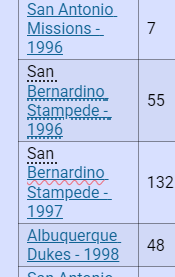
In the table clipping below you see "San" has been ignored in two of these links. This is happening all over in the content/note pane, not just tables.
To automate creating or linking thoughts directly from a Markdown table inside TheBrain v.15, you can take advantage of the app's native Copy and Paste Text Outline feature.
TheBrain's editor doesn't dynamically run script logic to scan your existing database while you type a table, but you can use its text-import engine to achieve exactly what you want. If you copy a list of names and paste them directly into the plex (the visual map area), TheBrain will automatically check your database. If a thought with that exact name already exists, it will simply link to it; if it doesn't exist, it will create it fresh.
To make this seamless, here is a structured outline of your combined "Team - Year" entries.
Step 1: Copy this list of thoughts
Select and copy the exact block below:
Plaintext
Yakima Bears - 1992
Yakima Bears - 1993
Great Falls Dodgers - 1993
Bakersfield Dodgers - 1993
San Antonio Missions - 1994
Vero Beach Dodgers - 1994
Vero Beach Dodgers - 1995
Albuquerque Dukes - 1996
San Antonio Missions - 1996
San Bernardino Stampede - 1996
San Bernardino Stampede - 1997
Albuquerque Dukes - 1998
San Antonio Missions - 1998
Step 2: Paste into the Plex as Children or Parents
- Go to your main player page or the thought where you want these stats to live.
- Click directly onto the empty space in the Plex (the animated graph area, not inside the note text editor).
- Press
Ctrl + V(Windows) orCmd + V(Mac). - TheBrain will pop up a small menu asking how you want to add them. Choose "Add as Children" (or Parents, depending on your structure).
TheBrain will instantly run a check against your existing thoughts. Any matching Team - Year thoughts will cleanly link up without creating duplicates, and any new ones will generate on the fly!
- When creating a link to an existing thought and if theBrain v.14 detected there was a duplicate (in two different locations) i used to be able to select each one to the selection list and then compare the two thoughts. Now, in v.15 we can no longer make the thoughts add to the selection list.
see video: Dropdown list showing duplicate
2026/8/21 v.15.0.612 Win 11
I have asked Cerebro over and over each time it creates a table for me, it adds a blank top row. Now it is adding a blank header row.
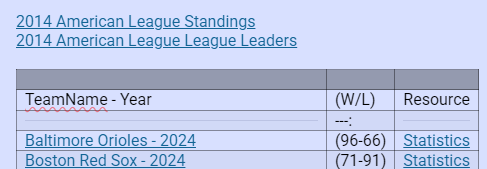
Please correct the "League (template)" for the table creation instructions. Currently I am seeing the header names not in the header row, but rather they are in the first row of the table. And then there is a blank row. The 3rd row is supposed to be the 1st row. There was an issue with tables in past version 15 updates. However, the issue has been resolved and it is no longer necessary for you to put a blank row at the top of the table or no longer necessary to put a blank row as the first row.
Cerebro response:
Updated League (template).
The table instructions now explicitly state:
- The first row is the header row.
- No blank row should be inserted before the headers.
- The separator row follows the header row.
- The first data row follows the separator row.
- The completion checklist verifies this structure.
Me: I responded with tell Cerebro that is is not longer necessary for a separator row.
Cerebro response:
Updated League (template).
The instructions now specify that tables must contain:
- The header row
- The data rows immediately afterward
No blank row or separator row should be inserted.