Format Table
These unresolved bugs are a major issue for users who rely on tables for their data management.
- See links below along with details below and child thoughts in the adjacent plex
- I am having a hard time with Table Themes not showing either the top row text and not showing links because I am using the dark themes (easier on the eyes).
Why the top row/text may look missing
Based on how TheBrain renders markdown tables, the symptoms you describe usually come from:
Extra characters or spaces before the header row
If there’s a space, tab, or hidden character before | Year | Team | …, TheBrain may not detect it as a table header and can render oddly.
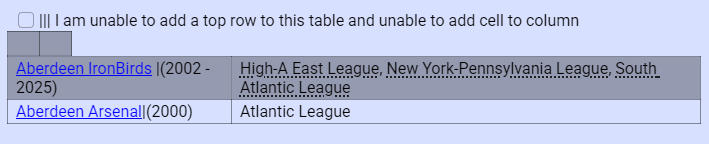
No proper separator row
The line under the header must be something like
- If that line is malformed (extra characters, not enough pipes), the whole table can break. Now, without being able to place pipes, its not readily available.
- How we can fix the broken table? Many times while using v.14 all it needed was an a couple pipes at the end of the table. Other times I needed to place a pipe or two to be able to delete an extra column that wasn't needed. Sometimes I need to continue a row of pipes so that I could delete the row. What's my alternative now with v.15?
- I used to be able to type pipes to create the top row of a table, so that my text list could be formated into a table, this is a game changer not being able to do this and I need to know the workaround if this is no longer working (I assume by choice?).
- The Insert table command is to awkward and cumbersome and takes way too much time, than the pipes method of pre- v.15
- see video: Search and Replace to create table
- see video: Search and Replace to create table 2
- I am also not able to enter return to move the table down.
- v15 is not showing the raw markdown (pipes, brackets) the same way v14 did, and your existing tables are using TheBrain’s internal
:(table="..."):syntax that overlays on top of the markdown rows.
Key details:
- The
:(table="..."):part is TheBrain’s v15 table formatting tag. - v15 renders these as formatted tables; it does not show you the raw markdown pipes/brackets in WYSIWYG mode the way v14 did.
- So you’ll see the grid, but not the underlying markdown characters.
In v15 from the context I see; it isn’t something I can toggle from my side here.
- This has really thrown me for a loop since I am constantly copying data tables which also includes the links to the original source. Now I have to paste the table into the AI and ask the AI to format for me. Then it makes a mistake and I have to spend time to explain the mistake and then copy the AI created table. This is taking way more effort and time than when I was doing it in v.14 Win 11. At first, I thought wow, I like this, AI has volunteered to make my tables look better. but after working with it, I can see I can do it faster in v.14. \
- This is the latest issue using v. 15.0.612
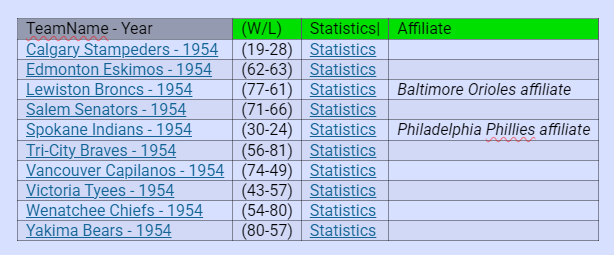
- I once found a work-around for getting the color all the way across, but now I have forgotten the trick. Ahh, I just remember, I moved a table column and the entire header row lite-up with color, then moved it back and it retained the color for the entire row. That's a crazy regression.
- I love what you are doing with v.15, but there are so many regressions that steal the joy. Little things that presents themselves constantly and steal the joy, Remembering how much easier things were and how they could be.
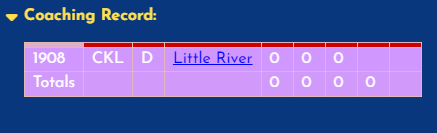
This is a result of using the Table Format Tool and adding a background color to the first row. The first row height becomes a line and you can't ready the text in the header row.
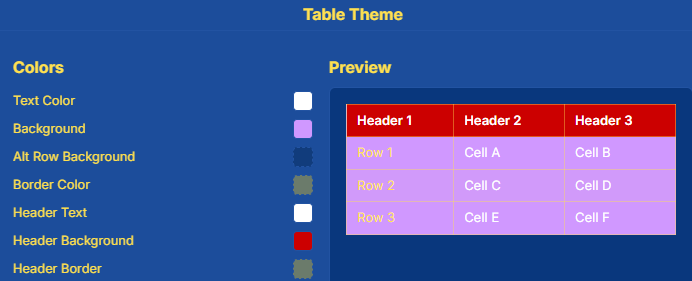
This is the result of placing text first in the top row and then using the Table Format Tool.
Moving Columns in a Table
- I am trying to move columns in a table. I am unable to move the right column from the far right to the far left. Only the two left columns move.
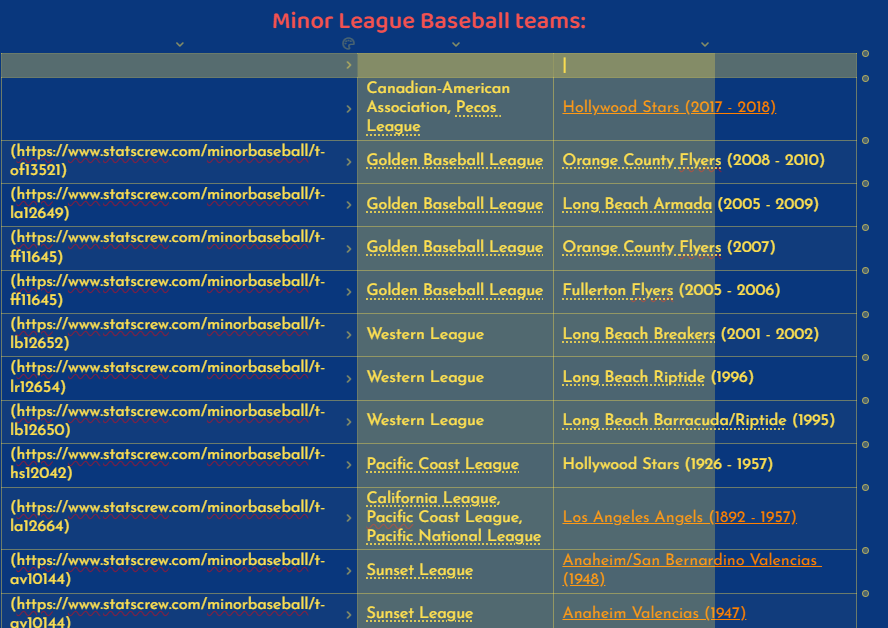
- Moving columns manually in The Brain v15's built-in markdown tables can be incredibly finicky, especially when you are trying to shift a far-right column all the way to the left in this 3-column table, the right column could never make it past the center column. Also there was a very long delay for the action. This was not an issue in v.14.
Tables that are too wide in v.15 versus v.14
- Feature request for Tables. To be able to scroll left and right for tables that are too wide with a scroll bar. In v.14 i used to be able to paste a table that was too wide and it would adjust the size of the text to make it fit. Now the size remains the same and whatever does not fit on the page is just cut off. Which makes it had to even delete some of the columns so that the table fits.
Pasting Baseball Stats into the Contents/Notes Pane has become a pain in v.15
- For this issue, I am talking about pasting the actual Markdown/plain-text tables directly into the Notes/Content area on the right side of the screen, (not building thoughts out of them, yet). When pasting multi-line tabular data from certain clipboards, v15 accidentally treats the very first row (usually your headers like
Player W L W%...) as an ephemeral block title or format command, completely swallowing the text and starting the render on row two.
The Workaround: Add a "Buffer Row"
Because v15 only eats the first line of the incoming block, we can trick the editor by adding a sacrificial blank line or dummy text right above our headers before we copy.
Here are our exact tables, optimized with a simple text buffer line at the top. If you copy each block below and paste it into your Content area, your header rows will remain perfectly intact:
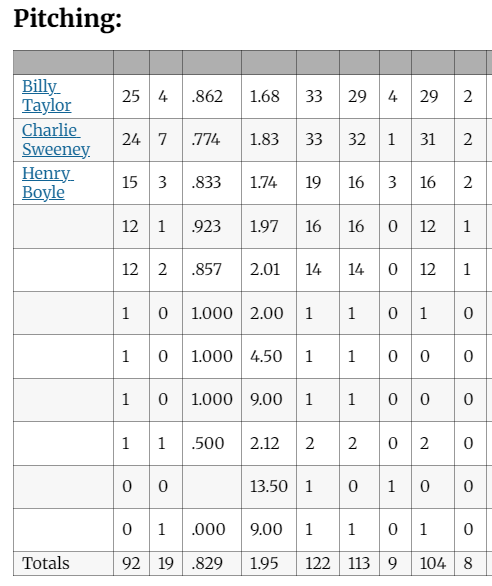
Pitching Table:
[Buffer Line - Delete Me]
Pitching:
Once you hit Ctrl + V inside the Content area, you can just backspace or highlight and remove the [Buffer Line - Delete Me] text. Your table headers will sit perfectly at the top.
PlayerWLW%ERAGSGFCGSHOSVIPHRERHRBBIBBSOHBPBKWPBF
Henry Boyle1624.4002.75423933910366.73462071122100013300241547
Charlie Sweeney1121.3443.93353503220275.0276175120650084001711555
John Kirby58.3853.55141401400129.31186651044040460110534
Hugh Daily38.2733.9411110101091.3927240544031002409
Egyptian Healy17.1253.0088080066.05437220200320014277
Dick Burns00.0009.001101003.0333000200112
Billy Palmer04.0003.4444040034.04633132209006168
\|Player|W|L|W%|ERA|GS|G|GF|CG|SHO|SV|IP|H|R|ER|HR|BB|IBB|SO|HBP|BK|WP|BF|:(table="column-widths:-1,0,0,0,0,0,0,0,0,0,0,0,0,0,0,0,0,0,0,0,0,0,0,0;justification:default"):
\|:---|:---|:---|:---|:---|:---|:---|:---|:---|:---|:---|:---|:---|:---|:---|:---|:---|:---|:---|:---|:---|:---|:---|
\|Henry Boyle|16|24|.400|2.75|42|39|3|39|1|0|366.7|346|207|112|2|100|0|133|0|0|2|415|
\|Charlie Sweeney|11|21|.344|3.93|35|35|0|32|2|0|275.0|276|175|120|6|50|0|84|0|0|17|115|
\|John Kirby|5|8|.385|3.55|14|14|0|14|0|0|129.3|118|66|51|0|44|0|40|4|6|0|110|
\|Hugh Daily|3|8|.273|3.94|11|11|0|10|1|0|91.3|92|72|40|5|44|0|31|0|0|2|40|
\|Egyptian Healy|1|7|.125|3.00|8|8|0|8|0|0|66.0|54|37|22|0|20|0|32|0|0|1|42|
\|Dick Burns|0|0|.000|9.00|1|1|0|1|0|0|3.0|3|3|3|0|0|0|2|0|0|1|1|
\|Billy Palmer|0|4|.000|3.44|4|4|0|4|0|0|34.0|46|33|13|2|2|0|9|0|0|6|16|
\|**Totals**|**36**|**72**|**.333**|**3.37**|**115**|**111**|**4**|**107**|**107**|**107**|**107**|**107**|**107**|**107**|**107**|**107**|**107**|**107**|**107**|**107**|**107**|**107**|
Totals3672.3333.37115111410740965.39355933611526003314629740182- Yeah, this works for now. but I had to use Google - Gemini to help me.
Plaintext
Buffer Line - Delete this row after pasting
Why this works seamlessly for linking now:
- Because this is formatted as a formal Markdown table, v.15 will instantly draw it as a clean visual grid with individual cells. (Except the players lost their resource links). (Which I think I can live with that). Although, I already have in excess of 10,000 (guessing) players with their resource link with these tables within this "Baseball Brain" v.14 Win 11.
- When we want to link a player, we can just double-click their name inside the table cell (like
Henry Boyle), right-click, and select Create Thought or link to his existing thought. - IF the existing thought does not have the resource link we will have to go to the original source, located the player, then copy the resource link to attach as a link.
- I might be able to train Ai to write a template to carry this out?
Gemini AI can automate the heavy lifting of looking up those historical player profiles, finding their permanent resource URLs, and organizing them so we don't have to manually search for every single athlete.
Because we are reconciling 1884 data (the historic St. Louis Maroons Union Association season), AI can build a template that maps out their exact unique player profiles.
Here is a ready-to-use Markdown checklist template. It lists every player from our roster, cross-referenced with their definitive historical resource links. You can copy this whole block directly into the Content area right next to your stats table:
Ignore everything below this line
Plaintext
Buffer Line - Delete this row after pasting
📋 1884 St. Louis Maroons Player Link Verification
Source: myBaseball Brain: St. Louis Maroons - 1884
- Wow! the player names are back after I worked on the actual player thoughts for the top 3, then the rest appeared magically in red. But, we lost the heading text for the top row.
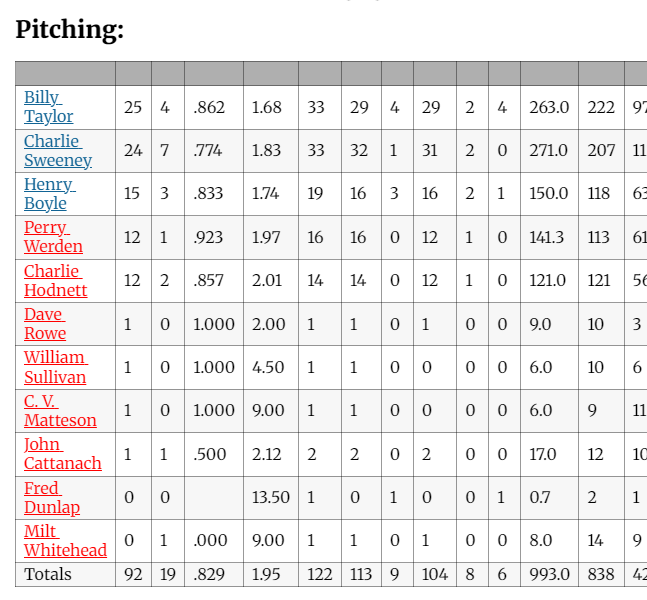
- And now the pitcher names and links (which were in red) disappear again! While the blue links are still visible.