Insert Table command
I have a shortcut command to insert table: Ctrl+T
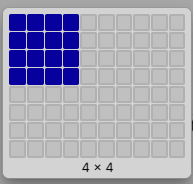
- So now in v.15, we have a key-board command that requires us to take our hand off the keyboard in order to select how many rows and columns. What's the point of having a short-cut key?
- But my favorite (in v.14) is to just type two pipes
|to create a table with a single cell and just add another pipe to create a 2nd cell and another pipe to create 3 cells. I can create a table of any size without taking my hands off the keyboard. This is no longer possible in v.15.
Another v.15 Workaround
As of v. 15.0.612 it is not possible to create a table almost like in v.14, but several more steps and not as quick. But there is more control than using the "insert table" above.
Insert Table key combo
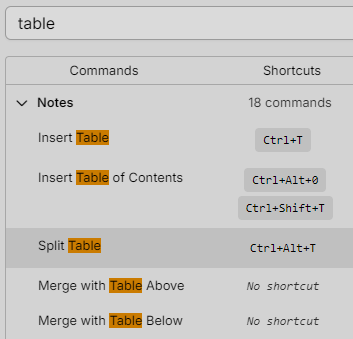
Insert Table of Contents (TOC) - Ctrl+Shift+T
| Command | Key combo |
|---|---|
| Insert Table | Ctrl+T |
| Split Table | Ctrl+Alt+S |
| Merge with Table above | Ctrl+Alt+Shift+T |
| Merge with Table below | Ctrl+Alt+T |
- So now instead of removing row spaces between tables, we have to first create a key-combo command in order to merge two tables. AND we have to create two different commands depending on whether the table is below or above?
- Key board combo
Ctrl+Shift+Tcreates a Table of Contents cell. I was trying to figure out how do I type into this cell. Nothing appears in the Table until you have a heading somewhere.
- Guys, this is just not progress! And have you actually tried to merge two tables in v.15?