Missing Links in copied table from source
- Copy from source and paste into theBrain v.15 Win 11 and most of the links are just missing, plus the text in the top row is missing.
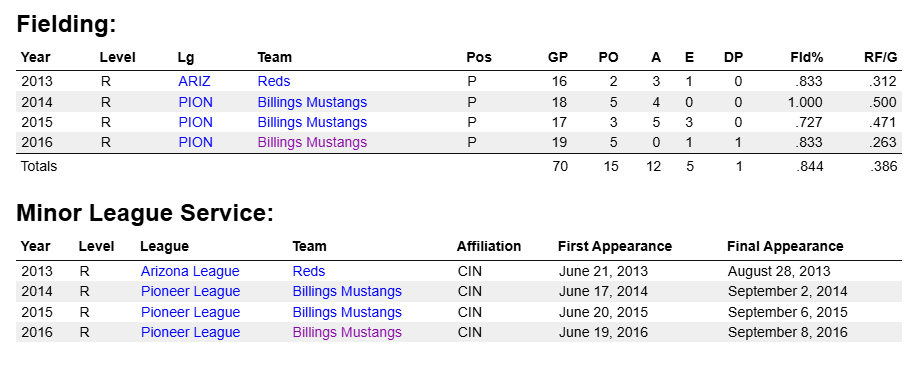
Above is the screen capture of the source and below is what happens when I paste into the Brain.
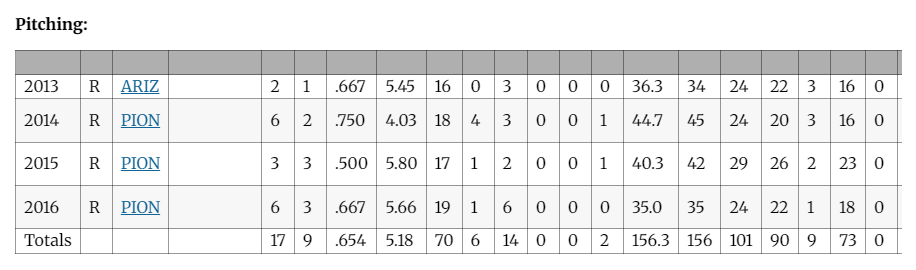
Pitching: (This is the source below) Note: I have observed the data appear in red and sometimes just blank. When you place the cursor over the ghost cells, the cursor turns to a pointer, so there is ghosts among us.
| 2013 | R | ARIZ | Reds | 2 | 1 | .667 | 5.45 | 16 | 0 | 3 | 0 | 0 | 0 | 36.3 | 34 | 24 | 22 | 3 | 16 | 0 | 25 | 5 | 0 | 7 | 161 |
| 2014 | R | PION | Billings Mustangs | 6 | 2 | .750 | 4.03 | 18 | 4 | 3 | 0 | 0 | 1 | 44.7 | 45 | 24 | 20 | 3 | 16 | 0 | 32 | 3 | 0 | 4 | 195 |
| 2015 | R | PION | Billings Mustangs | 3 | 3 | .500 | 5.80 | 17 | 1 | 2 | 0 | 0 | 1 | 40.3 | 42 | 29 | 26 | 2 | 23 | 0 | 41 | 1 | 1 | 8 | 179 |
| 2016 | R | PION | Billings Mustangs | 6 | 3 | .667 | 5.66 | 19 | 1 | 6 | 0 | 0 | 0 | 35.0 | 35 | 24 | 22 | 1 | 18 | 0 | 24 | 2 | 1 | 10 | 155 |
| Totals | 17 | 9 | .654 | 5.18 | 70 | 6 | 14 | 0 | 0 | 2 | 156.3 | 156 | 101 | 90 | 9 | 73 | 0 | 122 | 11 | 2 | 29 | 690 |
I used to be able, in v.14, be able to highlight (Select) a column and then hit the END key while holding SHIFT key and it would select every column to the right and then I could hit delete. Now, in v.15 Win 11, I have to select a column and then scroll right for each column one at a time and then hit delete. Depending on how many characters are in a cell in a column, that means you have to keep hitting the scroll right for each character.