Content Pane (notes)
Table of Contents
Pasting Tables into Content/Notes Pane issues
- I am not seeing the top row of the table and the text is not visible.
- I am running into a formatting/height issue in TheBrain’s notes pane, (not a data problem).
- Table paste behavior: lost links + invisible top row
- Previously (earlier TheBrain version v.14 on Win 11):
- Copy from a web page → paste into content/notes
- Result: full table, hyperlinks preserved, header row visible.
- Now (your current TheBrain 15 on Win 11):
- Same action → table appears but:
- Links in the cells are gone (plain text only), and/or
- Top row’s text is effectively invisible (e.g., white on grey, or zero height).
- The zero height issue happens when I try to use the table design feature by changing the top row background color
- Same action → table appears but:
- Text is not there.
- The text is there but in a color that blends with the background (the row is visible but the text isn’t).
- When I change the color of the first row background the text is visible, however the row collapses when the row is no longer the focus point of the cursor.
- I am not able to remove the Markdown bracket
[in front of the text that has a link, instead when I try to delete the bracket as in v.14, then I could create a new thought from the text and copy the link to the new thought. Now it just deletes the first character of the word and there is now no link.
For example:
Location: Goodyear, Arizona
Ballpark: Goodyear Ballpark
Workaround:
- Right-click on link and link menu appears, select "Open Link" which opens in an external browser.
- Right-click on link again and menu appears, select "Remove Link"
- Highlight line of text and create thought
- Copy the link from the open external browser
- Paste the link to the newly create thought.
- Now, I tried this workaround and after opening link, there is still no other option other than to "Open" or "Copy link". There is no option to "Remove" link.
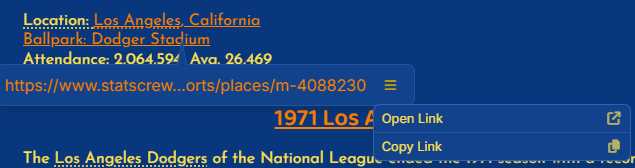
- i used to be able to select a thought so that I could link it. It would be great if this pop-up menu had the option to make thought selective. (I want the location: Los Angeles, CA to be the parent of Ballpark: Dodger Stadium).
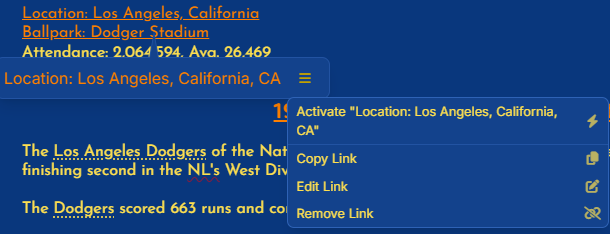
Link hamburger menu is missing "Edit" and "Remove" link options
Response email from Yahya (John the Baptist) to the above issues
6/3/2026, 11:08:16 AM
To investigate the case where the link menu is missing the Edit and Remove Link options, could you please send us the
Notes.mdfile for the specific thought or note where this happens? (Navigate to the thought > hit ctrl + shift + F on the keyboard to open the thought folder).Please also let us know exactly which link in that note you are right clicking, so we can try to reproduce the same menu behavior on our side.
We also noticed another issue in the video where right clicking a link inside a bullet list and choosing Edit Link appears to select text across multiple lines instead of opening the Edit Link popup. We are documenting that separately for review.
Ok, I am sending a new thought that is fresh, which has a lot of the issues which I would like to address. Take a look this screen capture:
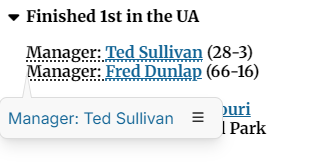
The links below are the source links:
Prior to v.15, I would delete the MD bracket `[` and then copy the source link and then create a thought from the naked text remaining after the source link is striped off. And then paste the source link to the new thought I just created.
Give it a try on these samples below:
Team Record: 94-19
Manager: Ted Sullivan (28-3)
Manager: Fred Dunlap (66-16)
Location: St. Louis, Missouri
Ballpark: Union Base Ball Park
The cursor is now over "Ted Sullivan" and we see the source link:
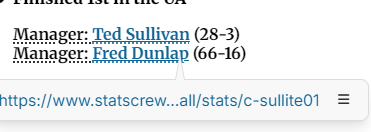
We click on the hamburger menu: And we see only choice is either Open or Copy Link.
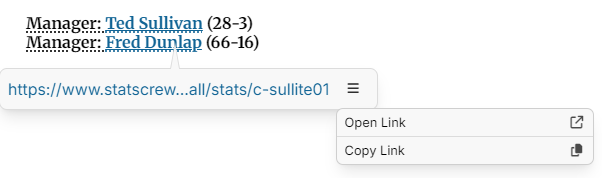
There is no option to remove link?
In v.14 I was able to delete the Markdown bracket which was in front of "Ted Sullivan" resource link. Now in v.15 that is no longer available because there is no view MD as in v.14.
So now what is our workaround?
Only choice we have is delete everything and retype it with no links or We can just create a new link
"Manager: Ted Sullivan"
even though there is a link already for "Ted Sullivan". v.14 would not allow it, but v.15 let's us create a link over a link. That's seems to be the quickest way now.
In myBaseball Brain, there are two different thoughts, one is the "Manager: Ted Sullivan". and one thought is for the player (Ted Sullivan). Since v.15 we can't just strip away the leading bracket "[" and our goal is to create a a thought or a link to an existing thought for the Manager: Ted Sullivan.
(Note: The source (in this instance the source is StatsCrew.com), has to be cleaned-up because StatsCrew is wrong, Ted Sullivan is being represented wrong). So, what I have to do is remove the resource link from "Ted Sullivan", which is not his personal player info, rather in error from the source, it is his managing info. So to correct this, I unlink the resource from "Ted Sullivan" and I create a new thought "Manager: Ted Sullivan". And then I paste the resource link to the new thought I just created ("Manager: Ted Sullivan"). I then link "Ted Sullivan" (the player) to "Manager: Ted Sullivan" as a jump link.
- Send the
Notes.mdfile for the specific thought
Tab/Shift+Tab behavior:
- There is a change in the UI/behavior in TheBrain’s notes editor, which I am not comfortable about. Prior to theBrain, v.15 Win 11, I used to be able to indent a sentence or paragraph even with a bullet or numbered order list, or even a check list. Now the curser stays behind the bullet ...
- In many editors,
Tabindents a list item (promotes it to a sub‑item) andShift+Taboutdents it.
- In many editors,
- When the cursor “stays behind the bullet,” TheBrain may now be treating indentation as list‑level only, not as arbitrary left-margin indent per line.
- I am still able to simulate a visual indent by inserting spaces at the start of the text after the bullet, but it won’t be a semantic paragraph indent; it’s just characters.
I struck-through (or checked this off my list for now). Because I can no longer replicate what I was experiencing.
- Is is possible to create a template for navigation to previous season (thought) and Next Season (thought) which I have linked in the plex as jumps in the Plex, however I would like to see it also on the contents page.
<< Previous Season | Fullerton Flyers Franchise History | Next Season >>
- Copy from source and paste into theBrain v.15 Win 11 and most of the links are just missing, plus the text in the top row is missing.

Above is the screen capture of the source and below is what happens when I paste into the Brain.

Pitching: (This is the source below) Note: I have observed the data appear in red and sometimes just blank. When you place the cursor over the ghost cells, the cursor turns to a pointer, so there is ghosts among us.
| 2013 | R | ARIZ | Reds | 2 | 1 | .667 | 5.45 | 16 | 0 | 3 | 0 | 0 | 0 | 36.3 | 34 | 24 | 22 | 3 | 16 | 0 | 25 | 5 | 0 | 7 | 161 |
| 2014 | R | PION | Billings Mustangs | 6 | 2 | .750 | 4.03 | 18 | 4 | 3 | 0 | 0 | 1 | 44.7 | 45 | 24 | 20 | 3 | 16 | 0 | 32 | 3 | 0 | 4 | 195 |
| 2015 | R | PION | Billings Mustangs | 3 | 3 | .500 | 5.80 | 17 | 1 | 2 | 0 | 0 | 1 | 40.3 | 42 | 29 | 26 | 2 | 23 | 0 | 41 | 1 | 1 | 8 | 179 |
| 2016 | R | PION | Billings Mustangs | 6 | 3 | .667 | 5.66 | 19 | 1 | 6 | 0 | 0 | 0 | 35.0 | 35 | 24 | 22 | 1 | 18 | 0 | 24 | 2 | 1 | 10 | 155 |
| Totals | 17 | 9 | .654 | 5.18 | 70 | 6 | 14 | 0 | 0 | 2 | 156.3 | 156 | 101 | 90 | 9 | 73 | 0 | 122 | 11 | 2 | 29 | 690 |
- I used to be able, in v.14, be able to highlight (Select) a column and then hit the END key while holding SHIFT key and it would select every column to the right and then I could hit delete. Now, in v.15 Win 11, I have to select a column and then scroll right for each column one at a time and then hit delete. Depending on how many characters are in a cell in a column, that means you have to keep hitting the scroll right for each character.
see video Deleting end columns
- If there were too many columns in a table, it used to in v.14, resize the text to make it fit. (That was a pain for sure, because the text would be too hard to read sometimes). Now, in v.15, the text size remains constant, which is nice, however if the table is too wide, it just cuts off the view of the extra columns. Even trying to edit the table to delete the extra columns is a difficult challenge.
Fielding:
| 2013 | R | ARIZ | Reds | P | 16 | 2 | 3 | 1 | 0 | .833 | .312 |
| 2014 | R | PION | Billings Mustangs | P | 18 | 5 | 4 | 0 | 0 | 1.000 | .500 |
| 2015 | R | PION | Billings Mustangs | P | 17 | 3 | 5 | 3 | 0 | .727 | .471 |
| 2016 | R | PION | Billings Mustangs | P | 19 | 5 | 0 | 1 | 1 | .833 | .263 |
| Totals | 70 | 15 | 12 | 5 | 1 | .844 | .386 |
Minor League Service:
| Year | League | Team | ||||
|---|---|---|---|---|---|---|
| 2013 | R | Arizona League | Reds | CIN | June 21, 2013 | August 28, 2013 |
| 2014 | R | Pioneer League | Billings Mustangs | CIN | June 17, 2014 | September 2, 2014 |
| 2015 | R | Pioneer League | Billings Mustangs | CIN | June 20, 2015 | September 6, 2015 |
| 2016 | R | Pioneer League | Billings Mustangs | CIN | June 19, 2016 | September 8, 2016 |
I typed in the text in this table top row, while online with John the Baptist (Yahya) request (#100707) while in a zoom meeting.
Twilight Zone: I just took a screen capture of what I see right now in the above Tables. Red letters, however, for several days where the red letters are now, was blank, nothing visible. The only thing that changed was I reduced the size of the headings from H3 to H4.
- BTW, where did the heading size go? Which used to be in front of the heading ### we could just delete a # or add ## to decrease or increase the heading size.

and a few hours later I check and the red letters text do not appear again

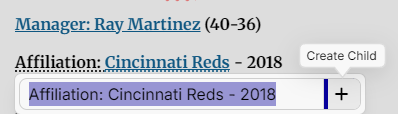
- I used to be able to hold the Ctrl Key to add as a parent thought or hold the Shift key to add as a jump. Now the only only option is to Create Child.
- I used to be able to hold the Ctrl + click on a link and it would be added to the Selection List. Is this happening because I had a custom keyboard command and now I need to recreate for this command for version v.15?
- I used to be able to (in v.14), click on a link holding the Ctrl key to activate the link into the Selection List.
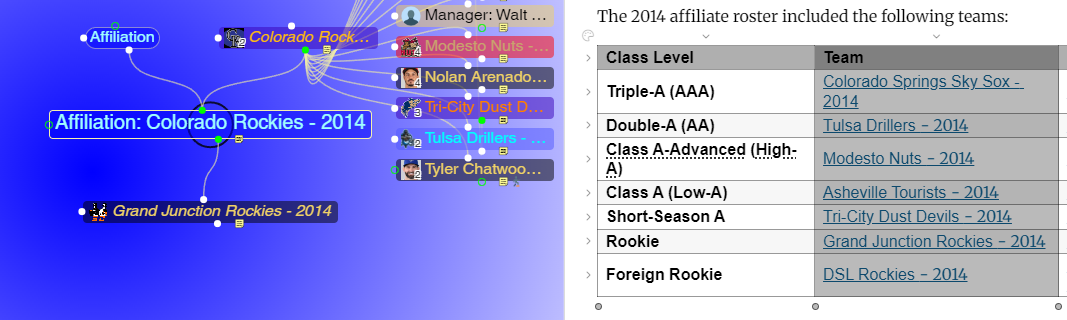
This is a screen capture of the thought Affiliation: Colorado Rockies - 2014 and the content page table with the 2nd column Team which I selected and it is now grey. I would like to be able to have those thoughts added to the selection list, as a group would be most ideal. Then I can have the selection list add links as children of the thought Affiliation: Colorado Rockies - 2014 .
- The video shows what happens when I try to create a link from text in the content/note to an existing thought. TheBrain v.15 recognizes that there is already an existing thought and then I try to link to that thought. Watch what happens. It jumps to the thought above it and also links it to the same, which is a huge error.
Also you can see how the blue links below have also turned red as I illustrated in the above comments. I point this out at the beginning of this video.
see this video Creating links strange behavior
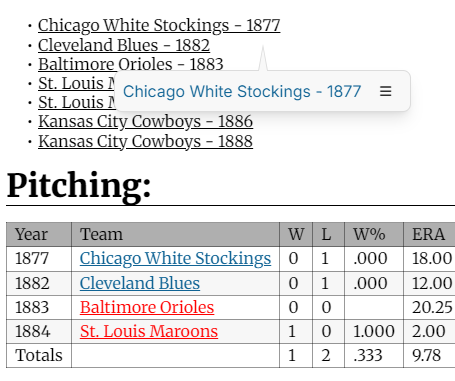
- And why are the links we just made without color?
That behavior shift in TheBrain v15 Beta can definitely be jarring when you are used to the strict boundaries of v14. What you are experiencing comes down to a fundamental change in how the notes editor engine handles inline Markdown and selection ranges during the Thought creation shortcut.
- In v14, the editor treated an active Markdown link (Fred Dunlap) as a protected, atomic block of text. If your cursor selection overlapped both plain text ("Manager: ") and a portion of that protected link block, the v14 validator threw that pop-up dialog error because it couldn't split the underlying Markdown syntax to inject a native Brain Thought link inside it.
In v15, the editor engine has been rewritten to be much more forgiving and "fluid"—but in my specific workflow, that fluid behavior is actually creating a bit of a data mess.

- I just created a link to an existing thought "Manager: Fred Dunlap" and after linking this thought to the parent team name - YEAR (St. Louis Maroons - 1885), the link changed to providing the color sytle.?
We are assuming: Why v15 allows this (and what it's doing under the hood)
When you highlight Manager: Fred Dunlap (or even just parts of it) and use the "Create Thought" shortcut in v15, the software aggressively strips or ignores the underlying Markdown link brackets to fulfill the command.
Instead of stopping you, v15 says, "Got it, you want a thought named 'Manager: Fred Dunlap'." It then does one of two things depending on exactly where your cursor is:
- It creates the new Thought or links to the existing one, but it overwrites and obliterates the original external source URL that was attached to "Fred Dunlap".
It nests a Brain Thought link directly over or adjacent to the raw text, destroying the external web link reference. That is the worst-case scenario for data integrity. Because v15 is aggressively converting your text selection into an internal Brain Thought link, it is treating the underlying (https://...) Markdown syntax as collateral damage and wiping it completely out of existence.
Because v15 doesn't block the action with a dialog box anymore, it's easy to accidentally wipe out your external source URLs without realizing it until you click off the Thought. So we have to undo (thankfully) but now we are adding steps to the procedure. We now have to make sure that we copy the underlying Markdown syntax (resource link) and we need to bypass its aggressive auto-conversion. So, we copy the resource link then edit and then create the new thought or find a match for an existing thought.
Since the raw Markdown toggle icon from the v14 toolbar was removed to make way for this unified engine, we have to look at how v15 allows us to interact with the underlying data block.
- With TheBrain v15's new Hybrid WYSIWYG editor, those raw Markdown brackets (text) are fully rendered out of sight by default. Because it acts like a rich text display, you see the clean, stylized text link "Fred Dunlap" instead of the underlying code, and that's exactly why breaking the brackets isn't an option anymore—there are no brackets to delete on the screen.
- Instead of deleting a bracket to expose the link, we can use the right-click behavior of the new editor to cleanly split the link away from the text before creating the thought.
Work-around that I am using
- Right-click directly on the rendered link text
Fred Dunlapand select Copy Link (this copies the hidden external URL to your clipboard). - Look for Edit Link or Unlink in the context pop-up.
- Choosing Edit Link will show you a small popover box containing the raw URL. You can copy the URL straight from there.
- Choosing Unlink will instantly strip the hidden Markdown syntax and leave behind pure plain text:
Manager: Fred Dunlap. - Now you can safely highlight the plain text and create your new internal thought without the editor eating an invisible URL.
- Set up the jump link to the player thought directly in the Plex. Before In v.14 I could Shift+Click the newly created link in the Content/note and it would be added to the Selection window. Now, I have to find the existing thought in the Plex and then Go back to your note, right-click the text, select Unlink to clear the old link, and paste the copied URL right below it for clean documentation.