Hping3
hping3 is a network tool able to send custom ICMP/UDP/TCP packets and to display target replies like ping does with ICMP replies. It handles fragmentation and arbitrary packet body and size, and can be used to transfer files under supported protocols.
You can also use hping3 to test firewall rules, perform (spoofed) port scanning, test network performance using different protocols, do path MTU discovery, perform traceroute-like actions under different protocols, fingerprint remote operating systems, audit TCP/IP stacks, etc. hping3 is scriptable using the Tcl language.
┌──(scott㉿notebook)-[~]└─$ hping3 -\-helpusage: hping3 host [options] \-h -\-help show this help \-v -\-version show version \-c -\-count packet count \-i -\-interval wait (uX for X microseconds, for example \-i u1000) -\-fast alias for \-i u10000 (10 packets for second) -\-faster alias for \-i u1000 (100 packets for second) -\-flood sent packets as fast as possible. Don't show replies. \-n -\-numeric numeric output \-q -\-quiet quiet \-I -\-interface interface name (otherwise default routing interface) \-V -\-verbose verbose mode \-D -\-debug debugging info \-z -\-bind bind ctrl+z to ttl (default to dst port) \-Z -\-unbind unbind ctrl+z -\-beep beep for every matching packet receivedMode default mode TCP \-0 -\-rawip RAW IP mode \-1 -\-icmp ICMP mode \-2 -\-udp UDP mode \-8 -\-scan SCAN mode. Example: hping -\-scan 1-30,70-90 \-S www.target.host \-9 -\-listen listen modeIP \-a -\-spoof spoof source address -\-rand-dest random destionation address mode. see the man. -\-rand-source random source address mode. see the man. \-t -\-ttl ttl (default 64) \-N -\-id id (default random) \-W -\-winid use win* id byte ordering \-r -\-rel relativize id field (to estimate host traffic) \-f -\-frag split packets in more frag. (may pass weak acl) \-x -\-morefrag set more fragments flag \-y -\-dontfrag set don't fragment flag \-g -\-fragoff set the fragment offset \-m -\-mtu set virtual mtu, implies -\-frag if packet size > mtu \-o -\-tos type of service (default 0x00), try -\-tos help \-G -\-rroute includes RECORD_ROUTE option and display the route buffer -\-lsrr loose source routing and record route -\-ssrr strict source routing and record route \-H -\-ipproto set the IP protocol field, only in RAW IP modeICMP \-C -\-icmptype icmp type (default echo request) \-K -\-icmpcode icmp code (default 0) -\-force-icmp send all icmp types (default send only supported types) -\-icmp-gw set gateway address for ICMP redirect (default 0.0.0.0) -\-icmp-ts Alias for -\-icmp -\-icmptype 13 (ICMP timestamp) -\-icmp-addr Alias for -\-icmp -\-icmptype 17 (ICMP address subnet mask) -\-icmp-help display help for others icmp optionsUDP/TCP \-s -\-baseport base source port (default random) \-p -\-destport [+][+]<port> destination port(default 0) ctrl+z inc/dec \-k -\-keep keep still source port \-w -\-win winsize (default 64) \-O -\-tcpoff set fake tcp data offset (instead of tcphdrlen / 4) \-Q -\-seqnum shows only tcp sequence number \-b -\-badcksum (try to) send packets with a bad IP checksum many systems will fix the IP checksum sending the packet so you'll get bad UDP/TCP checksum instead. \-M -\-setseq set TCP sequence number \-L -\-setack set TCP ack \-F -\-fin set FIN flag \-S -\-syn set SYN flag \-R -\-rst set RST flag \-P -\-push set PUSH flag \-A -\-ack set ACK flag \-U -\-urg set URG flag \-X -\-xmas set X unused flag (0x40) \-Y -\-ymas set Y unused flag (0x80) -\-tcpexitcode use last tcp\->th_flags as exit code -\-tcp-mss enable the TCP MSS option with the given value -\-tcp-timestamp enable the TCP timestamp option to guess the HZ/uptimeCommon \-d -\-data data size (default is 0) \-E -\-file data from file \-e -\-sign add 'signature' \-j -\-dump dump packets in hex \-J -\-print dump printable characters \-B -\-safe enable 'safe' protocol \-u -\-end tell you when -\-file reached EOF and prevent rewind \-T -\-traceroute traceroute mode (implies -\-bind and -\-ttl 1) -\-tr-stop Exit when receive the first not ICMP in traceroute mode -\-tr-keep-ttl Keep the source TTL fixed, useful to monitor just one hop -\-tr-no-rtt Don't calculate/show RTT information in traceroute modeARS packet description (new, unstable) -\-apd-send Send the packet described with APD (see docs/APD.txt)Hping3 has a lot of modes and modules, I’ll leave it to you to use your creativity to scan a network using above help section of hping3.
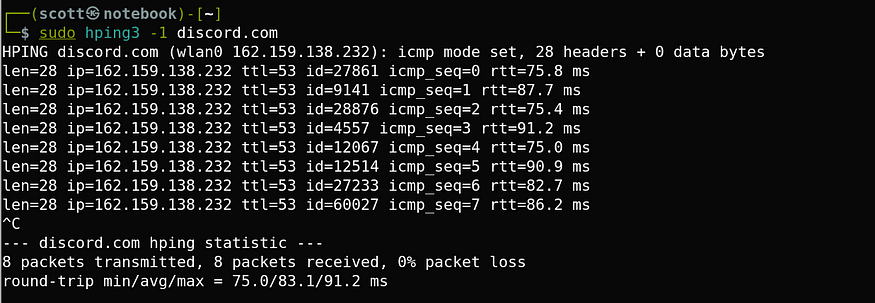
Here is a example of hping3 doing simple ICMP Live Host Recon by the following command, Don’t forget to become a root user before using hing3.
hping3 \-1 <hostname/host_IP>