August 14, 2025, Tickets
https://thebrain.zendesk.com/agent/tickets/97811
Hello Dr. Andy,
Thank you for reaching out.
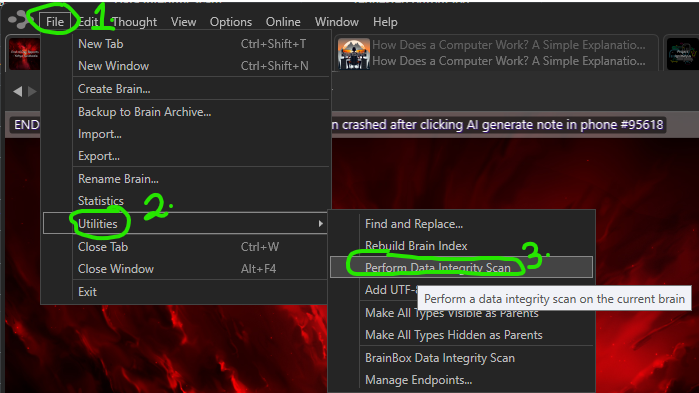
To perform a Data Integrity Scan:
- Open your Brain in TheBrain desktop application.
- Go to File > Utilities > Perform Data Integrity Scan.
- Follow the prompts to complete the process.
If you don’t mind, could you also send us a log file so we can review it? This will allow us to see exactly what was happening in the background when the error occurred, which helps us confirm the cause and provide the most accurate solution. You can find it by going to Help > Open Log Directory, then attach the most recent file to your reply.
Best regards,
John