Copying and Duplicating Thoughts
Overview
There are two different things people mean by "copy" a thought: making a duplicate thought in the brain, and copying a link to a thought so you can paste it somewhere else. TheBrain supports both, plus copying thoughts and pasting them under another thought, and copying a selection of thoughts as plain text.
Duplicating a Thought
Duplicate Thought is an alternate command: it takes the place of Copy Thought in the menu while you hold a modifier key.
- Right-click the thought, or open the More Actions (⋯) menu in its properties header.
- Hold
Shift(⌥on Mac) — Copy Thought changes to Duplicate Thought in the same spot. On a device with no keyboard, tap the "Tap for alternative commands" notice at the bottom of the menu instead. - Choose Duplicate Thought.
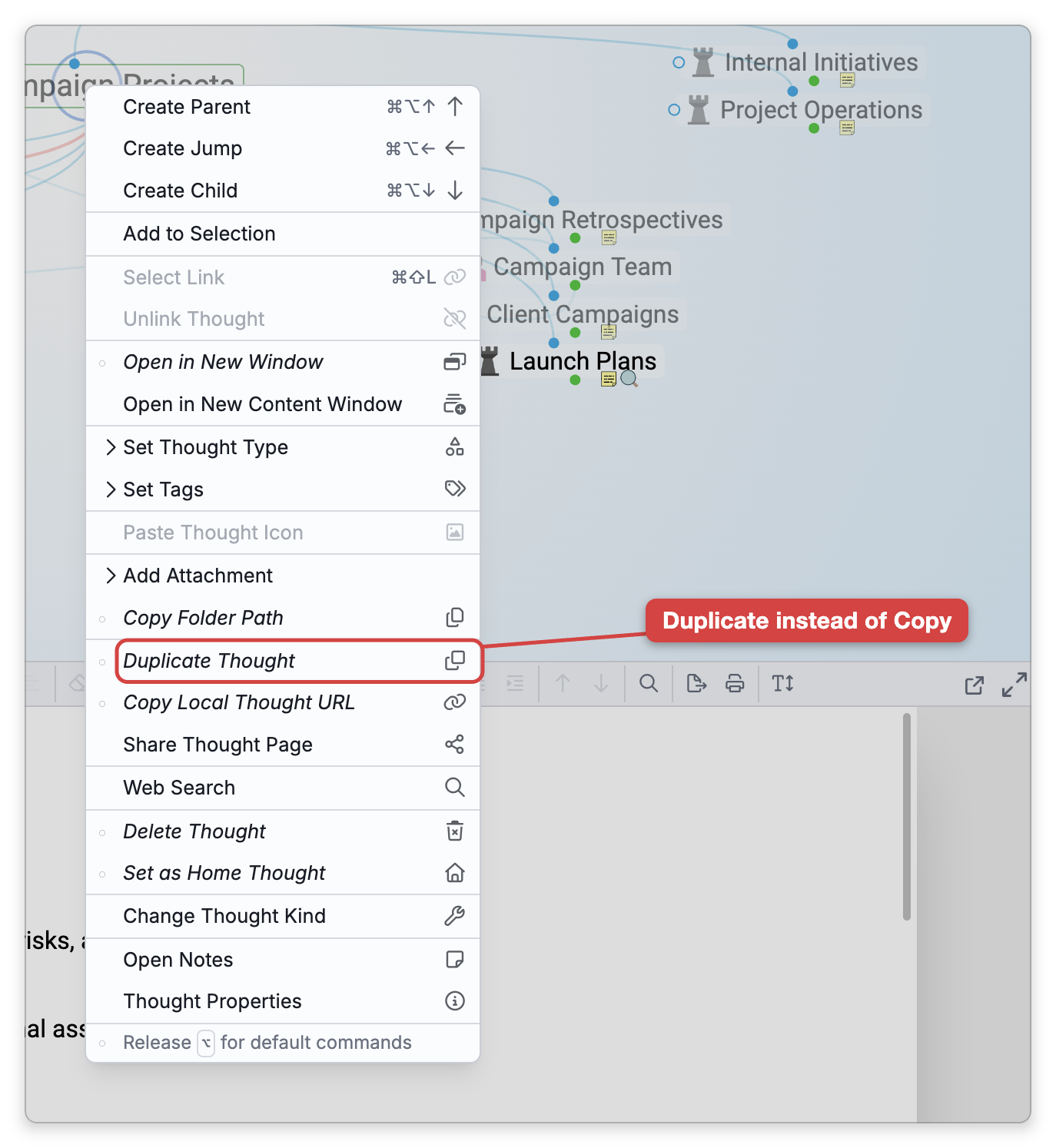
In the Mac desktop app, Duplicate Thought is also in the menu bar's Thought menu, where no modifier is needed. The command isn't available for a type or tag thought, or for a thought you can't edit.
The duplicate is a full copy — it gets the original's links (the same parents, children, and jumps), type, tags, notes, icon, and attachments — and it is also made a child of the original. Only its identity is new, so later edits to one don't affect the other.
Copying and Pasting Thoughts
Copy Thought, in a thought's right-click menu and its More Actions (⋯) menu, copies the thought so you can paste it somewhere else — in this brain or in another one. To copy several thoughts at once, select them and choose Copy Thoughts from the selection menu (see Selecting Multiple Thoughts).
To paste what you copied:
- Activate the thought you want the copies to go under.
- Right-click an empty part of the Plex and choose Paste Thought "name" — or Paste N Thoughts when you copied several. The same command is in Main Menu > Edit, and in the Mac desktop app it is Edit > Paste onto Plex in the menu bar. On an iPhone or iPad the item reads just Paste.
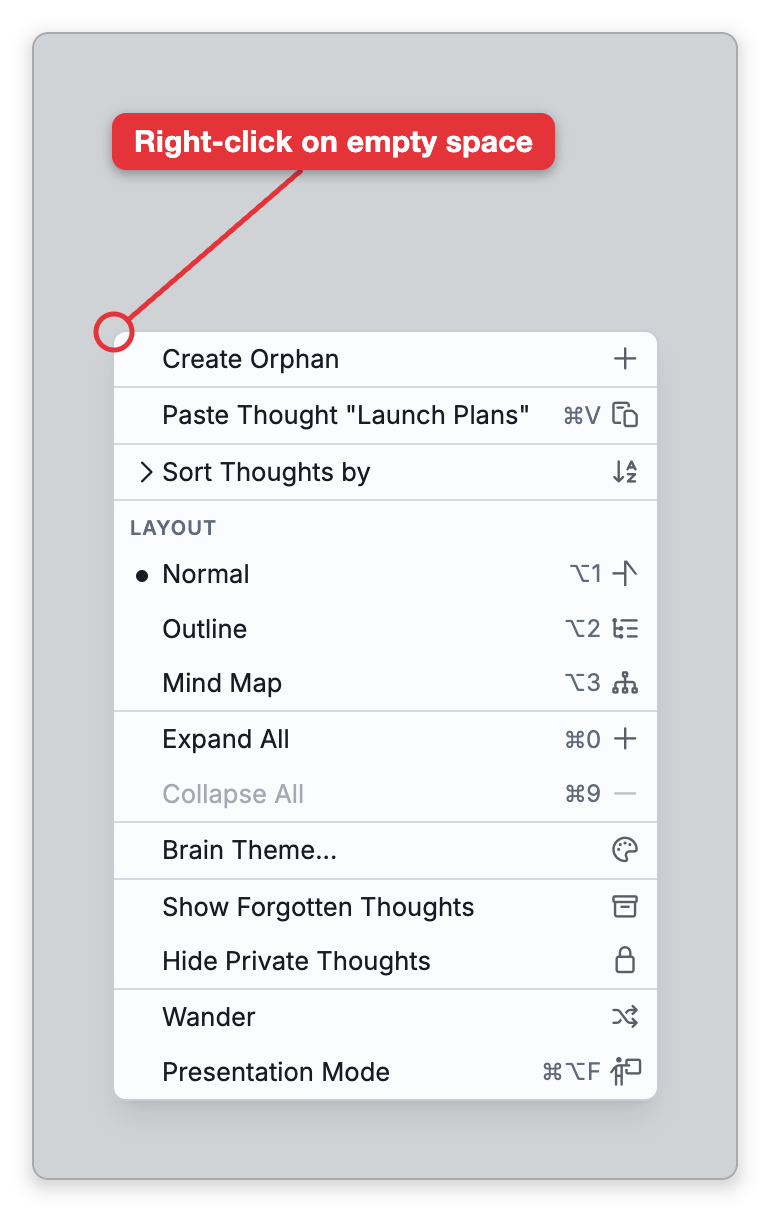
Pasting makes new copies and leaves the originals where they were. The copies are linked under the active thought as children (as jumps when the active thought is a type). When you paste into the same brain, each copy also keeps the links its original had to thoughts that weren't copied — the same parents, children, and jumps — so it also appears under the original's parent. Thoughts that were linked to each other when you copied them stay linked, and such a group hangs from the active thought by one of its thoughts.
The same Paste item also turns other things on the clipboard into a new thought under the active thought, and its label tells you what it is about to do:
- Paste Thought "text" — a single line of text becomes a child thought with that name.
- Paste URL — a web address becomes a child thought with that link attached.
- Paste Text Outline as Thoughts — in the desktop app, text of two or more lines is pasted as an outline of thoughts.
- Paste File, Paste Folder, or Paste Image — in the desktop app, a file, folder, or image on the clipboard becomes a child thought with it attached.
Copying a Link to a Thought
A thought has two kinds of link, available from the right-click menu (and the share menu):
- Copy Web Thought URL — The standard
https://web link. Opening it loads the thought in the web app; the viewer needs access to the brain to see it. (The desktop app doesn't offer it for a brain that exists only on this device; in the mobile app, TheBrain offers to upload such a brain first.) - Copy Local Thought URL — A
brain://link that opens the thought directly in the desktop app on a machine that has the brain. This command is available in the desktop app only. For a brain that is in the cloud, the menu shows it only while you holdShift(⌥on Mac) with the menu open; a brain that exists only on this device shows it straight away. See Copy Thought Links.
Either link points at the original thought; it doesn't copy the thought's content. Use the web URL for sharing and the local brain:// URL for linking between thoughts and apps on your own device. For the share-menu versions and shared public pages, see Copy Thought Links and Shared Thought Pages.
Copying Several Thoughts as Text
When you have multiple thoughts selected, you can copy them out as plain text from the selection menu:
- Copy as Text Outline — An indented outline of the thoughts.
- Copy as Text Outline with Notes — The same, including each thought's notes.
There is no command that copies a selection as a Markdown list; use Copy as Text Outline for an indented list. Copy Thoughts is the other option: as well as copying the thoughts themselves for pasting into a brain, it puts their names on the clipboard as plain text, one per line.
See Selecting Multiple Thoughts for how to build a selection.
Pasting into a Brain That Already Has Some of the Items
When you paste thoughts into a brain that already contains some of them — typically a cross-brain paste of thoughts that came from that brain — TheBrain shows an Existing Objects Detected dialog instead of silently making copies. Each conflicting item (grouped by kind: thoughts, types, tags, links, and so on) gets a choice of Replace (overwrite the existing item with the pasted one), Copy (paste as a new copy and keep the existing one), or Skip (keep the existing item and don't paste this one), with set-all controls on each group. Links and link types offer only Replace and Skip. Nothing is written until you confirm — Cancel aborts the entire paste, including the items without conflicts.