To-Do List
Overview
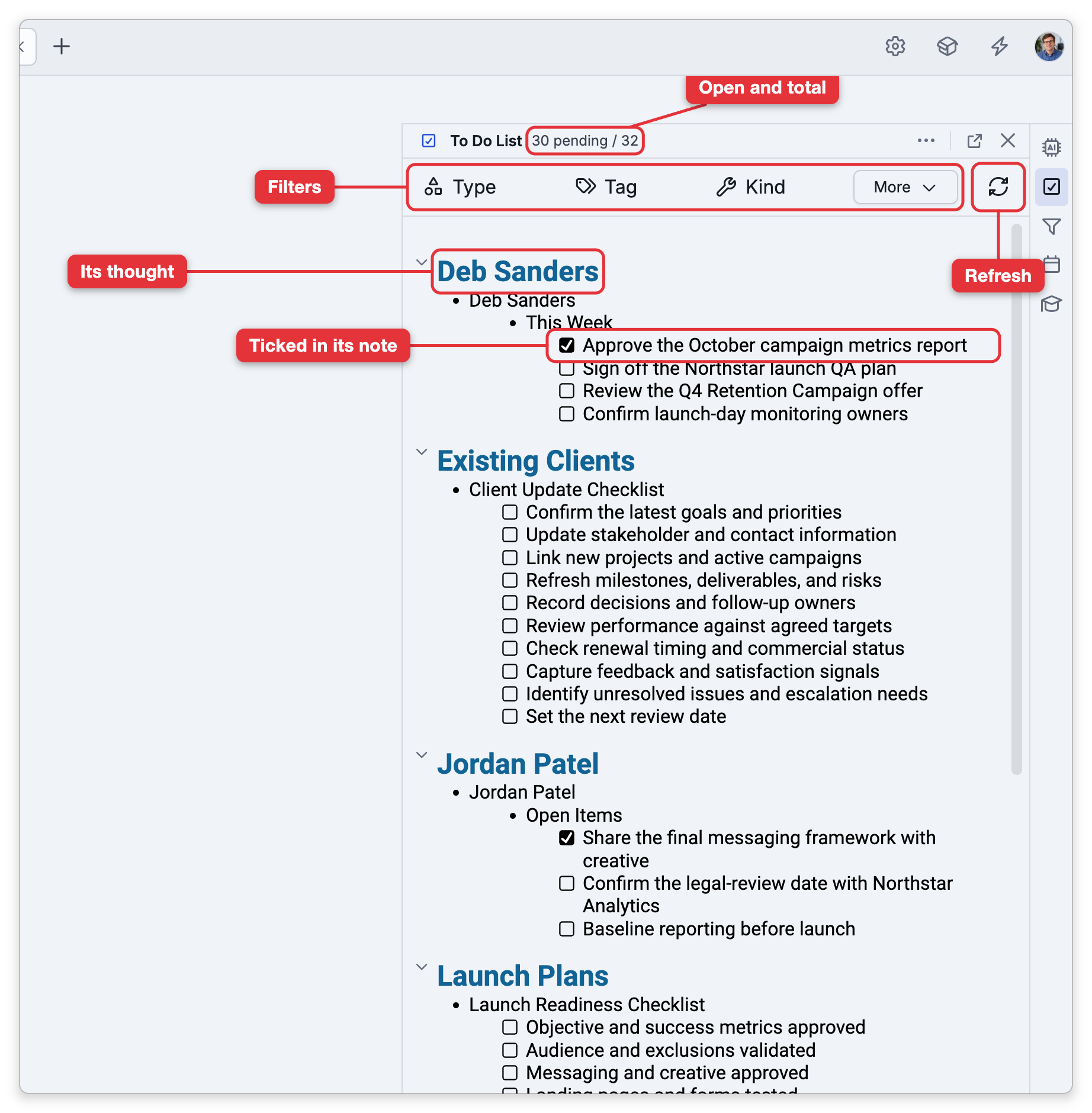
The To-Do List panel collects every checkbox you've written across all your notes into a single list, so your tasks aren't scattered through the brain. It's the brain-wide view of everything left to do.
Where Tasks Come From
To-do items are the checkboxes in your notes — there's no separate task type. Add a checkbox in any note (see Writing and Formatting Notes) and it appears in the To-Do List. Checking an item in the panel ticks the same checkbox in its note, and vice versa. The list is built from the brain's search index, so while a brain is indexing, some items may be missing until it finishes (see Rebuilding the Search Index).
Using the Panel
Open the To Do List panel from the tools panel or with Main Menu > View > To Do List (in the Mac menu bar, View > Panels > To-Do List). Opening it requires admin rights on the brain: on your own brains you're the admin, but on a brain shared with you the panel may be unavailable. It shows your pending and total counts, and lets you:
- Sort by name or date modified.
- Expand or collapse all groups.
- Filter by type, tag, kind, access, and dates (created and modified) to narrow the list.
- Add to Selection or Remove from Selection to work with the listed thoughts elsewhere.
- Refresh the list, and Print it (on a computer, in the desktop app or a browser; not on phones and tablets).
When a Thought Leaves the List
The list shows a thought only while its note still has at least one unchecked box. Boxes you've already ticked stay visible beside the open ones of the same thought, and the header counts both: it reads, for example, 3 pending / 5. When you tick a thought's last open box, the whole thought drops off the list. Nothing is lost — the completed items are still in the thought's note, with their boxes ticked, and that is where to look for them.
Two kinds of checkbox aren't gathered at all: those in the notes of links (only the notes of thoughts are scanned), and those in the notes of forgotten thoughts.
- To turn the To-Do List off for a brain, tick Disable to do list on the Search page of the brain's settings (Settings > Brain > Search), below the Show search results from other brains and Show search results from public brains checkboxes. The setting is not under Content Settings. While it's ticked, the To-Do List doesn't appear for that brain; untick it to bring the list back. It is a brain setting, so in a shared brain it applies to everyone who uses the brain.