Undo and Redo
Overview
TheBrain keeps an undo history of the edits you make to a brain — creating a thought, linking two thoughts, moving one under a new parent, forgetting or deleting, renaming, recoloring, saving a note, and so on. If you make a change you didn't mean to, Undo reverses it, and Redo puts it back.
Undoing and Redoing
- Undo — Main Menu > Edit > Undo, or
Ctrl+Z(⌘Zon Mac). The menu names the specific action, so it reads something like Undo Create Thought or Undo Forget "Budget". - Redo — Main Menu > Edit > Redo, or
Ctrl+Shift+ZorCtrl+Y(⇧⌘Zor⌘Yon Mac). - On the desktop app — the window toolbar has Undo and Redo buttons by default, after the Back and Forward buttons. A window toolbar you've customized keeps your layout; resetting it to its default brings them in (see Customizing Toolbars).
- On a phone — Undo and Redo buttons sit at the right end of the top toolbar, next to the settings button. They're available only when there's something to undo or redo.
Usually undo and redo happen immediately — there's no confirmation beforehand. Afterwards a brief notice names what was reversed (for example Undid Create Thought, or Redid Create Thought after a redo) and then fades on its own; on a phone it appears as a small strip under the toolbar — see Notifications. As usual, once you make a new edit after undoing, the redo history is cleared. When there's nothing to reverse, Undo is unavailable in the menu. The one time TheBrain asks first is when something the step would change has itself changed since — see When TheBrain Asks Before Undoing below.
Stepping Back Several Edits
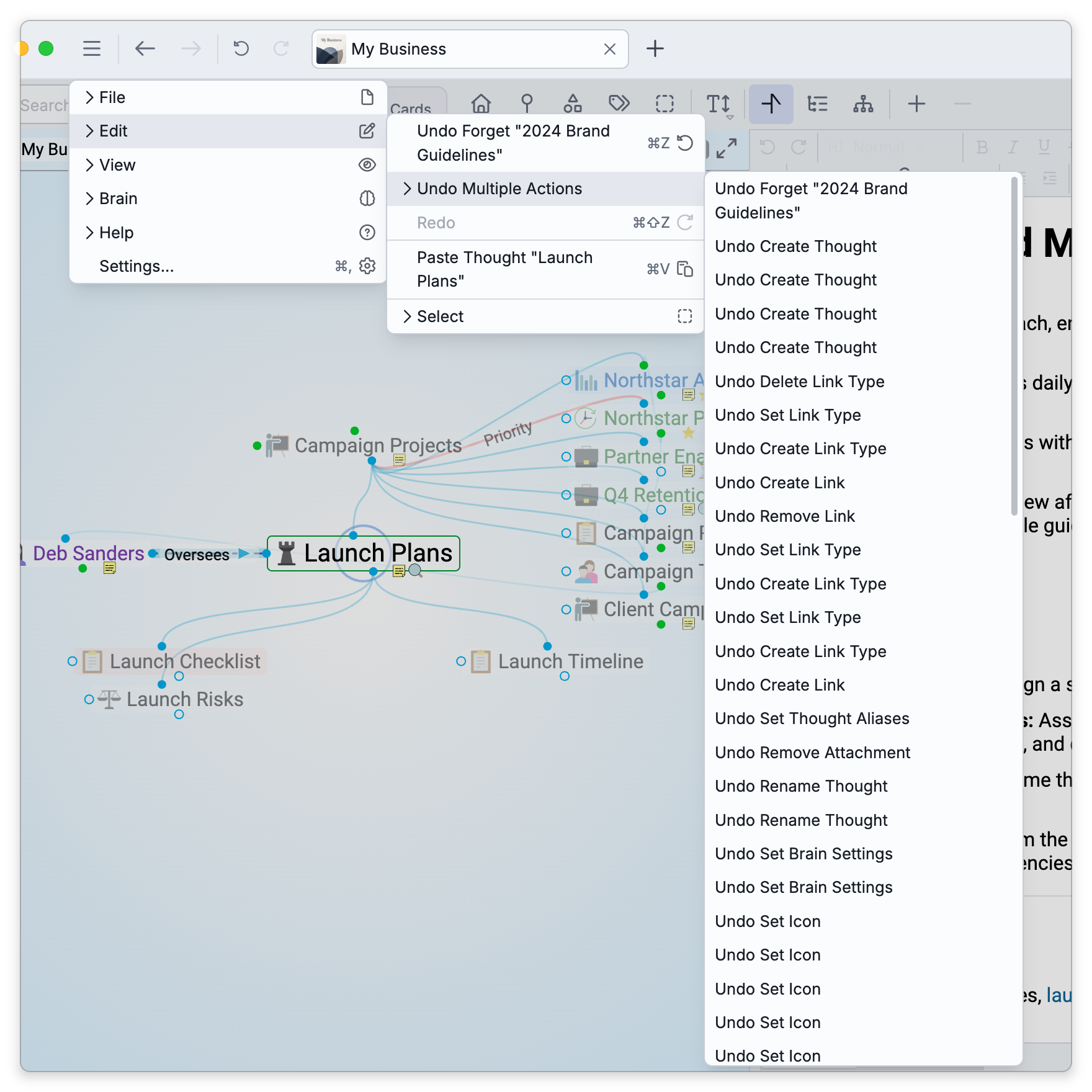
When you've made several changes, Undo Multiple Actions (and Redo Multiple Actions) list your recent edits newest-first. Pick an action in the list to undo everything up to and including it in a single step.
What Can Be Undone
The history covers brain edits broadly — creating, renaming, forgetting, deleting, and reparenting thoughts; creating and removing links and changing their properties; setting types, tags, and colors; adding and removing attachments; saving notes; creating, changing, and deleting calendar events; and more.
Each undo and redo is also written into the thought's history as its own Undo or Redo entry naming the action, so on a shared brain collaborators can see that a change was reversed — see Thought History.
A deleted file attachment has one extra safety net on the desktop app: a copy also goes to your computer's trash, so it stays recoverable even after this undo history is gone — see Managing Attachments.
Undo here is a brain-edit history. Undo while you're typing in the note editor is the note editor's own text undo — it happens to share the shortcut Ctrl+Z (⌘Z on Mac) but is a separate history for the note's text.
When TheBrain Asks Before Undoing
Undo works by putting things back the way they were when the action was recorded. If one of the items involved has changed since — most often because a sync brought in a change made on another device or by another person, but also when something on this device changed it without going through undo, such as Cerebro, a bulk operation, or a file edited directly in the brain's folder on the desktop — TheBrain doesn't overwrite that change silently. It asks first.
The question is the title of the dialog: Undo Rename Thought?, or Undo 3 actions? when you're undoing several steps at once. Beneath it, each affected item says what changed and what proceeding will do about it:
- What changed — for example "Budget" was changed on another device 5 minutes ago, or renamed; a cloud icon marks a change that arrived by sync, while was changed here since means something on this device changed it.
- What Undo Anyway does — Undoing puts it back as it was before, discarding that change., with Its name goes back to "…" when the name differs; for a note, Undoing restores the earlier note text, discarding the note as it is now.; when the step deletes the item, Undoing deletes it, including that change.
- Items that were deleted since — "Budget" was deleted; Undoing brings it back, without the notes and attachments it had., or was deleted and stays deleted. when the step only removed it; an item that was created again since is called out as was created again.
- Notes and files are not lost — when proceeding would overwrite a note or file that changed since, the line ends with the note as it is now is kept on the thought as a conflict file (or the file as it is now is kept beside it as a conflict copy). The current version is saved first as a separate attachment named
[Conflict] name (who, when).ext— see Working Offline and Sync Recovery for how these copies are named and what to do with them.
Choose Undo Anyway (or Redo Anyway) to proceed with every step, or Cancel to leave everything as it is. With a multi-step undo it's all or nothing: either every action is undone, conflicts included, or none is.
If an Undo Fails
If a step can't be applied — a file locked by another program, say — TheBrain shows an Undo Failed (or Redo Failed) message with the reason, The change could not be applied: …, and the brain is left as it was.
Important Limits
- It's this device's history, for as long as the brain is open. The undo history is kept per brain, on the device you're working on. It is cleared when you close the brain, so a change from an earlier session has to be edited back by hand. Syncing does not clear it: you can sync and keep undoing, and an undo is applied as a fresh edit that syncs out to your other devices like any other change.
- Undo can bring back a deleted thought — even after a sync. Right after a delete, Undo restores the thought, and that stays true after the brain has synced, as long as it hasn't been closed. Once the brain is closed, that history is gone and the delete is permanent. To set a thought aside more safely, Forget it instead — that's separately reversible; see Forgetting and Deleting Thoughts.
- You can't undo someone else's edits. Undo only covers your own actions on this device. When a collaborator's change overlaps something you're undoing, TheBrain asks first, as described above, rather than reversing their work silently.
- Cerebro's Undo All and Redo All buttons go through the same check, so they too ask before overwriting a change that arrived since.
- Undo/Redo is about edits; to retrace which thoughts you were looking at, see Back and Forward Navigation.