Plex Settings
Overview
Plex Settings (under Settings > Brain) controls how thoughts are drawn in a brain's Plex: how wide the columns of thoughts are and how far apart the rows sit, whether a thought's tags show as names or icons, and which small icons a thought carries. The page is available whenever a brain is open.
These settings are saved with the brain, so a change applies to everyone who uses it. In a shared brain, a note at the top of the page says so and links to Personal Settings, which holds the settings that are yours alone: text size, sorting, the Plex layout and animation speed are there, not on this page (see Personal Settings).
How to Open Plex Settings
- Open the brain you want to change.
- Open Settings (the default shortcut is
Ctrl+,,⌘,on Mac). - Choose Brain > Plex Settings.
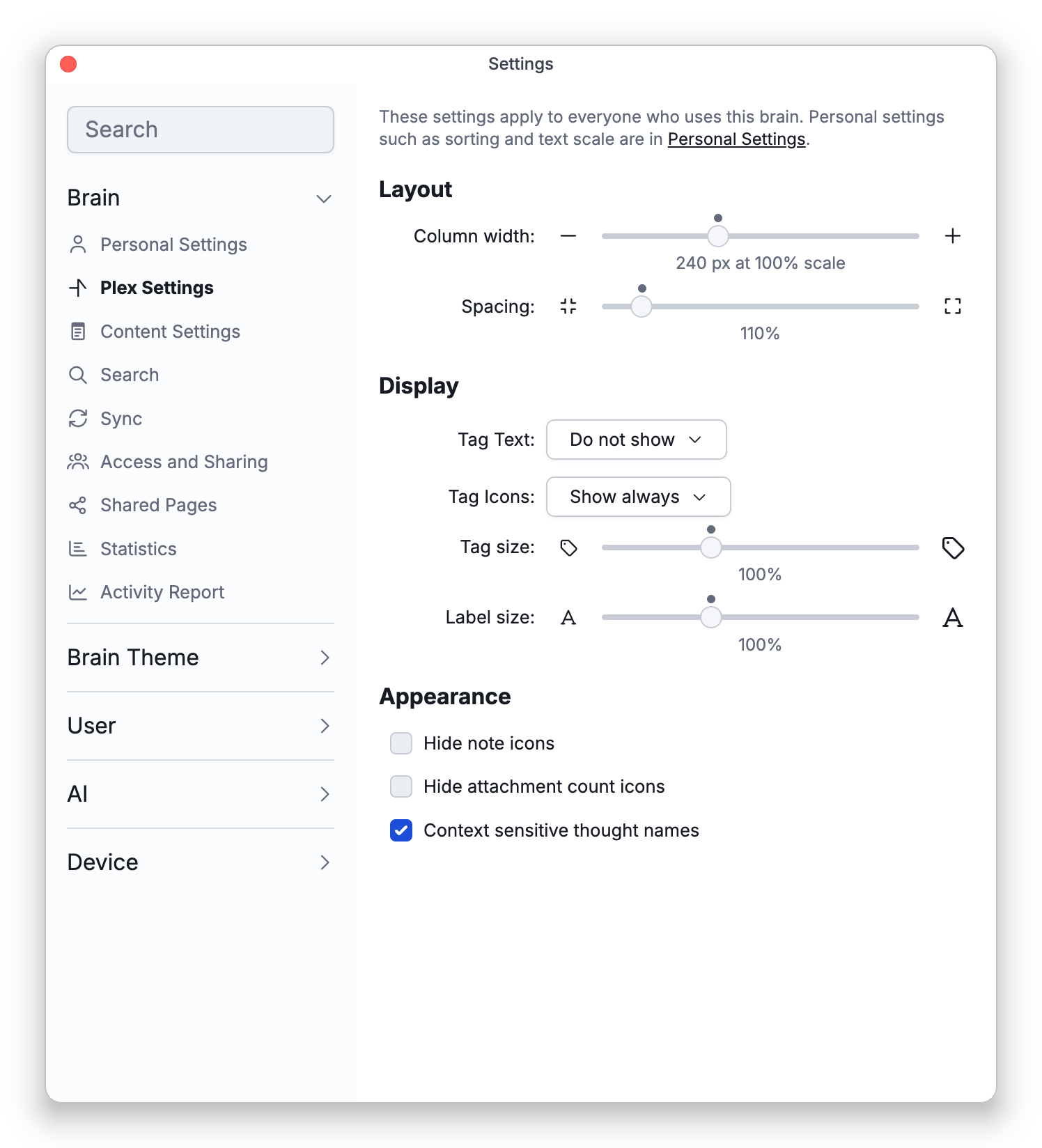
Layout
- Column width — The minimum width of a column of thoughts, from 40 to 600 (240 by default). Raise it to give each thought more room for its name; fewer columns then fit across the Plex. In the Mind Map layout, it sets the least width kept for the active thought. The number under the slider is in pixels at 100% text scale, and the width grows and shrinks with the Nav text scale.
- Spacing — The vertical space between rows of thoughts, from 100% to 200% (110% by default).
A dot above each slider marks its default value.
Display
- Tag Text — Whether the names of a thought's tags show in the Plex: Do not show (the default), Show on hover, or Show always.
- Tag Icons — Whether the icons of a thought's tags show in the Plex: Do not show, Show on hover, or Show always (the default).
- Tag size — Scales the tag names and tag icons, from 75% to 150% (100% by default).
- Label size — Scales the label that appears beneath a thought when you point at it with the mouse, from 75% to 150% (100% by default). See The Plex.
With Show on hover, a thought's tags appear when you point at the thought with the mouse.
Appearance
- Hide note icons — Hides the small icon that marks a thought that has a note. Off by default.
- Hide attachment count icons — Hides the number that shows how many attachments a thought has. Off by default.
- Context sensitive thought names — On by default. When a thought's name is made of parts separated by commas, the Plex leaves out a part that repeats the name of the linked thought one step nearer the active thought. With "2024" active, its child "Budget, 2024" shows as "Budget", and a thought named "Smith, John" shows as just "John" under "Smith". Only what the Plex shows changes; the thought's real name stays the same. Turn the option off to always show full names. See Context-Sensitive Thought Names.
To change the Plex's colors, fonts and wallpaper, see Plex Theme and Wallpaper.