Markdown Files Settings
Overview
Settings > User > Markdown Files holds the settings for Markdown files that come from outside TheBrain: files you open in windows of their own in the desktop app (see Markdown File Windows), .md files attached to thoughts, and Markdown imports.
In the web app and on phones and tablets, the tab has only Wrapped lines, because the other settings are for Markdown file windows.
What Saving Does to a File
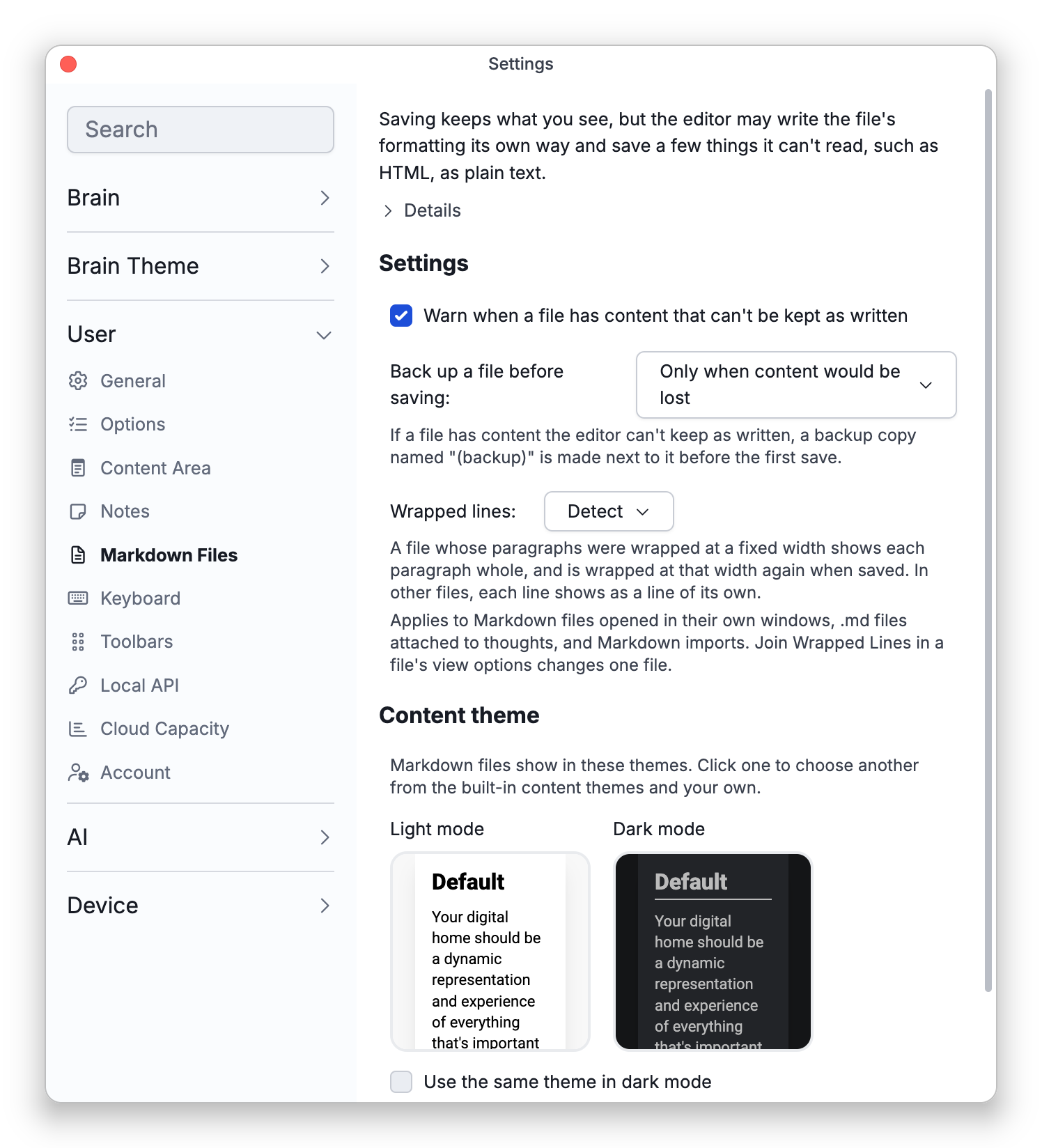
At the top, the tab sums up what happens when you save a Markdown file window: what you see is kept, but the editor writes the whole file again in standard Markdown, so the file's text can change. Open Details for the full list:
- Formatting written differently — The content stays the same, but list bullets written with
*or+become-and numbered lists are numbered again, underlined headings are written with#, bold and italic written with underscores may be written with asterisks, and blank lines, indentation and line breaks inside paragraphs may change. Reference-style links ([text][name]with a[name]: addressline elsewhere) are kept, and their address lines are written together at the end of the file. - Content that can't be kept as written — HTML written in the file (such as
<div>or<span>) is shown and saved as text. Syntax that other apps add to Markdown, such as wiki links, definition lists or custom blocks, is shown and saved as plain text. Some comments and text the editor can't show may be dropped. - Always kept — Properties at the top of the file (frontmatter), the file's line endings and its byte order mark, and the paths the file gives its images. Pasted images are saved in an
imagesfolder beside the file. In the Text view, saving writes exactly what you typed.
The Settings
| Setting | Choices | Default |
|---|---|---|
| Warn when a file has content that can't be kept as written | On or off | On |
| Back up a file before saving | Never, Only when content would be lost, Before the first save in each window, Before every save | Only when content would be lost |
| Wrapped lines | Detect, Always join, Keep lines | Detect |
| Content theme | A theme for light mode and one for dark mode | Default |
| Text and spacing | Text scale, Line spacing, Line gap, and Show YouTube and Vimeo links as embedded videos | 100%, 1.4, 30%, and on |
| Opening Markdown files | Set TheBrain as the default app for Markdown files | — |
A Markdown file belongs to no brain, so Markdown file windows show files with the Text and spacing settings here instead of a brain's settings. Line spacing and Line gap work as they do for a brain's notes (see Brain Content Settings), and changing the note text scale in a file's window changes Text scale here too.
The Warning and Backup Copies
With the warning on, a Markdown file window that opens a file with content the editor can't keep as written shows a bar: This file uses some markdown that TheBrain shows as plain text. It goes on to say that a backup copy is made next to the file before saving, or, when backups are set to Never, that saving may change how the file looks in other apps. The bar has More info and Dismiss buttons.
A backup is a copy of the file made next to it, with (backup) added to its name:
- Only when content would be lost — Before the first save of a file that has content the editor can't keep as written.
- Before the first save in each window — Before a window first saves the file.
- Before every save — Before every save, replacing the previous backup.
- Never — Files are saved without a backup copy.
When a once-only backup would replace an earlier one, it is named (backup 2) instead, and so on. After a save that made a backup, TheBrain tells you the name it was kept under.
Wrapped Lines
Many Markdown files are hard-wrapped: each paragraph is broken into lines of about the same width, often 80 characters, because Markdown joins those lines into one paragraph when the file is displayed. TheBrain's own notes keep every line break, so such a file would show as a column of short, broken lines. Wrapped lines decides how TheBrain reads these files:
- Detect — A file whose paragraphs were wrapped at a fixed width shows each paragraph whole, and is wrapped at that width again when saved. In other files, each line shows as a line of its own.
- Always join — Lines with no blank line between them always show as one paragraph, the way GitHub shows them.
- Keep lines — Each line of a file shows as a line of its own, as in TheBrain's own notes.
The setting applies to:
- Markdown file windows in the desktop app.
.mdfiles attached to thoughts, unless the file is written in TheBrain's own Markdown dialect.- Imports with Markdown Files, Obsidian Vault, Bear, Notion and Joplin. Wrapped paragraphs are joined once, as the notes are imported, and the imported notes then keep their lines like any other note.
To change one file, use Join Wrapped Lines: in a Markdown file window it is in Main Menu > View, and for an attached file it is in the file's view options. A Markdown file window remembers the choice on this device. For an attached file, the choice is saved with the attachment, so it is the same for everyone who uses the brain, and changing it needs write access. If you turn Join Wrapped Lines off while you have unsaved edits, the paragraphs you didn't change get their original lines back.
Content Theme
Markdown file windows use a content theme of their own rather than a brain's. Click the Light mode or Dark mode preview to choose another theme from the built-in content themes and your own; Default uses the app's default content theme. Tick Use the same theme in dark mode to use one theme in both.
Opening Markdown Files
Set TheBrain as the default app for Markdown files makes double-clicking a .md file in your file manager open it in a Markdown file window. On Windows, the button opens Windows' list of apps, where you choose TheBrain. Once TheBrain is the default, the tab says TheBrain opens Markdown files when you double-click them. When this copy of TheBrain can't be registered with the system, for example an AppImage on Linux without a desktop entry, the tab says This copy of TheBrain can't be set as the default app. The installed app can. instead. Installing TheBrain on Windows adds it to Open With but doesn't make it the default.
- When no one is signed in, these settings are kept for the device. Once you sign in, your own settings apply.
- Reference-style links are kept in notes too, in brains that save standard Markdown (see Standard Markdown Notes).